I have a recurring problem which happens 2-4 times a week. My FBX server becomes unavailable. I cannot connect to it in the browser (with local IP address, freedombox.local, or domain name) or via ssh. However, sometimes I can ping the server successfully.
I tried plugging an HDMI cable into the hardware, but I get the warning “no device connected”.
If I do nothing at all (as when I am away from home for an extended period) the problem sometimes resolves itself after a day or two.
However, when I am home the easiest/quickest fix is to unplug the FBX (I have disconnected the battery for this reason) and plug it back in.
Since I am likely causing damage to my FBX by regularly unplugging it / doing a hard shutdown, I would like to debug this issue. Can anyone help?
Hardware is Olimex Pioneer Edition, maybe 7 years old.
Software should be up to date (but cannot check at the moment).
I use vanilla Freedombox software and have not modified anything myself other than the sources list.
As I write I currently have this problem. Although I cannot connect to the FBX, when trying to connect with the local IP address I get the “Service Unavailable” error (whereas for freedombox.local or the domain name I get server not found error).
Service Unavailable

The server is temporarily unable to service your request due to maintenance downtime or capacity problems. Please try again later.
Apache/2.4.67 (Debian) Server at 192.168.178.XX Port 443
Your hardware has some years on it. The first thing I would do is to renew your hardware and your sd card. I run several Pioneers and they all are running rock solid. Since your installation is “vanilla”, you should not have any issues on the software.
I have the same issue.
I either get a connect error or service temporarily unavailable.
I also have issues (the number varies) on the diagnostics.
Rebooting and/or restarting do not do anything when I am able to connect, so I also have to unplug.
Indeed, the hardware has some years on it. Do you know of which logs to take a look at or hardware checks to run in order to narrow it down to this being hardware failure?
Regarding ths SD card, I followed the instructions here to move the file system onto the external SSD: FreedomBox/Tips and Tricks - Wiki
I am sorry, but I don’t know which logs to look up. If you go to cockpit and storage, what does device health say (select your ssd)? Maybe your ssd has some corrupt sectors. If your logs in cockpit do not give you any hint on your problem, then you may take a new sd card and flash the freeddombox image on it and see if it still occurs with a fresh installation.
Thank you @David ! In the meantime I have enabled the sysreq keys so I can do a soft reboot with “REISUB” and a connected keyboard. I hope this will at least prevent needing hard reboots when the system is not available online.
I’ve had this issue randomly too. I’m using a Pioneer box but it’s a spare one I’ve not used before and has a new memory card too. It was working fine this morning, I went out for a few hours and when I returned, the box was unreachable. It was only installed about a week ago and that’s the third time it’s happened.
How long has this been happening or when has this behavior started?
This page suggests that apache is working.
I also have a Pioneer. It is a fine computer but the hardware is limited. Is your Pioneer too loaded with apps or running heavier ones?
Another reason could be that the Pioneer is taking long to update or it is stuck updating. This can bring Plinth down sometimes, according to my own experience.
The Cockpit homepage’s dashboard has a “Usage” card that shows the current CPU and RAM usage. You can drill down further by clicking the “View metrics and history” link. This way you can see exactly what is taxing the machine.
Personally, I would check the “Software Update” section. The “Show recent update logs” button at the bottom of the page will show you what is happening with update process.
Well, I’m migrating my music collection from a Mac Mini minimal Debian install to a Pioneer FBX. One of the reason’s to do so, once in a while the Mac Mini for some reason shut down (and indeed, when not being in the neighborhood of the Mac).
Using the Pioneer for a few weeks now, couldn’t reach it two times. Difference with Mac, this one shut down completely, the Pioneer seems running according to led’s on SSD?
So, maybe it’s not a problem related to Pioneer/FBX, but to Debian?
I also suspect something in the update process is causing the problem. Why? No idea, except at my Pioneer there’s some warning about the package snapper, and I’ve seen an error in the upgrade-log the night before I found the Pioneer not reachable (can’t find the log anymore, but haven’t spend time to investigate).
Which power supply are you using? The one provided with the Pioneer is 5V 1A, which has a strong risk of not working properly with a USB SSB that does not have its own power source.
I am using a 5V 4A power supply for a Pioneer with a Sata SSD. Initially, I used a 5V 2A power supply and the disk was looking like it was working, but during long writes it unmounted and remounted, and the write failed. I saw that when I tried using the Pionner not with freedombox, when trying to copy some parts of the disk, it always failed after some time (in the order of minutes or tens of minutes).
Using the 1A one. But hardly can imagine that’s the problem.
Always detect the Pioneer (and also the Mac Mini) stalled in the morning. Up to now never experienced the machines stopping during daytime. And that’s when the machines are used the most (most in the sense of one user listening music), except for updating processes.
The SSD is mounted to /media, up to now there only resides my music collection. So when the machine starts updating, don’t think (hope?) the SSD is used.
Now I realize that if the Pioneer and Mac stalled for the same reason, the updating process isn’t probably the reason. The Pioneer updates automatically, the Mac I updated manually …
If they stalled for a different reason, the updating process is still a candidate.
Since I’m new to FBX, don’t have the experience yet how things have to look like. When just eyeballing the log file, I see a difference since the 1st of July:
Don’t see logging of June, does it start a new log-file on the first of a new month? Where resides the June logging?
In June there was always a table with percentages, in July there isn’t?
In June there was always a message about an illegal snapshot, in July it ‘just’ disappeared?
Now there’s every day that message ’ Package snapper is kept back because a related package is kept back or due to local apt_preferences(5).’
Maybe it’s not related to the stalls, maybe it is? Maybe it’s worth a new topic?
What Avron mentioned is what I was getting at. The Pioneer’s power supply is just enough for the board. I don’t think the original power supply will be able to properly handle a Pioneer that is taxed while also powering and external drive. I think you will experience instability or degraded performance.
At least that was my experience with an external USB HDD.
There might be some other issue causing the instability, but it could be a good idea to look into getting a powered USB hub to connect external drives to the Pioneer.
On a separate note, the Pioneer is a neat machine, but it is modest. Users might be tempted by the selection of apps and start installing them without considering the limited resources of the board.
I’d recommend testing things out and finding what works for you. In my case, I adapted my Pioneer to work as an “edge” machine, handling mainly connectivity tasks. I have a second FreedomBox on a Raspberry Pi 4B to handle “heavy” apps and storage.
After taxing mine too much, I
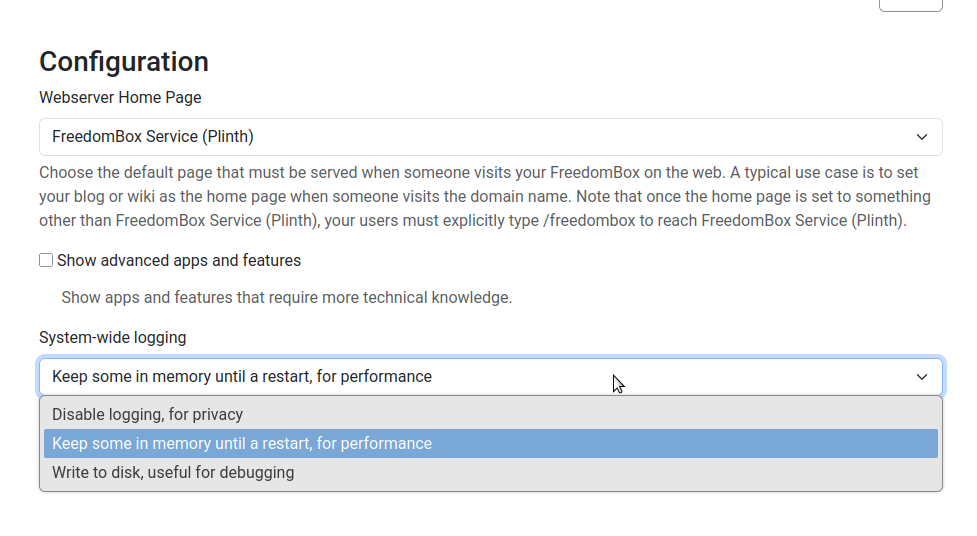
I only look at logs using “sudo journalctl” (with various options). The default settings for the Pioneer is that logs are only kept in memory, not written to the microSD card, so upon reboot, there is nothing left from before the reboot. This default choice is because microSD cards tend to wear out after a lot of writing, and logs are a really large source of writing.
For debug purpose, this can be changed using the web interface: System->Configure:
I assume you are looking at Cockpit. I never use Cockpit so I have no idea about that. Perhaps it is following the parameter I just mentioned, but I don’t know. I assume the illegal snapshot message is not important.