I have freedombox running on a Debian 13 PC. FB v. 26.4.
The primary drive is a 500G SSD.
Over the last 3 months it has stopped running 3 times. The last time it ran for 2 weeks. I am away travelling and have someone at home physically restart the machine and that, so far, has brought it back to life each time.
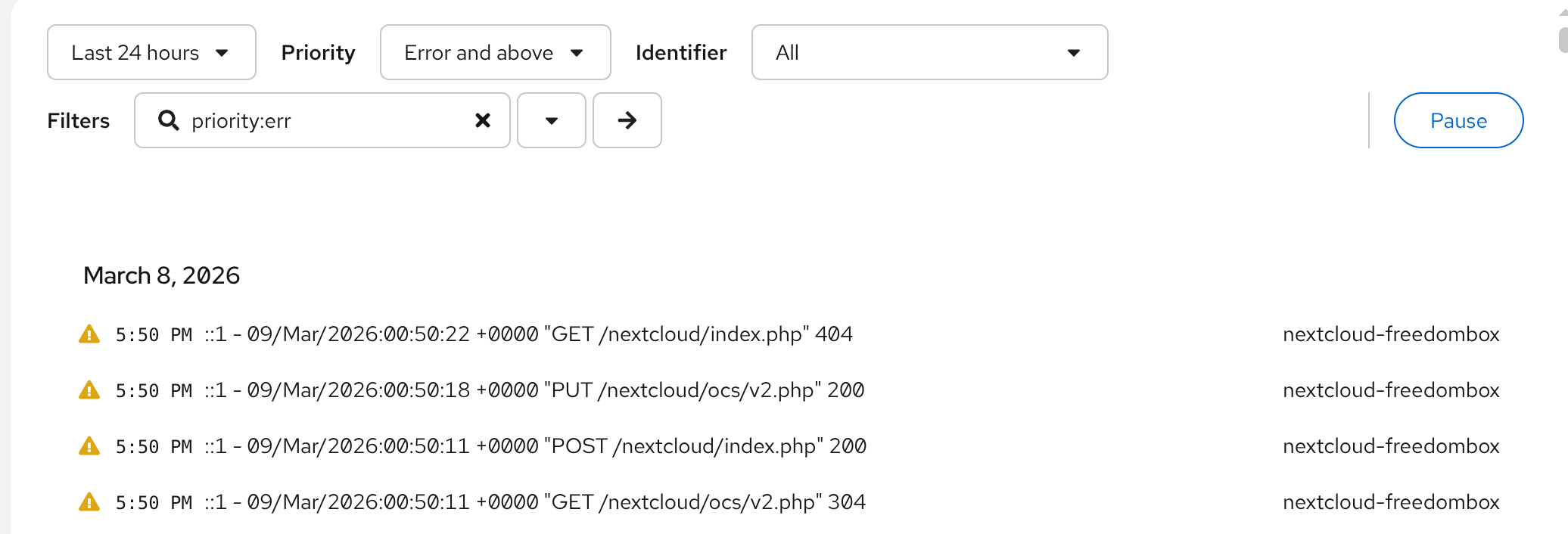
I have not learned the art of reading logs and when I look at them in cockpit, I am not sure what to look for.
When I scroll back in the log that appears there, it seems to start when the machine was rebooted.
I was hoping to find some log info from when it stopped running to see whether it gave me any idea what made the system stop running.
Is there a better selection of the filters at the top of the log screen that would help me chase down what I am looking for?
Or maybe there is a better way to see logs from the previous session?
Any tips on where I should look to find my way around with this would be welcome.
My plan is to replace the SSD primary drive with a larger, new HD When I am home later in the month and hope that solves the problem. My guess is that the SDD, which is too small anyway, is the issue and that replacing it will make these crashes go away but before I do that I would like to see if there is a way to identify what is making the system crash.
I don’t use cockpit (mostly because it would be one more thing to learn and I don’t feel the need), I use sudo journalctl from ssh and I search for the last boot and then look at what is above. I use the --since="yyyy-mm-dd hh:mm:ss" option to search from a certain time.
Most often, there is absolutely nothing that gives a hint about what happened. At best, I could find out that the problem happened during a specific procedure (backup), which helped diagnose where the issue was. From that experience, I have rather limited hope of finding out issues thanks to logs.
I never used a PC for freedombox, only SBCs (Pionner with or without SATA SSD, Rockpro64 with USB SSD, raspberry pi with USB SSD). I have two PCs (NUC style, root on NVME disk, data on SATA SSD) in different locations running Trisquel that I configured without Freedombox with samba and sftp, and that backup each other daily using borg, both have been running for 2 years and I never lost contact with them.
I was assuming it was because PCs are most stable than SBCs but the reason could also be because every software has bugs, so the more software you use the more often you will encounter a bug.
EDIT: by the way, I lost contact with my main Freedombox today and I am away from home. I have the option to remotely cut the power and put it back, I tried, but it did not work. This never happened before. Then I will have to wait until I am back.
There are a limited amount of logs stored which is probably configurable. I recall cockpit logs letting you go back a week for sure maybe longer.
There is a log level field allowing you to select the severity (debug, info, warning, error, alert, etc.) debug is the lowest severity and the highest is critical, I believe. You can filter the most severe which may give some idea about the biggest problem and maybe work your way down to see what was leading up to that.
If you are losing connection when you travel and this gets corrected with reboot it would be good to know whether FreedomBox was running when it lost outside connection. This could be the rogue DHCP server thing where Internet gets interrupted and FreedomBox gets a non-working IP address from a different DHCP server. It is not always obvious that you have extra DHCP servers and some consumer devices enable them by default. I have found these in my network:
two access points enable DHCP server when they are assigned a fixed IP address
the cable modem starts a DHCP server on restart to make it easy for users to set up the device
other devices which can share their Internet connection
If these devices get used by FreedomBox as a DHCP then FreedomBox is running okay, but won’t have a working network configuration and loses external connection. This is cleared up after a reboot once the cable modem finishes its Internet connection establishment.
I used cockpit logs to figure that out by filtering for DHCP messages and found the bogus DHCP servers that way, for example.
Is there a better selection of the filters at the top of the log screen that would help me chase down what I am looking for?
after a crash change the date range to include the crash + at least a few hours
you have priority err, try a higher level to filter for most severe messages (critical, alert, etc. maybe error)
Check your disk capacity with df -h. If your disk is filled you are going to struggle.
Try to see if FreedomBox is continuing to run when you perceive a crash. You may have to check from home. You could also do a script that outputs ‘date’ to a file every hour or something. That may continue running when you see a system that looks down.
You can type search keywords in the field after where you see priority:err
The identifier field lets you filter for a particular service.
Check multiple services when you perceive what looks like a crash, check these from the internal and external side both if you can.