Now that Bookworm is in its soft-freeze stage, getting ready for Trixie, I have the urge to upgrade my FBX (prematurally).
On my laptop, this was very staightforward (just editing my apt sources to trixie and going full-upgrade). But with FBX, I have worries that I might break something.
Would anyone help on what would the correct way of doing this be?
FreedomBox can automatically handle the upgrade to Trixie. You can even start this process before the official release. Go to System → Software Updates and look for the “Distribution Update” button.
(I just found an issue where this button does not work on my system, but assume that is something we can fix in the upcoming weeks.)
thanks @jvalleroy
tried that; had to tick Enable auto-update to next stable release beforehand but update went well.
afrer update, a manual apt update still showed sources as bookworm. got me confused (edit: miniflux page in plinth stated it was not in the repo)
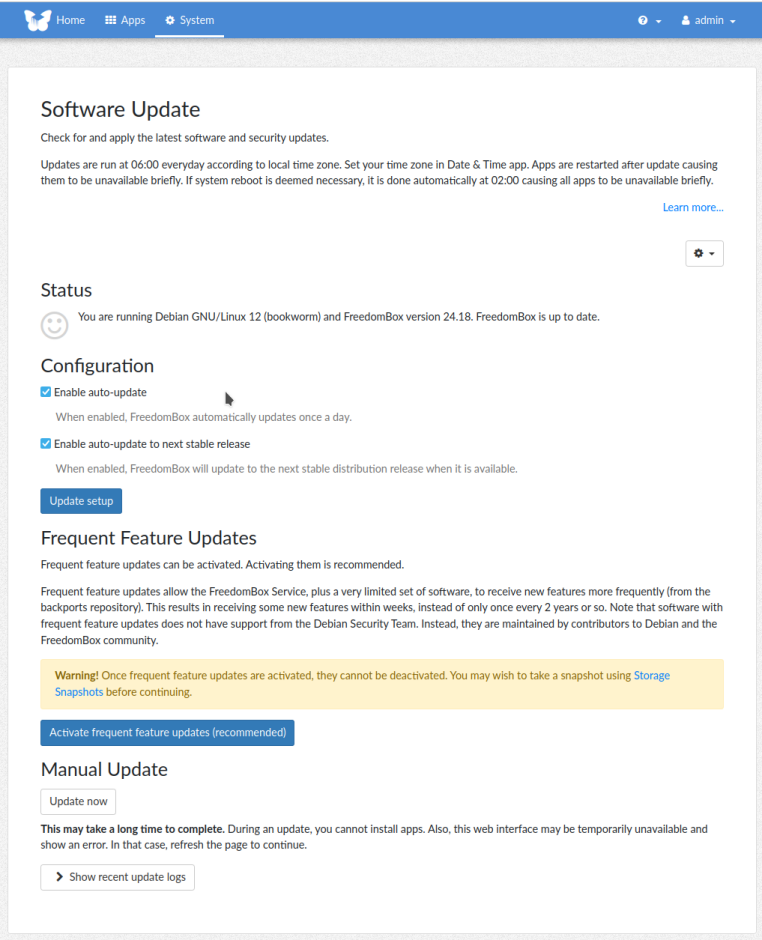
I have the ticks for the auto-update on my Pi3, but no changes. If I hit “manual update” all I get is this.
2025-10-20 18:00:09,973 INFO Starting unattended upgrades script
2025-10-20 18:00:09,976 INFO Allowed origins are: origin=Debian,codename=bookworm,label=Debian, origin=Debian,codename=bookworm,label=Debian-Security, origin=Debian,codename=bookworm-security,label=Debian-Security, o=Debian Backports,n=bookworm-backports,l=Debian Backports
2025-10-20 18:00:09,977 INFO Initial blacklist:
2025-10-20 18:00:09,979 INFO Initial whitelist (not strict):
2025-10-20 18:00:27,574 INFO No packages found that can be upgraded unattended and no pending auto-removals
Btw, “frequent feature updates” are off.
Any hint what I can do, to upgrade smoothly to Trixie?
I would have thought the distribution update would kick off autmatically, but did you try the “Distribution Update” button on the System/Software Update page?
You are at FreedomBox v24.18. That’s “up-to-date” only because frequent feature updates are not activated. With auto-update enabled you get Debian security updates and point releases, but the FreedomBox packages get updated through the frequent feature updates mechanism (backports).
Distribution upgrade logic was revamped in v25.7 (and added the “Distribution Update” button I was referring to), and the last release on bookworm was v25.9.3.
I still think a distribution upgrade should have started automatically, but perhaps an incompatibility between v24.18 and Trixie prevented that or caused it to fail.
Apart from disabling “auto-update to next stable release”, enabling “frequent feature updates”, updating to v25.9.3, then re-enabling “auto-update to next stable release” and trying a distribution update, all I can think of to suggest is to look at the logs after a daily auto-update to look for clues to what might have gone wrong. I’m not sure how many issues were fixed in v25.7 and afterwords or whether it’s feasible to fix or work around them manually on v24.18.
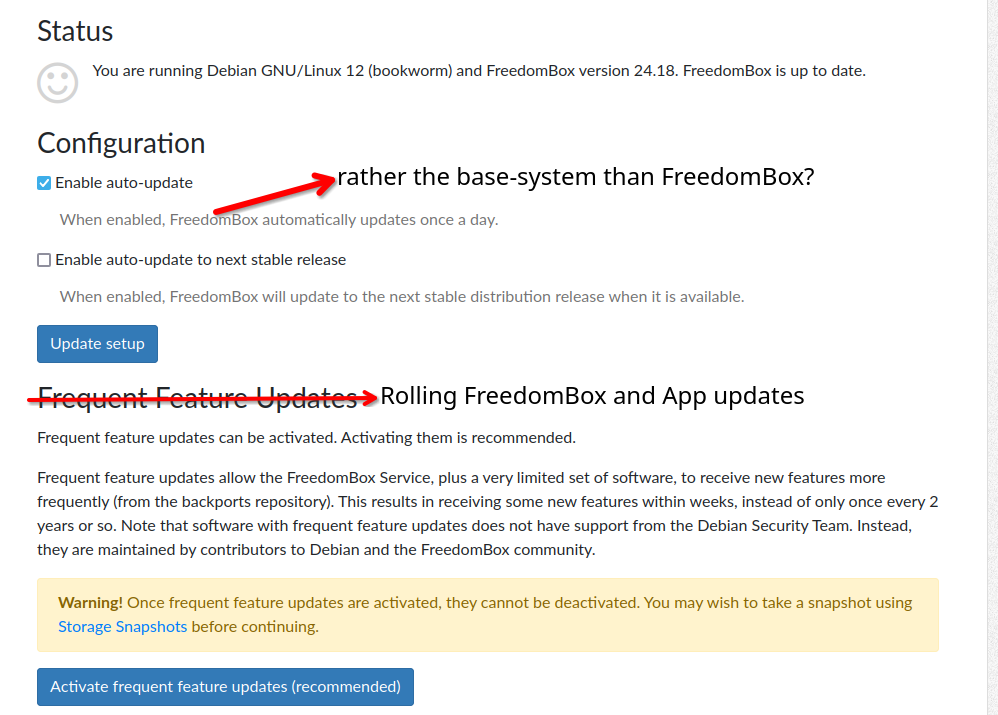
Unfortunately, most text on this page is misleading.
I thought about that couple months ago, back then I was confused about the: is up to date.
So I thought, which terminology is more appropriate, my ideas: