[SOLVED] VPS install: password verification problem

Hello All,

Over the last few days I have installed freedombox on a VPS several times and after getting web access to freedombox I have had some problems ! which I will show below:

The command to install freedombox:

apt-get update
DEBIAN_FRONTEND=noninteractive apt-get install freedombox

Info:

Debian GNU/Linux 13 (trixie) and FreedomBox version 25.9.3.

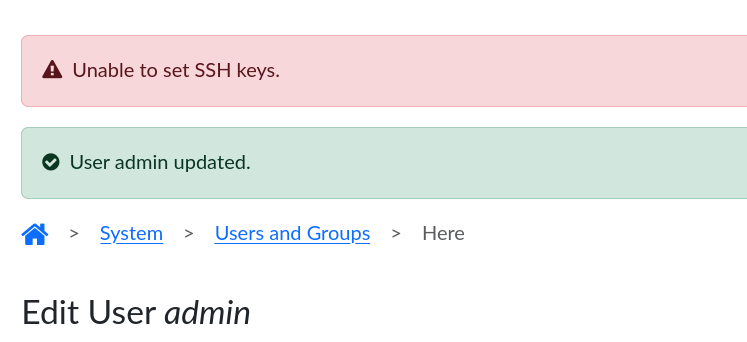
I have tried to add my SSH key to the admin user of freedombox, it not possible. Below is a screen shot after I tried to save the SSH key to the freedombox user admin.

I copy and paste the SSH key from another freedombox setup.

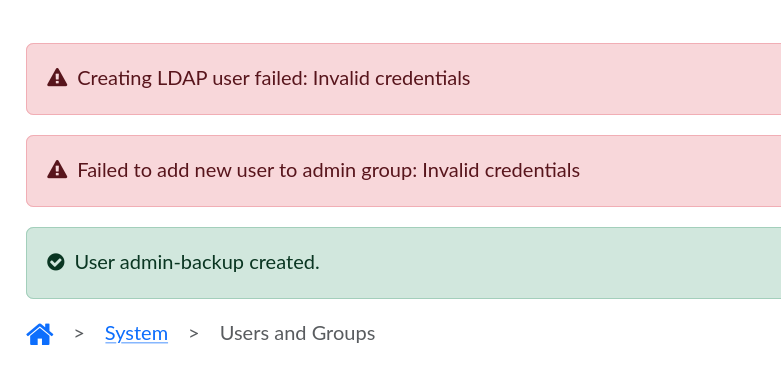
I have had problems with adding and removing a new freedombox user. Below is a screen shot of when I have created a new user called: admin-backup.

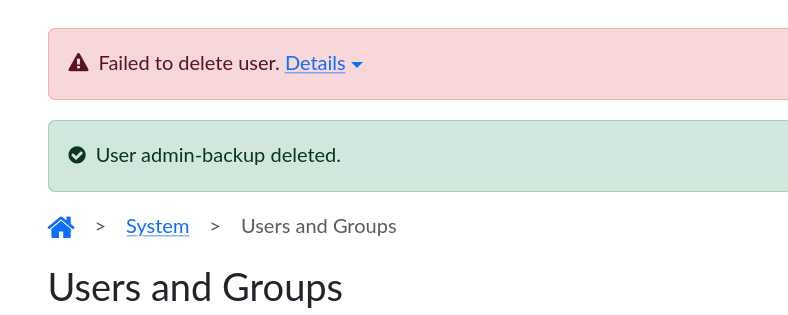
When I try to delete the user: admin-backup. The user admin-backup is not removed and this error appears which is shown in the screen shot, below:

Failed to delete user. Details

Error running action: users..remove_user("admin-backup", "admin", ****): Permis> Action traceback: ╞ File "/usr/lib/python3/dist-packages/plinth/actions.py", line 398, in _priv> ╞ return_values = func(*arguments['args'], **arguments['kwargs']) ╞ File "/usr/lib/python3/dist-packages/plinth/modules/users/privileged.py", l> ╞ _validate_user(auth_user, auth_password) ╞ ~~~~~~~~~~~~~~^^^^^^^^^^^^^^^^^^^^^^^^^^ ╞ File "/usr/lib/python3/dist-packages/plinth/modules/users/privileged.py", l> ╞ _validate_password(username, password) ╞ ~~~~~~~~~~~~~~~~~~^^^^^^^^^^^^^^^^^^^^ ╞ File "/usr/lib/python3/dist-packages/plinth/modules/users/privileged.py", l> ╞ raise PermissionError('Invalid credentials')

Regard: peter

@Peterc I suspect this could be due to a clash with an existing user account that came with VPS and the first admin account created with FreedomBox during first wizard. More specifically, they may have different passwords? Are they both “admin”? Or perhaps the default account does not have a password? Could you please try to create a different username during the first wizard?

Hi @Sunil and thanks,

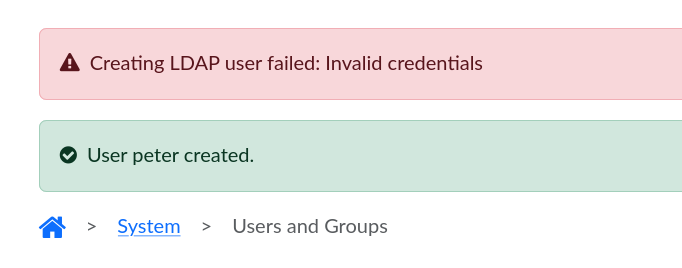
I have created a new user called ‘peter’ with a different password and unfortunately it the same result. The screen shot show below:

I have install freedombox a few times over the last few days and it been the same problems, can not add SSH key to ‘admin’ account and can not delete user ‘admin-backup’ and now ‘peter’.

In the home directory is:

admin linuxuser

The ‘peter’ home directory not there ?

Regards: peter

Could you let us know which VPS this is?

I have found that different VPSs can have slightly different “Debian” images, so there might be some package pre-installed that would conflict with FreedomBox.

Hello @jvalleroy

The VPS is from www.vultr.com I had no problem before with vultr !

I just done a fresh VPS setup then installed freedombox and again the same problems, can not add SSH key to admin user and can not add a new user without a error.

I have recorded the install with the program script. Unfortunately I can not upload the file to the forum. So hear is a web link:

The script program output file of the freedombox install

Hope it of some help ?

Regards and thanks: peter

@Peterc If I understand correctly, you tried to create a new user account on a machine that is already facing the problems you mentioned. I believe you should try a fresh installation of FreedomBox on a clean VPS instance. During this fresh installation, during the first wizard, the admin account you create during the first wizard run of FreedomBox should not be named ‘admin’.

During the creation of a new user account from the ‘Users and Groups’ app, the password of the currently logged in administrator account will be re-verified for extra security. This is what is failing during all the operations you are performing. The administrator account that you are using to create all the other accounts is facing the bug. So, the accounts are not getting created or updated properly. They are half-created state.

Please try the fresh install approach I suggest if you haven’t already done so.

Hi @Sunil

When I delete a user from the admin account. The error appears, I have used the password for the admin account to delete a freedombox user. After this action there No Red writing appeared to say the password as failed.

I have install freedombox on vultr several time before in the past. I have done the same things many time before and never met these issues.

Copying the SSH key into a freedombox account. Now the key will not save.

Very confusing, is it me, password management ? or a software issue ?

Regards: peter

Hello all and @Sunil

I have just setup a new VPS install of freedombox:

Debian GNU/Linux 13 (trixie) and FreedomBox version 25.9.3.

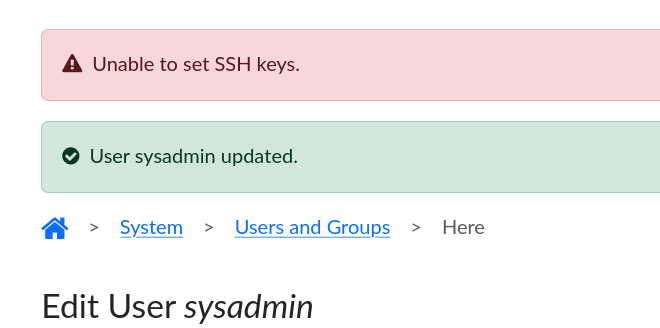
and the first user I setup as the name ‘sysadmin’ not ‘admin’ as before. Unfortunately when I try to add my SSH key to the account of ‘sysadmin’ I still get the error again. Below is a screen shot:

Regards: peter

Hi Again,

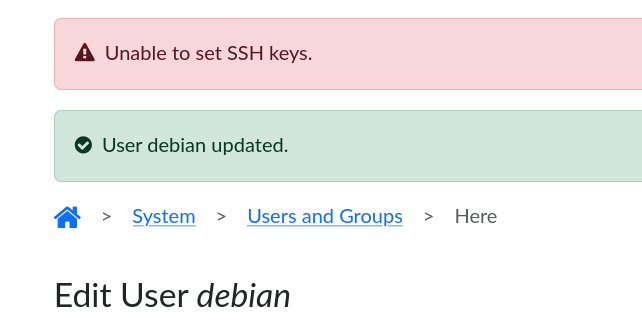
Unfortunately there same problems after I done a fresh install. The first user after the wizard is now named: debian

When I add my SSH key to this account I get the message shown below:

Regards: peter

Hello All,

Below is a copy of the out put from the plinth command.

There is some error messages in the logs about a program called cherrypy.

I hope that the info shown can help the resolve the issues I have with freedombox at the moment.

Regards: peter
`
root@Wireguard:~# plinth
INFO plinth.main FreedomBox Service (Plinth) version - 25.9.3
INFO plinth.main Script prefix - /plinth
INFO plinth.app Initialized apps - apache, names, dynamicdns, cockpit, storage, backups, diagnostics, help, first_boot, firewall, config, upgrades, security, avahi, networks, ssh, privacy, letsencrypt, users, datetime, power, snapshot, api, sso, radicale, bepasty, miniflux, quassel, sharing, featherwiki, privoxy, email, sogo, zoph, jsxc, samba, mediawiki, tiddlywiki, minidlna, calibre, bind, minetest, pagekite, ikiwiki, wordpress, searx, shadowsocksserver, tor, coturn, mumble, gnome, syncthing, matrixsynapse, gitweb, ejabberd, infinoted, kiwix, torproxy, openvpn, shaarli, shadowsocks, deluge, performance, roundcube, janus, nextcloud, ttrss, transmission, rssbridge, wireguard
INFO plinth.glib Started new thread for glib main loop.
INFO plinth.web_server Setting up CherryPy server
INFO plinth.network Creating network manager client
INFO plinth.modules.names Added domain Wireguard of type domain-type-static with services all
INFO plinth.modules.names Added domain wireguard.fbx.one of type domain-type-static with services all
INFO plinth.dbus D-Bus connection acquired: org.freedombox.Service
INFO plinth.dbus D-Bus name acquired: org.freedombox.Service
INFO plinth.network Created Network manager client
INFO cherrypy.error [30/Nov/2025:19:36:19] ENGINE Listening for SIGTERM.
INFO cherrypy.error [30/Nov/2025:19:36:19] ENGINE Listening for SIGHUP.
INFO cherrypy.error [30/Nov/2025:19:36:19] ENGINE Listening for SIGUSR1.
INFO cherrypy.error [30/Nov/2025:19:36:19] ENGINE Bus STARTING
INFO plinth.modules.names Added domain Wireguard.local of type domain-type-local with services all
INFO plinth.actions # ikiwiki..get_sites()
INFO plinth.modules.letsencrypt Checking if any Let’s Encrypt certificates got renewed.
INFO plinth.actions # letsencrypt..get_status()
ERROR cherrypy.error [30/Nov/2025:19:36:20] ENGINE Error in ‘start’ listener <bound method Server.start of <cherrypy._cpserver.Server object at 0x7f3e2b7e5160>>
Traceback (most recent call last):
File “/usr/lib/python3/dist-packages/portend.py”, line 122, in free
Checker(timeout=0.1).assert_free(host, port)
~~~~~~~~~~~~~~~~~~~~~~~~~~~~~~~~^^^^^^^^^^^^
File “/usr/lib/python3/dist-packages/portend.py”, line 71, in assert_free
list(itertools.starmap(self._connect, info))
~~~~^^^^^^^^^^^^^^^^^^^^^^^^^^^^^^^^^^^^^^^^
File “/usr/lib/python3/dist-packages/portend.py”, line 87, in _connect
raise PortNotFree(tmpl.format(**locals()))
portend.PortNotFree: Port 8000 is in use on 127.0.0.1.

During handling of the above exception, another exception occurred:

Traceback (most recent call last):
File “/usr/lib/python3/dist-packages/cherrypy/process/wspbus.py”, line 229, in publish
output.append(listener(*args, **kwargs))
~~~~~~~~^^^^^^^^^^^^^^^^^
File “/usr/lib/python3/dist-packages/cherrypy/_cpserver.py”, line 191, in start
super(Server, self).start()
~~~~~~~~~~~~~~~~~~~~~~~~~^^
File “/usr/lib/python3/dist-packages/cherrypy/process/servers.py”, line 176, in start
portend.free(*self.bind_addr, timeout=Timeouts.free)
~~~~~~~~~~~~^^^^^^^^^^^^^^^^^^^^^^^^^^^^^^^^^^^^^^^^
File “/usr/lib/python3/dist-packages/portend.py”, line 126, in free
raise Timeout(“Port {port} not free on {host}.”.format(**locals()))
portend.Timeout: Port 8000 not free on 127.0.0.1.

ERROR cherrypy.error [30/Nov/2025:19:36:20] ENGINE Shutting down due to error in start listener:
Traceback (most recent call last):
File “/usr/lib/python3/dist-packages/cherrypy/process/wspbus.py”, line 267, in start
self.publish(‘start’)
~~~~~~~~~~~~^^^^^^^^^
File “/usr/lib/python3/dist-packages/cherrypy/process/wspbus.py”, line 247, in publish
raise exc
cherrypy.process.wspbus.ChannelFailures: Timeout(‘Port 8000 not free on 127.0.0.1.’)

INFO cherrypy.error       [30/Nov/2025:19:36:20] ENGINE Bus STOPPING
INFO cherrypy.error       [30/Nov/2025:19:36:20] ENGINE HTTP Server cherrypy._cpwsgi_server.CPWSGIServer(('127.0.0.1', 8000)) already shut down
INFO cherrypy.error       [30/Nov/2025:19:36:20] ENGINE Bus STOPPED
INFO cherrypy.error       [30/Nov/2025:19:36:20] ENGINE Bus EXITING
INFO cherrypy.error       [30/Nov/2025:19:36:20] ENGINE Bus EXITED

root@Wireguard:~#
`
Oops, the problem seems deeper than what I expected. Sorry to have made you try again with no result.

This command starts a new instance of FreedomBox service. It has tried to acquire the same port as the service that is already running and failed. The proper way to acquire logs (last 1000 lines) for FreedomBox service is as follows:

sudo journalctl -u plinth.service -u freedombox-privileged.service --lines=1000

Hello All,

Below is a copy and paste from the VPS freedombox setup used the command below:

journalctl -u plinth.service -u freedombox-privileged.service --lines=100

I think it showing what go on when I try to add my SSH key ?

Regards: peter

Dec 01 10:34:23 Wireguard /usr/bin/plinth[893]: Error running action ssh..set_keys("debian", "ssh-rsa 
Replace ssh key with - xxxxxxxxxxxxxx
 sysadmin@ubuntu-1", "debian", ****): PermissionError("Invalid credentials")
                                                Action traceback:
                                                ╞   File "/usr/lib/python3/dist-packages/plinth/actions.py", line 398, in _privileged_call
                                                ╞     return_values = func(*arguments['args'], **arguments['kwargs'])
                                                ╞   File "/usr/lib/python3/dist-packages/plinth/modules/ssh/privileged.py", line 99, in set_keys
                                                ╞     _validate_user(auth_user, auth_password, must_be_admin=must_be_admin)
                                                ╞     ~~~~~~~~~~~~~~^^^^^^^^^^^^^^^^^^^^^^^^^^^^^^^^^^^^^^^^^^^^^^^^^^^^^^^
                                                ╞   File "/usr/lib/python3/dist-packages/plinth/modules/ssh/privileged.py", line 33, in _validate_user
                                                ╞     raise PermissionError('Invalid credentials')
Dec 01 10:34:23 Wireguard /usr/bin/plinth[893]: # ssh..get_keys("debian") 

@Peterc Do you see any diagnostic failures for overall system diagnostics run or for ‘Users’ app?

If so, please post the logs for the User app (accessible from System → Users and Groups →Extra menu → Logs)

Hello @Sunil

I just run diagnostic test and all is OK. regards: peter

Hello All,

I have just setup another VPS for freedombox at contabo.com and its Good news - perfect !!

I think the freedombox install at contabo installed more packages ?
0 upgraded, 327 newly installed

What I will do is setup two new VPS installs one at contabo & one at vultr.

and do a package list of both setup before freedombox is installed.

Or is the app source list are differnet ?

Regards: peter

Hello All,

My efforts to get freedombox installed on a vultr.com vps as gone No where ! My efforts have been moved over to contabo.com for a freedombox vps setup.

I been able to setup freedombox at contabo with a couple of NetworkManager tweaks.

A basic observation I seen is that vult debian basic install as 566 packages and contabo as 342 packages - smaller install. At vult NetworkManager set it self up with no problems and I could edit the fbx Networks page with out any issues.

Not the same at Contabo. Vult as interfaces file that needs editing but Contabo as no interfaces file to edit !

Regards: peter

Hi All,

It been a while since I hit a brick wall with installing freedombox at vultr on a vps. I had problems creating and deleting a new users. I have now got freedombox to install at vultr by using the custom image install. Debian USB mini.iso image !!

With a bit of help from DeepSeek AI.

I uploaded to DeepSeek two package lists, one from Vultr basic install and the other from Digitalocean basic install :
apt list --installed > package-list.

Replie from DeepSeek AI:


Now it’s clear — and it’s not a Vultr-vs-DigitalOcean network thing at all. The two package lists show you installed FreedomBox on two very different base images, and one of them (Vultr’s) contains packages that conflict with how FreedomBox configures authentication.

What the package lists reveal

DigitalOcean is a minimal cloud image. The tell-tale packages are grub-cloud-amd64, cloud-init, netplan.io, and systemd-resolved. Networking is handled by netplan plus systemd-resolved. It does not include libpam-pwquality, cracklib-runtime, libpam-wtmpdb, or libnss-systemd, and it also lacks bind9-dnsutils, net-tools, and ufw.

Vultr is a full Debian Installer install. The tell-tale packages are installation-report, tasksel, task-english, build-essential, g++, cmake, xorg-sgml-doctools, and the X11 development libraries. Networking is handled by ifupdown, resolvconf, and rdnssd. It does include libpam-pwquality, cracklib-runtime, libpam-wtmpdb, and libnss-systemd, as well as bind9-dnsutils, net-tools, and ufw.

So: DigitalOcean = clean minimal cloud image. Vultr = a full Debian install where you (or the image) selected a bunch of tasks during install. That is the variable — not the provider.

Why that breaks admin auth

FreedomBox on trixie still provisions the admin user via LDAP (slapd + nslcd) and wires PAM/NSS via pam-auth-update profiles registered by libpam-ldapd / libnss-ldapd. Those profiles are read by pam-auth-update, which merges all registered profiles in priority order.

On the Vultr box, libpam-pwquality is already installed and has registered its own pam-auth-update profile. When FreedomBox later pulls in libpam-ldapd and runs pam-auth-update --package, the merge can do one of two harmful things:

  • It can put pam_pwquality.so (and pam_cracklib) into the merged stack in a way that conflicts with, or shadows, pam_ldap.
  • Or it can leave common-auth without pam_ldap in the right order.

Either way, pam_authenticate("admin", …) either finds no matching entry for admin (no LDAP in the auth stack) or rejects it — which surfaces as exactly PermissionError('Invalid credentials') in _validate_password.

The extra libnss-systemd NSS module on Vultr can also change how getent passwd resolves names when nsswitch.conf order/backends differ from what FreedomBox expects.


I hope the above copy and paste from DeepSeek can be help full !

What I have done now is learned how to do a Custom install at Vultr with the Debian 13 USB mini.iso . I can install Freedombox at the end of the Debian install by picking the Blend option to install Freedombox, Or just install the minimal and after when I got the command line of the new vps to install freedombox from the command line.

Regards: peter and thanks all for your efforts.

Can this post be Marked as Solved.

This is unlikely to be the problem knowing what libnss-systemd does and what we experimented with it. The likely culprit is one of the other pam modules.

This is a fantastic effort to resolve the problem. Thank you for posting the solution.