deb http://deb.debian.org/debian bookworm main contrib non-free
deb-src http://deb.debian.org/debian bookworm main contrib non-free

deb http://deb.debian.org/debian bookworm-updates main contrib non-free
deb-src http://deb.debian.org/debian bookworm-updates main contrib non-free

deb http://security.debian.org/debian-security/ bookworm-security main contrib non-free
deb-src http://security.debian.org/debian-security/ bookworm-security main contrib non-free

deb http://ftp.de.debian.org/debian bookworm-backports main contrib non-free
This is /etc/apt/sources.list.d/freedombox2.list:
# This file is managed by FreedomBox, do not edit.
# Allow carefully selected updates to 'freedombox' from backports.

deb http://deb.debian.org/debian bookworm-backports main
deb-src http://deb.debian.org/debian bookworm-backports main
The original apt sources files for Bookworm look somewhat like this:
deb http://deb.debian.org/debian bookworm main
deb-src http://deb.debian.org/debian bookworm main

deb http://deb.debian.org/debian bookworm-updates main
deb-src http://deb.debian.org/debian bookworm-updates main

deb http://security.debian.org/debian-security/ bookworm-security main
deb-src http://security.debian.org/debian-security/ bookworm-security main
and
deb http://deb.debian.org/debian bookworm-backports main
deb-src http://deb.debian.org/debian bookworm-backports main
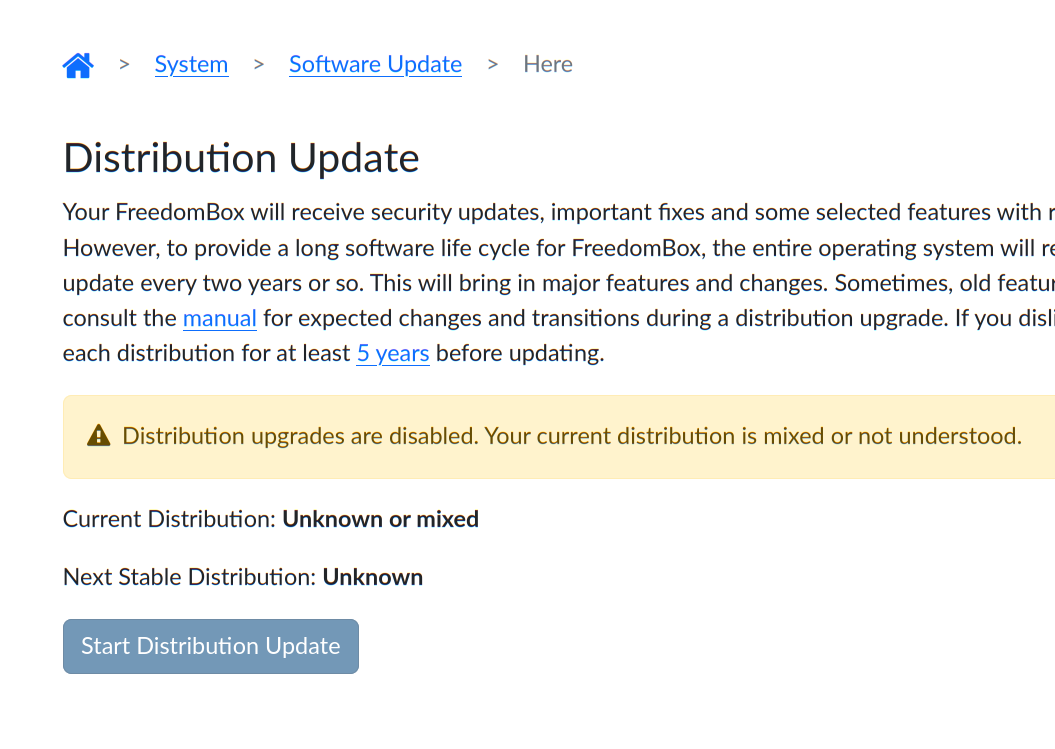
When FreedomBox says that the current distribution is “Unknown or mixed”, then it is trying to parse all the files in the /etc/apt/sources.list and /etc/apt/sources.list.d. Then it extracts all the “distribution” parts from there. In your case it is “bookworm”, “bookworm-updates” and “bookworm-security”. Then it strips the ‘-updates’ and ‘-security’. Then there should only one be one distribution code remaining. If multiple distribution codes are present, it shows “unknown or mixed”. From your posting, everything looks okay with your sources files. Are there any other sources files in the /etc/apt/sources.list.d directory? If so, temporarily move them. Let FreedomBox complete the distribution upgrade to Trixie and then setup those sources again.
So now it seems to be okay again. The only thing I changed was, I removed the double entry for bookworm-backports in /etc/apt/sources.list (last line).
There are no other source files apart from the standard two.
Now the original problem unfortunately still persists. I checked the backport packages for bookworm and could not find matrix-synapse in it. I don’t understand, where does Freedombox source the package files from?
Aah! I see the problem now. The distribution update code is expecting the backports to be in a separate file. I will fix this part.
Sorry, I forgot to mention in my previous mail. Matrix Synapse was available in Bookworm because it was present in bookworm-backports. It was never included in Bookworm. However, later it got removed from bookworm-backports. So, there is no easy way to install Matrix Synapse in Bookworm.
In Trixie, we are installing Matrix Synapse from ‘unstable’ (very specific use) after some careful testing. If you wish to use Matrix Synapse this way, please upgrade to Trixie.
Matrix is a fast moving platform due to its ongoing evolution, decentralized nature, and having to apply security fixes through major protocol updates. There seems to be no clear way to deal with it on a stable distribution release.
We certainly don’t have the resources to try out the unstable packages on “oldstable” and fix problems if they arise in future. There is also a real risk that existing setups will stop working one fine day and we will be powerless to do something about it. So, we focus on the current stable. Thank you for your understanding.
Indeed it is. For your setup, you can try this. In FreedomBox however, we evaluated both options and since supporting oldstable was not a goal, we picked the Debian package from unstable. If the situation changes on how favorable the Debian package is, we will switch to using a container using Podman.