Related
Problem Description
Samba service will not start. Logs report a problem with apparmor.
Steps to Reproduce
- Login to FreedomBox.
- Go to Cockpit Services
- See samba not started, start that manually
- Service attempts to start, fails, logs an error.
Expected Results
Samba service should start normally.
Actual results
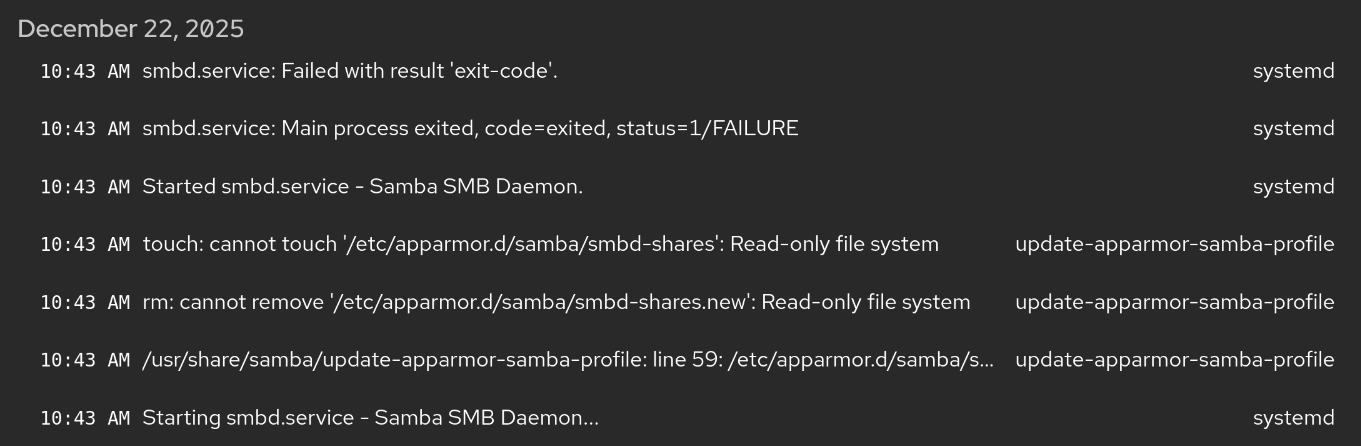
Error messages from Samba:
update-apparmor-samba-profile
/usr/share/samba/update-apparmor-samba-profile: line 59: /etc/apparmor.d/samba/smbd-shares.new: Read-only file system
The filesystem is not read only. The _UID field in the log entry is 0 (root). I was able to use touch to create an empty /etc/apparmor.d/samba/smbd-shares.new file as root. Permissions of this file and folder match others in /etc/apparmor.d.
I’ve also checked for apparmor profiles installed outside of packages using /sbin/apparmor_parser -N /etc/apparmor.d | xargs -i dpkg-query --search {} >/dev/null There are no samba related profiles not part of an installed package. Everything looks as-distributed here.
The solution in the Nmbd service post did not resolve the issue (explicit addition of local network address to firewall). My firewall configuration for Internal already included that interface and with all subnets before the change.
It appears the line 59 error is the cause of the next two errors. The apparmor profile should be recreated after every samba startup - so the .new file fails. The next two errors appear to be subsequent file operations using the .new file.
Screenshot
Information
- FreedomBox version: You are running Debian GNU/Linux 13 (trixie) and FreedomBox version 25.17.1. FreedomBox is up to date.
- Hardware: Linux xxx 6.12.57+deb13-amd64 #1 SMP PREEMPT_DYNAMIC Debian 6.12.57-1 (2025-11-05) x86_64 GNU/Linux
- How did you install FreedomBox?: Debian netinst (maybe stretch or even jessie) and then ‘DEBIAN_FRONTEND=noninteractive apt-get install freedombox -y’