The new setup with radicale is such that there is a ‘socket’ unit that always keeps listening for new connections and a ‘service’ unit that may (not verified yet) automatically shutdown when not being used. As soon a new connection arrives on /radicale/ URL, systemd should automatically start the radicale service and pass on the incoming connection. All this work transparently to reduce resource usage when services are not being used. Users should not notice it and for them it appears as if service is always running.
But it looks like things are not working as expected. Since you are able to consistently reproduce the issue after a day, I will try to do the same and find out what’s going wrong.
Yesterday, what made me notice that radicale was not running was a failed diagnostic. Today, it was that I had evolution fail to access radicale. Both times, on the plinth page for radicale, there was a notification that the service was inactive.
This morning, none of my clients complain so radicale probably works but on the plinth page for radicale, there is the warning message that radicale is not working.
I’ve also been facing issues with Radicale for a few days now, diagnostics showing errors and the service not being available to clients.
Re-running the setup through plinth (which did try a re-installation) did not solve the issue, so I logged in via SSH to look at the logs.
I saw that the service was disabled and enabled & started it:
kopfkind@fbox:~ $ sudo systemctl status radicale
○ radicale.service - A simple CalDAV (calendar) and CardDAV (contact) server
     Loaded: loaded (/usr/lib/systemd/system/radicale.service; disabled; preset: enabled)
     Active: inactive (dead)
       Docs: man:radicale(1)

kopfkind@fbox:~ $ sudo systemctl enable radicale
Synchronizing state of radicale.service with SysV service script with /usr/lib/systemd/systemd-sysv-install.
Executing: /usr/lib/systemd/systemd-sysv-install enable radicale
Created symlink '/etc/systemd/system/multi-user.target.wants/radicale.service' → '/usr/lib/systemd/system/radicale.service'.

kopfkind@fbox:~ $ sudo systemctl start radicale

kopfkind@fbox:~ $ sudo systemctl status radicale
× radicale.service - A simple CalDAV (calendar) and CardDAV (contact) server
     Loaded: loaded (/usr/lib/systemd/system/radicale.service; enabled; preset: enabled)
     Active: failed (Result: exit-code) since Sun 2026-04-12 11:22:39 CEST; 9s ago
   Duration: 674ms
 Invocation: 79d1fa740a3141dc9205528ab9486deb
       Docs: man:radicale(1)
   Main PID: 788497 (code=exited, status=1/FAILURE)

Apr 12 11:22:39 fbox systemd[1]: radicale.service: Scheduled restart job, restart counter is at 5.
Apr 12 11:22:39 fbox systemd[1]: radicale.service: Start request repeated too quickly.
Apr 12 11:22:39 fbox systemd[1]: radicale.service: Failed with result 'exit-code'.
Apr 12 11:22:39 fbox systemd[1]: Failed to start radicale.service - A simple CalDAV (calendar) and CardDAV (contact) server.
Logs with journalctl -u radicale are showing errors:
Apr 12 11:22:38 fbox radicale[788497]: [788497] [INFO] Storage location: '/var/lib/radicale/collections'
Apr 12 11:22:38 fbox radicale[788497]: [788497] [WARNING] Storage location: '/var/lib/radicale/collections' does not exist, creating now
Apr 12 11:22:38 fbox radicale[788497]: [788497] [CRITICAL] An exception occurred during server startup: [Errno 17] File exists: '/var/lib/radicale'
The storage location did (and does) exist already - I’ve been running radicale for years now. The folder /var/lib/radicale is a symlink to /var/lib/private/radicale, but the radicale user cannot access it:
# folder exists and belongs to radicale user:
root@fbox:~# ls -ld /var/lib/radicale/collections/
drwxr-x--- 3 radicale radicale 4096 Jun 16  2024 /var/lib/radicale/collections/

# But radicale user not allowed to access it:
root@fbox:~# sudo -u radicale ls -ld /var/lib/radicale/collections/
ls: cannot access '/var/lib/radicale/collections/': Permission denied

# folder is a symlink from /var/lib/radicale:
root@fbox:~# ls -l /var/lib/radicale
lrwxrwxrwx 1 root root 16 Apr  1 07:17 /var/lib/radicale -> private/radicale

# 'private' is owned by root and has mod 700:
root@fbox:~# ls -ld /var/lib/private
drwx------ 6 root root 4096 Apr  1 07:17 /var/lib/private
The service somehow does not recognize the existing storage location, and this leads to the error File exists: '/var/lib/radicale' above. I am unsure about the /var/lib/private thing here. I believe this is a systemd ‘DynamicUser’ thing and the permissions are there for a reason, so I would not want to change permissions on it (e. g. by allowing o+x).
I did not realize that FB uses uswgi for managing the service via systemd. I stumbled across it in this Salsa issue. I am not familiar with uswgi and how this affects my analysis of standard systemd units above.
However, I noticed that my FB showed bepasty to be installed and broken on the diagnostics, on top of radicale. I never installed not used bepasty on my FB and was quite surprised to see it popping up sometime after FB 26.5.1 - which was installed on April 1 through unattended-upgrades on my machine.
Question: Is there some kind of (wrong & broken) dependency that installs bepasty alongside any updates to radicale and/or uwsgi?
I’ve not found the root cause, yet. But I’ve managed to get my radicale installation back into working state by doing the following:
Make a backup copy of all data from /var/lib/private/radicale
Uninstall radicale via plinth web UI
Verify that data folders have been purged, nothing remains
Reinstall radicale via plinth
Check the data folders, they were still missing
This is not surprising, since radicale is activated by socket, so without a connecting client, the service will stay disabled.
Connect with a client once, connect & refresh, then verify that the data folders are now existing
This actually dropped all collections and data from the client since the server-side is blank after reinstallation. But I expected this and I’ve the backup copy made above.
Copy back my backed up data files into the (now existing) collection folders.
Make sure permissions are correct by running chown -R nobody:nogroup /var/lib/private/radicale/collections/collection-root/*
Reload & refresh on the client again. This time, everything is there and synchronization works again
One thing I noticed was that previous to the reinstallation all the data files would belong to the radicale user:group. After reinstallation, all the data belonged to nobody:nogroup, so I adopted this in my last step above. Not sure, but maybe this was somehow contributing to my issues.
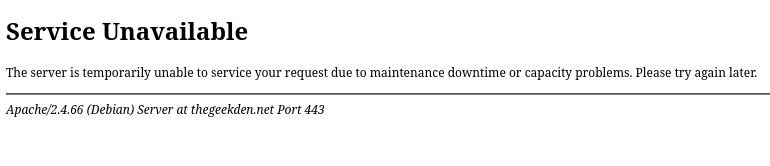
This may have something to do with my post last night: Fail2ban Periodically Locking access to Freedombox. It might not look like it at first, but I’m having a LOT of the same issues as Ya’ll, both Bepasty, and Radicale are acting WEIRD, and throwing a LOT of logged errors, and their services are showing as failing in the web browser when I navigate to my https://thegeekden.net/radicale/. Here is a screenshot:
Here is the error in my logs from radicale re-run setup command from within plinth interface:
Just to save myself the headaches of trying to troubleshoot this issue right now, I have uninstalled both Bepasty and Radicale. I have not seen another error pop up since I did so this morning, about 5 hours ago. I will report back here if I see more errors regarding this.
The plinth page is still saying the service is inactive, I have a failed diagnostic for uwsgi-app@radicale.socket (the last one) but radicale is actually working.
Hi all!
I’m seeing a similar issue.
Radicale is shown as active in plinth.
Radicale is working.
uwsgi-app@radicale.socket is failing in the diagnostic.
Additional info:
uwsgi-app@radicale.socket is dead
uwsgi-app@radicale.service is running
I am trying to reproduce this issue and still could not. Apparently, everyone else is facing the issue. Please note that we don’t use radicale.service or uwsgi.service (anymore). That correct services are uwsgi-app@radicale.socket (this will be enabled and started) and uwsgi-app@radicale.service (this will be started the .socket service when user accesses the service). When the failures occurs could someone post the output of the following commands?
journalctl -u uwsgi-app@radicale.socket
journalctl -u uwsgi-app@radicale.service
systemctl show uwsgi-app@radicale.socket
systemctl show uwsgi-app@radicale.service
journalctl -u uwsgi-app@radicale.service (truncated and anonymized, there isn't any other information in the log)
avril 23 10:23:04 freedombox radicale[1404]: [1404] [INFO] PROPFIND request for '/famille/60870e65-9ebb-0c4c-4c9b-f1a4333f6e07/' with depth '0' received from 2001:xxx:xxxx:xxxx:xxxx:xxxx:cd6e:a6b9 using 'Mozilla/5.0 (Windows NT 10.0; Win64; x64; rv:140.0) Gecko/20100101 Thunderbird/140.9.1'
avril 23 10:23:04 freedombox radicale[1404]: [1404] [WARNING] Base prefix (from HTTP_X_SCRIPT_NAME) must not end with '/': '/radicale/'
avril 23 10:23:04 freedombox radicale[1404]: [1404] [INFO] Successful login: 'famille' (remote_user)
avril 23 10:23:06 freedombox radicale[1404]: [1404] [INFO] PROPFIND response status for '/famille/60870e65-9ebb-0c4c-4c9b-f1a4333f6e07/' with depth '0' in 1.644 seconds: 207 Multi-Status
avril 23 10:23:06 freedombox uwsgi[1404]: [pid: 1404|app: 0|req: 186/540] 2001:xxx:xxxx:xxxx:xxxx:xxxx:cd6e:a6b9 (famille) {106 vars in 1778 bytes} [Thu Apr 23 10:23:04 2026] PROPFIND /radicale/famille/60870e65-9ebb-0c4c-4c9b-f1a4333f6e07/ => generated 553 bytes in 1651 msecs (HTTP/2.0 207) 4 headers in 173 bytes (1 switches on core 0)
avril 23 10:23:06 freedombox radicale[1404]: [1404/uWSGIWorker2Core3] [INFO] OPTIONS request for '/famille/' received from 2001:xxx:xxxx:xxxx:xxxx:xxxx:cd6e:a6b9 using 'Mozilla/5.0 (Windows NT 10.0; Win64; x64; rv:140.0) Gecko/20100101 Thunderbird/140.9.1'
avril 23 10:23:06 freedombox radicale[1404]: [1404/uWSGIWorker2Core3] [WARNING] Base prefix (from HTTP_X_SCRIPT_NAME) must not end with '/': '/radicale/'
avril 23 10:23:06 freedombox radicale[1404]: [1404/uWSGIWorker2Core3] [INFO] Successful login: 'famille' (remote_user)
avril 23 10:23:06 freedombox radicale[1404]: [1404/uWSGIWorker2Core3] [INFO] OPTIONS response status for '/famille/' in 0.012 seconds: 200 OK
avril 23 10:23:06 freedombox uwsgi[1404]: [pid: 1404|app: 0|req: 187/541] 2001:xxx:xxxx:xxxx:xxxx:xxxx:cd6e:a6b9 (famille) {100 vars in 1591 bytes} [Thu Apr 23 10:23:06 2026] OPTIONS /radicale/famille/ => generated 0 bytes in 18 msecs (HTTP/2.0 200) 2 headers in 179 bytes (1 switches on core 3)
avril 23 10:23:06 freedombox radicale[1404]: [1404/uWSGIWorker2Core2] [INFO] REPORT request for '/famille/60870e65-9ebb-0c4c-4c9b-f1a4333f6e07/' with depth '1' received from 2001:xxx:xxxx:xxxx:xxxx:xxxx:cd6e:a6b9 using 'Mozilla/5.0 (Windows NT 10.0; Win64; x64; rv:140.0) Gecko/20100101 Thunderbird/140.9.1'
avril 23 10:23:06 freedombox radicale[1404]: [1404/uWSGIWorker2Core2] [WARNING] Base prefix (from HTTP_X_SCRIPT_NAME) must not end with '/': '/radicale/'
avril 23 10:23:06 freedombox radicale[1404]: [1404/uWSGIWorker2Core2] [INFO] Successful login: 'famille' (remote_user)
avril 23 10:23:08 freedombox radicale[1404]: [1404/uWSGIWorker2Core2] [INFO] REPORT response status for '/famille/60870e65-9ebb-0c4c-4c9b-f1a4333f6e07/' with depth '1' in 2.211 seconds: 207 Multi-Status
avril 23 10:23:08 freedombox uwsgi[1404]: [pid: 1404|app: 0|req: 188/542] 2001:xxx:xxxx:xxxx:xxxx:xxxx:cd6e:a6b9 (famille) {106 vars in 1778 bytes} [Thu Apr 23 10:23:06 2026] REPORT /radicale/famille/60870e65-9ebb-0c4c-4c9b-f1a4333f6e07/ => generated 175 bytes in 2219 msecs (HTTP/2.0 207) 3 headers in 113 bytes (2 switches on core 2)
Thank you, @Mjules and others for reports and data. I have found the cause and submitted a fix.
Problem: During backups, FreedomBox temporarily shuts down services (to preserve data integrity). When service is a systemd .socket unit, the corresponding .service unit is not being shutdown. When trying to restart the .socket unit, it fails due the socket being already listened on.
Impact: The impact is minimal in that only diagnostic tests fail. Service continues to run so radicale/bepasty continue to work as expected. If machine is restarted, the services are started properly again as well.
Fix: We implemented properly handling the socket units during backup/restore and other operations. The fix will become available with next release in about 2 weeks. Meanwhile, please ignore failing diagnostic tests.