sudo apt install mc
Download size: 1,891 kB - Space needed: 8,056 kB
Works in the terminal in Cockpit or via SSH. Even though it’s in a terminal, a mouse works for many things. No drag and drop.
It’s in Debian and has been for some time - Debian -- Details of package mc in trixie
Wikipedia page
Home Page
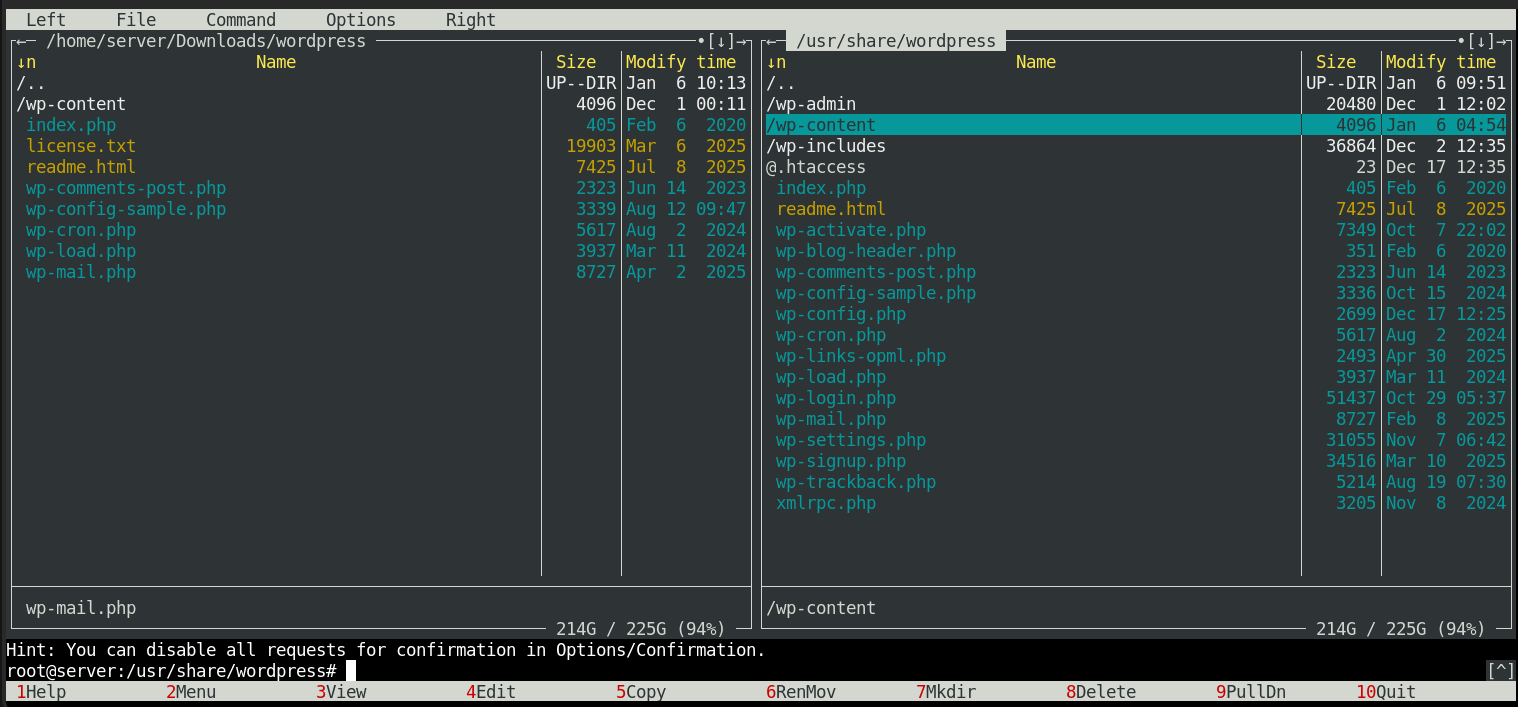
Screenshot is after me having updated WordPress.
Files and wp-content folder remain on the left as I didn’t move those. The files had the same date so they haven’t been updated and wp-content never gets replaced when updating wp.
The numbers at the bottom of MC pertain to F keys. F6 is RenMov or rename/move.
MC gives a popup to confirm move/location and a second popup with an option to overwrite all.
I’m not afraid of a terminal but I use it so infrequently, I have to look up commands every time for most things. Overwriting 3,217 files that will break my website if I screw up? Yeah, I’d like it to be visual.
Commands also work within MC down in the black panel near the bottom. I was able to navigate to Downloads in left pane, use wget to fetch the latest.tar.gz, use tar to unpack it and F6 to move the new files from Downloads to /usr/share/wordpress all in one interface in just a few minutes.
I would say this should be built into FBX but it runs in a terminal so there’s nothing to build in. Maybe preinstalled with mention of it in the FBX Manual and/or the SSH welcome text.