Since the update on Trixie, my rspamd server has different issues. I did try to solve the problems with already four fresh (“vanilla”) installations of FreedomBox and Postfix/Dovecot in different ways. But the issues remained.
Issue 1
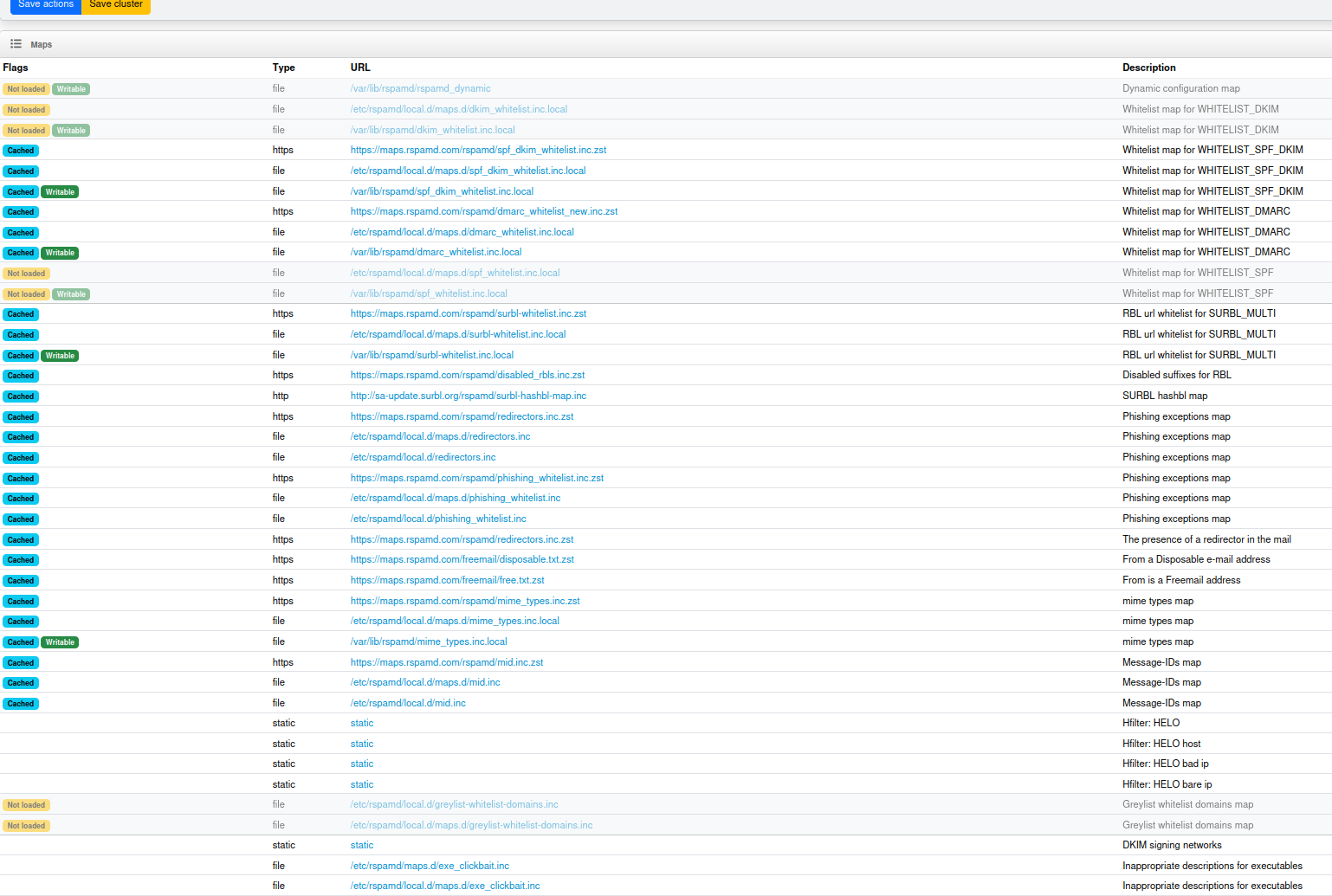
Configuration under https://domain/rspamd/#configuration
The configuration looks not the same as in Bookworm I guess and I cant’t remember that I’ve had all these blue boxes “Cached” before. The configuration didn’t look as crowded, as it looks now (maybe I’m wrong). But if there is an issue with the Maps in Configuration, then this could cause the issue 3 (increased CPU usage on redis-server).
Issue 2
ssl connect errors
Since around two weeks I have ssl connect errors every 3 - 15 minutes.
Message in RSPAMD History > Errors:
error reading https://maps.rspamd.com/freemail/free.txt.zst(157.180.118.77:443): connection with http server terminated incorrectly: ssl connect error: syscall fail: Connection reset by peer
These are core messages after https://maps.rspamd.com:
/freemail/disposable.txt.zst(157.180.118.77:443):
/freemail/free.txt.zst(157.180.118.77:443):
/rspamd/dmarc_whitelist_new.inc.zst(157.180.118.77:443):
/rspamd/spf_dkim_whitelist.inc.zst(157.180.118.77:443):
/rspamd/disabled_rbls.inc.zst(157.180.118.77:443):
/rspamd/redirectors.inc.zst(157.180.118.77:443):
/rspamd/surbl-whitelist.inc.zst(157.180.118.77:443):
/rspamd/mime_types.inc.zst(157.180.118.77:443):
/rspamd/mid.inc.zst(157.180.118.77:443):
connection with http server terminated incorrectly: ssl connect error: syscall fail: Connection reset by peer
I found a command and this command implies, that the certificates are ok?
~$ curl -v https://maps.rspamd.com
* Host maps.rspamd.com:443 was resolved.
* IPv6: (none)
* IPv4: 157.180.118.77
*   Trying 157.180.118.77:443...
* ALPN: curl offers h2,http/1.1
* TLSv1.3 (OUT), TLS handshake, Client hello (1):
*  CAfile: /etc/ssl/certs/ca-certificates.crt
*  CApath: /etc/ssl/certs
* TLSv1.3 (IN), TLS handshake, Server hello (2):
* TLSv1.2 (IN), TLS handshake, Certificate (11):
* TLSv1.2 (IN), TLS handshake, Server key exchange (12):
* TLSv1.2 (IN), TLS handshake, Server finished (14):
* TLSv1.2 (OUT), TLS handshake, Client key exchange (16):
* TLSv1.2 (OUT), TLS change cipher, Change cipher spec (1):
* TLSv1.2 (OUT), TLS handshake, Finished (20):
* TLSv1.2 (IN), TLS handshake, Finished (20):
* SSL connection using TLSv1.2 / ECDHE-ECDSA-AES256-GCM-SHA384 / secp256r1 / id-ecPublicKey
* ALPN: server accepted http/1.1
* Server certificate:
*  subject: CN=maps.rspamd.com
*  start date: Aug 19 21:57:38 2025 GMT
*  expire date: Nov 17 21:57:37 2025 GMT
*  subjectAltName: host "maps.rspamd.com" matched cert's "maps.rspamd.com"
*  issuer: C=US; O=Let's Encrypt; CN=E6
*  SSL certificate verify ok.
*   Certificate level 0: Public key type EC/prime256v1 (256/128 Bits/secBits), signed using ecdsa-with-SHA384
*   Certificate level 1: Public key type EC/secp384r1 (384/192 Bits/secBits), signed using sha256WithRSAEncryption
*   Certificate level 2: Public key type RSA (4096/152 Bits/secBits), signed using sha256WithRSAEncryption
* Connected to maps.rspamd.com (157.180.118.77) port 443
* using HTTP/1.x
> GET / HTTP/1.1
> Host: maps.rspamd.com
> User-Agent: curl/8.14.1
> Accept: */*
>
* Request completely sent off
< HTTP/1.1 302 Moved Temporarily
< Server: nginx
< Date: Wed, 24 Sep 2025 07:35:11 GMT
< Content-Type: text/html
< Content-Length: 138
< Connection: keep-alive
< Location: https://rspamd.com/
<
<html>
<head><title>302 Found</title></head>
<body>
<center><h1>302 Found</h1></center>
<hr><center>nginx</center>
</body>
</html>
* Connection #0 to host maps.rspamd.com left intact
Issue 3
Redis-Server
Before the update on Trixie, the redis-server consumed constantly around 1,3 - 1,5 % of the CPU usage. Since the update constantly around 8 - 9 % CPU usage.
What could cause this? Could it be connected to the issue 1?
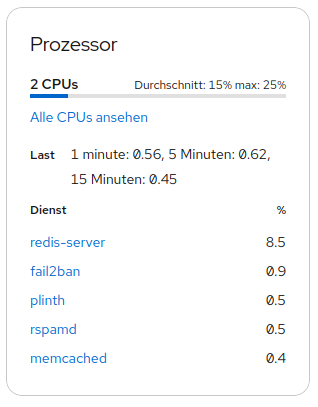
My first question to @Avron and @Ged (because I know, that you also have an email server):
does the configuration in rspamd look the same as in my posted picture (issue 1)?
If yes, I assume that you also have increased redis-server CPU usage (issue 3).
@Sunil What could be the next step?
Thanks a lot!
Pioneer (purchased early 24)