I could take the box and the sdd drive to the tech fellow and ask him to do it again.
When I use plinth to look at the data storage, nothing there has changed. When I look at files in Nextcloud, it looks like everything is still there.
Anyway, for another day.
That was the result before I made the resize attempt. Now it says:
ken@fbox:~$ sudo pvs
PV VG Fmt Attr PSize PFree
/dev/sda3 fbox-vg lvm2 a-- 475.96g 0
The other commands also seem to produce the same results as before:
ken@fbox:~$ sudo vgs
VG #PV #LV #SN Attr VSize VFree
fbox-vg 1 2 0 wz–n- 475.96g 0
ken@fbox:~$ sudo lvs
LV VG Attr LSize Pool Origin Data% Meta% Move Log Cpy%Sync Convert
root fbox-vg -wi-ao---- 475.00g
swap_1 fbox-vg -wi-ao---- 980.00m
Anyway, for another day 
The odd rendering issue can be fixed by doing a full page reload (hold shift while clicking the Reload current page button in the browser).
1 Like
I worry that the lv metadata is written but not recognized until reboot. If your are not able to effect the lv resize then I suspect that after a power cycle you’ll have a problem.
If you can’t do the resize command try the vgscfgrestore. If not that then you are left with re-image the disk or try to restore.
Try the relative size syntax (+500G) just to get that lv boundary back past the end of the filesystem. Maybe there will not be an extents complaint with a smaller operation.
Got this:
ken@fbox:~$ sudo lvresize --size +500G /dev/fbox-vg/root
[sudo] password for ken:
Insufficient free space: 128000 extents needed, but only 0 available
Will look at vgscfgrestore
Tried this first:
ken@fbox:~$ sudo vgcfgrestore --list VG
Couldn’t scan the archive directory (/etc/lvm/archive).
Then this:
ken@fbox:~$ sudo vgcfgrestore VG
/etc/lvm/backup/VG: stat failed: No such file or directory
WARNING: couldn’t read volume group metadata from file.
Failed to read VG VG from /etc/lvm/backup/VG
Restore failed.
If that means what I think it means, I guess the next step would be to reboot the server and, if as expected, it no longer runs, go back to the tech and have another run at cloning the ssd. I wonder if there is anything I should tell him about the process to get the result we need.
Before I do any of that, I wonder if there is anything I should do to try to save the data with a backup as the one I mentioned looks like it produced a 36g backup for 10 times that data.
Thanks for your help with this. To be clear, any mistakes here have been mine alone, I own them. I broke it, I get to keep all the pieces.
Maybe the “VG” in the command line is meant to be replaced with a name for the volume group?
Tried this:
ken@fbox:~$ sudo vgcfgrestore -l fbox-vg
Couldn’t scan the archive directory (/etc/lvm/archive).
File: /etc/lvm/backup/fbox-vg
VG name: fbox-vg
Description: Created after executing ‘vgcfgbackup’
Backup Time: Mon Aug 18 20:35:31 2025
When the problem didn’t show up on other devices or on other browsers on this device I thought it was just my Vivaldi browser and tried a refresh without success. Shift reload didn’t fix it but Ctrl F5 did. Thanks!
Yes, fbox-vg is the volume group name. We looked at that file a couple of posts above.
1 Like
Before I shut it down and take it back to the shop to have them clone the sd drive to the new hd again, I will look for a way to do a full backup of the photos I have stored in the nextcloud memories app. I know that is outside of freedombox and will look for answers in their stuff. My guess is that if I have the tech guy do exactly what he did last time again, I will be able to get resizing the partition and the file system right on my second attempt. Before I do anything to it, I will run vgcfgbackup first. Fingers crossed!
I rebooted the server since I was about to shut it down anyway to do the fresh clone of the ssd to the new hd and it came up apparently normally. As far as I can see it is working as it regularly does.
Yet the resize commands still seem off:
ken@fbox:~$ sudo vgs
[sudo] password for ken:
VG #PV #LV #SN Attr VSize VFree
fbox-vg 1 2 0 wz–n- 475.96g 0
ken@fbox:~$ sudo lvs
LV VG Attr LSize Pool Origin Data% Meta% Move Log Cpy%Sync Convert
root fbox-vg -wi-ao---- 475.00g
swap_1 fbox-vg -wi-ao---- 980.00m
ken@fbox:~$ sudo pvs
PV VG Fmt Attr PSize PFree
/dev/sda3 fbox-vg lvm2 a-- 475.96g 0
ken@fbox:~$ sudo lvresize --size 7.5T /dev/fbox-vg/root
Insufficient free space: 1844479 extents needed, but only 0 available
ken@fbox:~$ sudo lvresize --size +500G /dev/fbox-vg/root
Insufficient free space: 128000 extents needed, but only 0 available
ken@fbox:~$
I guess I will take it in and have the tech clone it again and see how it goes but I am wondering whether that will change anything. Will see.
KenW
OK, I had the new hd wiped and the sdd cloned onto it.
So far, I have done this:
ken@fbox:~$ sudo vgs
[sudo] password for ken:
VG #PV #LV #SN Attr VSize VFree
fbox-vg 1 2 0 wz–n- 475.96g 0
ken@fbox:~$ sudo lvs
LV VG Attr LSize Pool Origin Data% Meta% Move Log Cpy%Sync Convert
root fbox-vg -wi-ao---- 475.00g
swap_1 fbox-vg -wi-ao---- 980.00m
ken@fbox:~$ sudo pvs
PV VG Fmt Attr PSize PFree
/dev/sda3 fbox-vg lvm2 a-- 475.96g 0
ken@fbox:~$ sudo vcfgbackup
sudo: vcfgbackup: command not found
ken@fbox:~$ sudo vgcfgbackup
Volume group “fbox-vg” successfully backed up.
ken@fbox:~$ sudo lvresize --size +500G /dev/fbox-vg/root
Insufficient free space: 128000 extents needed, but only 0 available
Hmm, not sure what is next.
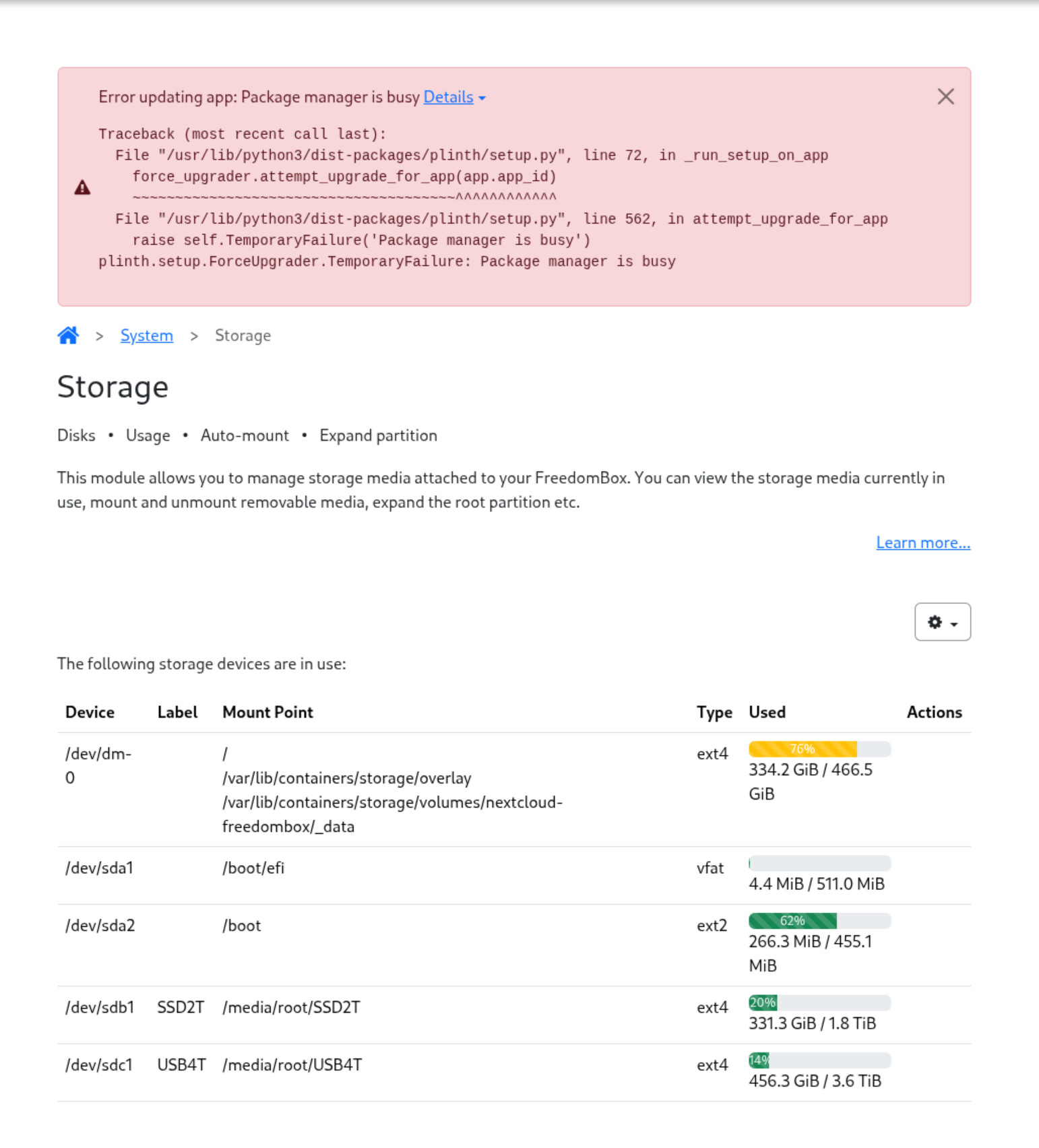
In Plinth under Storage, I tried Re-run setup and got this:
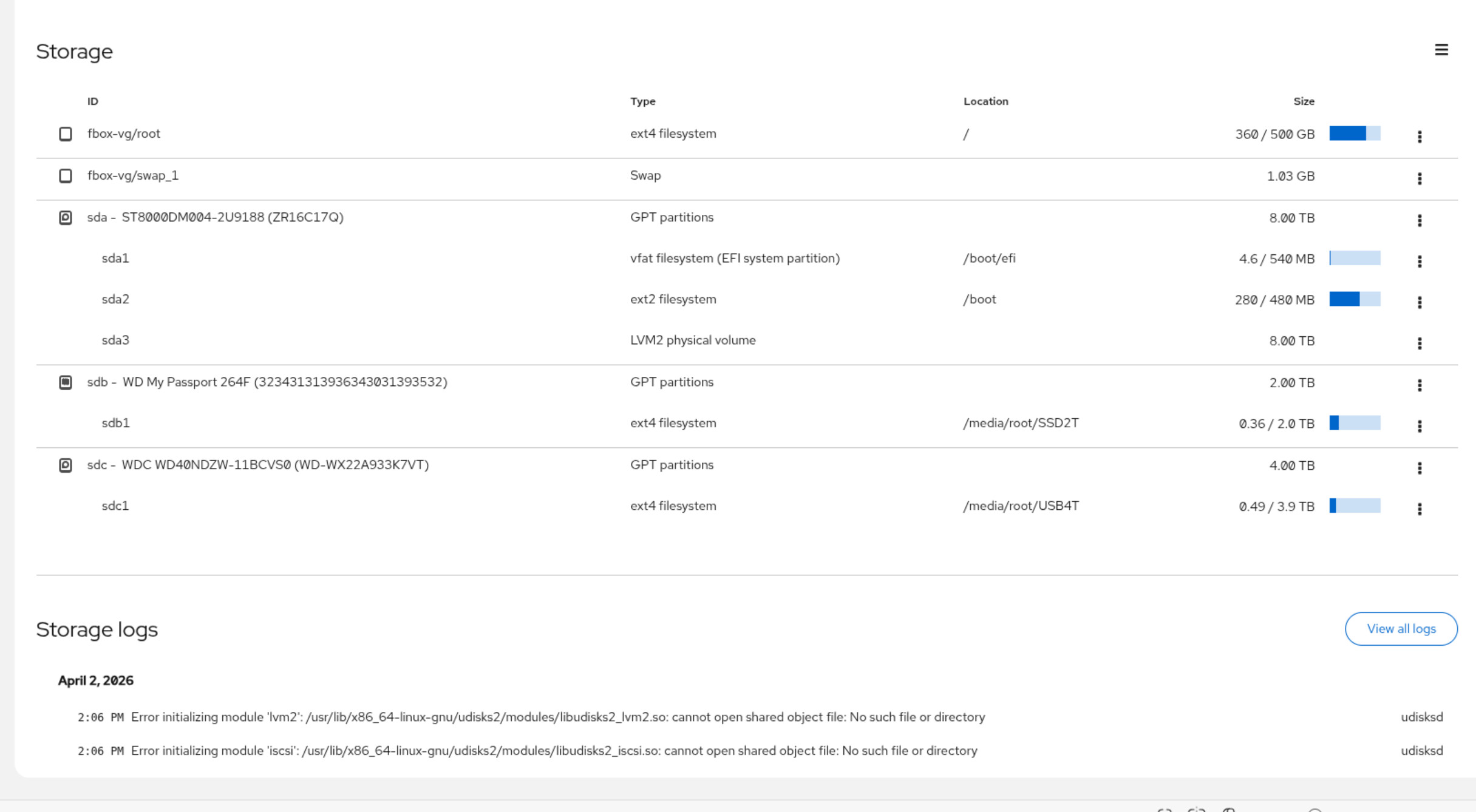
In Cockpit, this is what Storage shows:
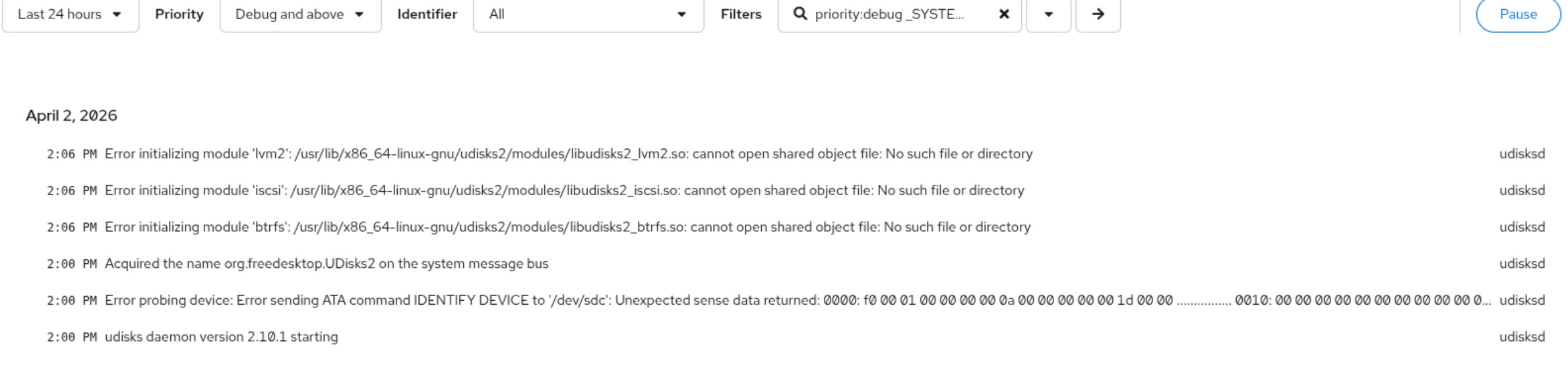
When I choose All logs, I see this:
The cockpit help link lead me to this:
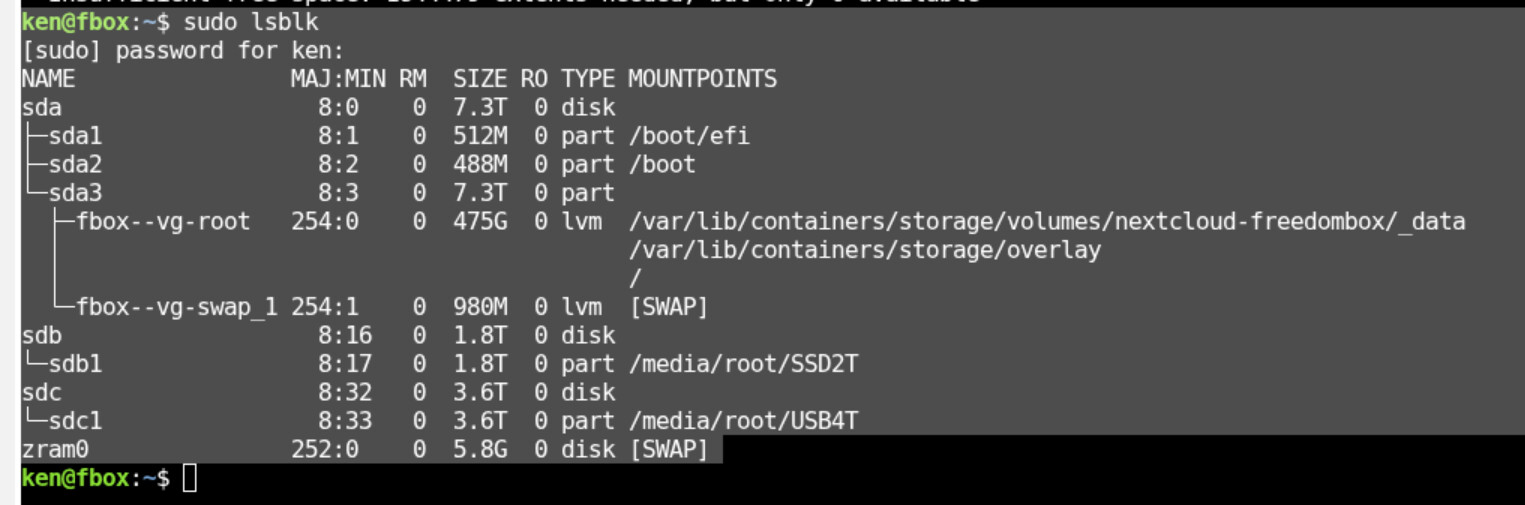
Some further digging turns this up:
ken@fbox:~$ sudo lsblk
[sudo] password for ken:
NAME MAJ:MIN RM SIZE RO TYPE MOUNTPOINTS
sda 8:0 0 7.3T 0 disk
├─sda1 8:1 0 512M 0 part /boot/efi
├─sda2 8:2 0 488M 0 part /boot
└─sda3 8:3 0 7.3T 0 part
├─fbox–vg-root 254:0 0 475G 0 lvm /var/lib/containers/storage/volumes/nextcloud-freedombox/_data
│ /var/lib/containers/storage/overlay
│ /
└─fbox–vg-swap_1 254:1 0 980M 0 lvm [SWAP]
sdb 8:16 0 1.8T 0 disk
└─sdb1 8:17 0 1.8T 0 part /media/root/SSD2T
sdc 8:32 0 3.6T 0 disk
└─sdc1 8:33 0 3.6T 0 part /media/root/USB4T
zram0 252:0 0 5.8G 0 disk [SWAP]
Ha! I found my way. Here is what I did:
ken@fbox:~$ sudo pvresize /dev/sda3 --setphysicalvolumesize 7t
/dev/sda3: Requested size 7.00 TiB is less than real size <7.28 TiB. Proceed? [y/n]: y
WARNING: /dev/sda3: Pretending size is 15032385536 not 15626002432 sectors.
Physical volume “/dev/sda3” changed
1 physical volume(s) resized or updated / 0 physical volume(s) not resized
ken@fbox:~$ sudo lvresize --size 7T /dev/fbox-vg/root
[sudo] password for ken:
Insufficient free space: 1713407 extents needed, but only 1713161 available
ken@fbox:~$ sudo lvresize --size 6.99T /dev/fbox-vg/root
Rounding size to boundary between physical extents: 6.99 TiB.
Size of logical volume fbox-vg/root changed from 475.00 GiB (121601 extents) to 6.99 TiB (1832387 extents).
Logical volume fbox-vg/root successfully resized.
ken@fbox:~$ sudo lsblk
NAME MAJ:MIN RM SIZE RO TYPE MOUNTPOINTS
sda 8:0 0 7.3T 0 disk
├─sda1 8:1 0 512M 0 part /boot/efi
├─sda2 8:2 0 488M 0 part /boot
└─sda3 8:3 0 7.3T 0 part
├─fbox–vg-root 254:0 0 7T 0 lvm /var/lib/containers/storage/volumes/nextcloud-freedombox/_data
│ /var/lib/containers/storage/overlay
│ /
└─fbox–vg-swap_1 254:1 0 980M 0 lvm [SWAP]
sdb 8:16 0 1.8T 0 disk
└─sdb1 8:17 0 1.8T 0 part /media/root/SSD2T
sdc 8:32 0 3.6T 0 disk
└─sdc1 8:33 0 3.6T 0 part /media/root/USB4T
zram0 252:0 0 5.8G 0 disk [SWAP]
ken@fbox:~$ sudo resize2fs /dev/fbox-vg/root
resize2fs 1.47.2 (1-Jan-2025)
Filesystem at /dev/fbox-vg/root is mounted on /; on-line resizing required
old_desc_blocks = 60, new_desc_blocks = 895
The filesystem on /dev/fbox-vg/root is now 1876364288 (4k) blocks long.
ken@fbox:~$ sudo lsblk
NAME MAJ:MIN RM SIZE RO TYPE MOUNTPOINTS
sda 8:0 0 7.3T 0 disk
├─sda1 8:1 0 512M 0 part /boot/efi
├─sda2 8:2 0 488M 0 part /boot
└─sda3 8:3 0 7.3T 0 part
├─fbox–vg-root 254:0 0 7T 0 lvm /var/lib/containers/storage/volumes/nextcloud-freedombox/_data
│ /var/lib/containers/storage/overlay
│ /
└─fbox–vg-swap_1 254:1 0 980M 0 lvm [SWAP]
sdb 8:16 0 1.8T 0 disk
└─sdb1 8:17 0 1.8T 0 part /media/root/SSD2T
sdc 8:32 0 3.6T 0 disk
└─sdc1 8:33 0 3.6T 0 part /media/root/USB4T
zram0 252:0 0 5.8G 0 disk [SWAP]
ken@fbox:~$
That took me from this:
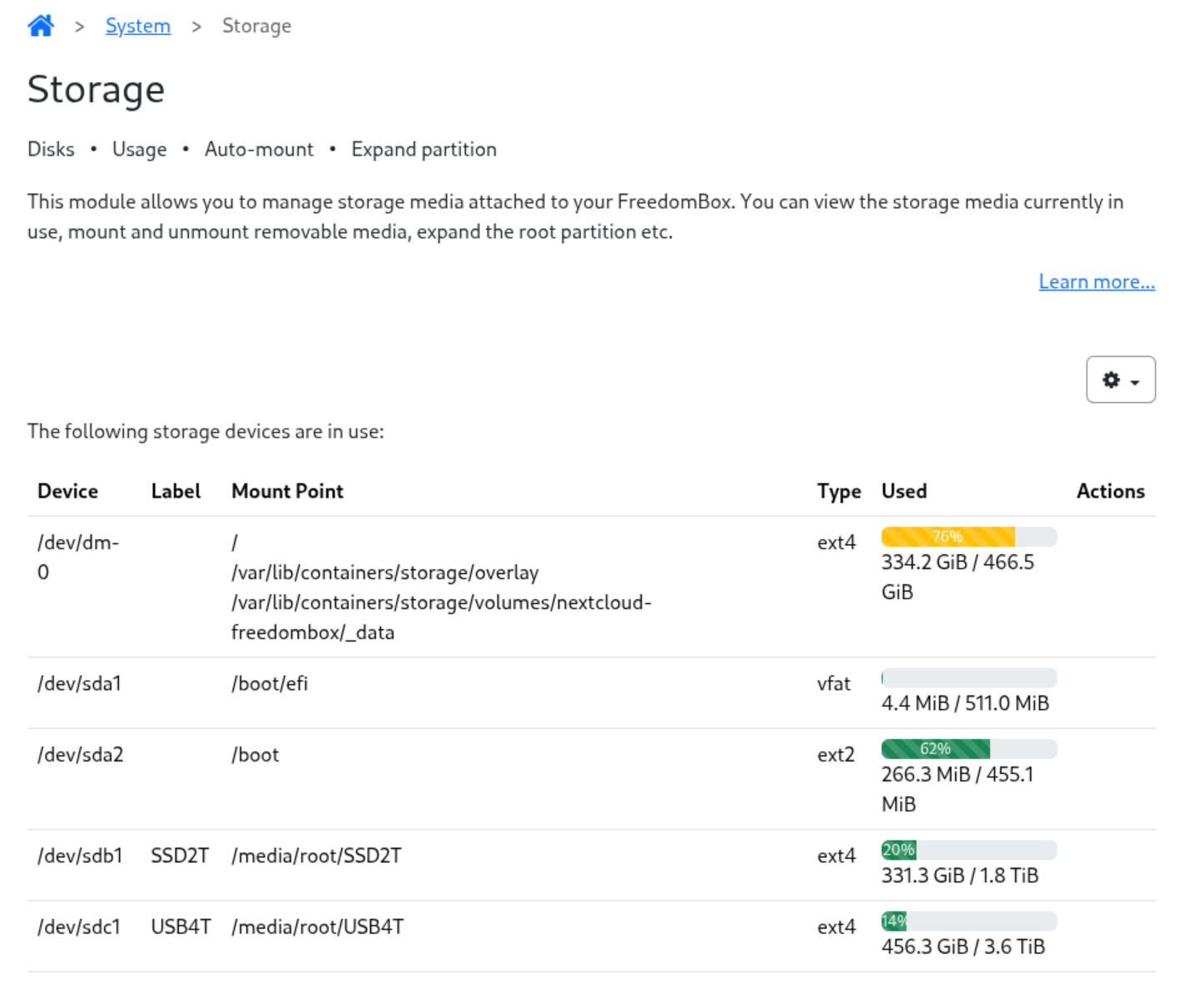
to this:
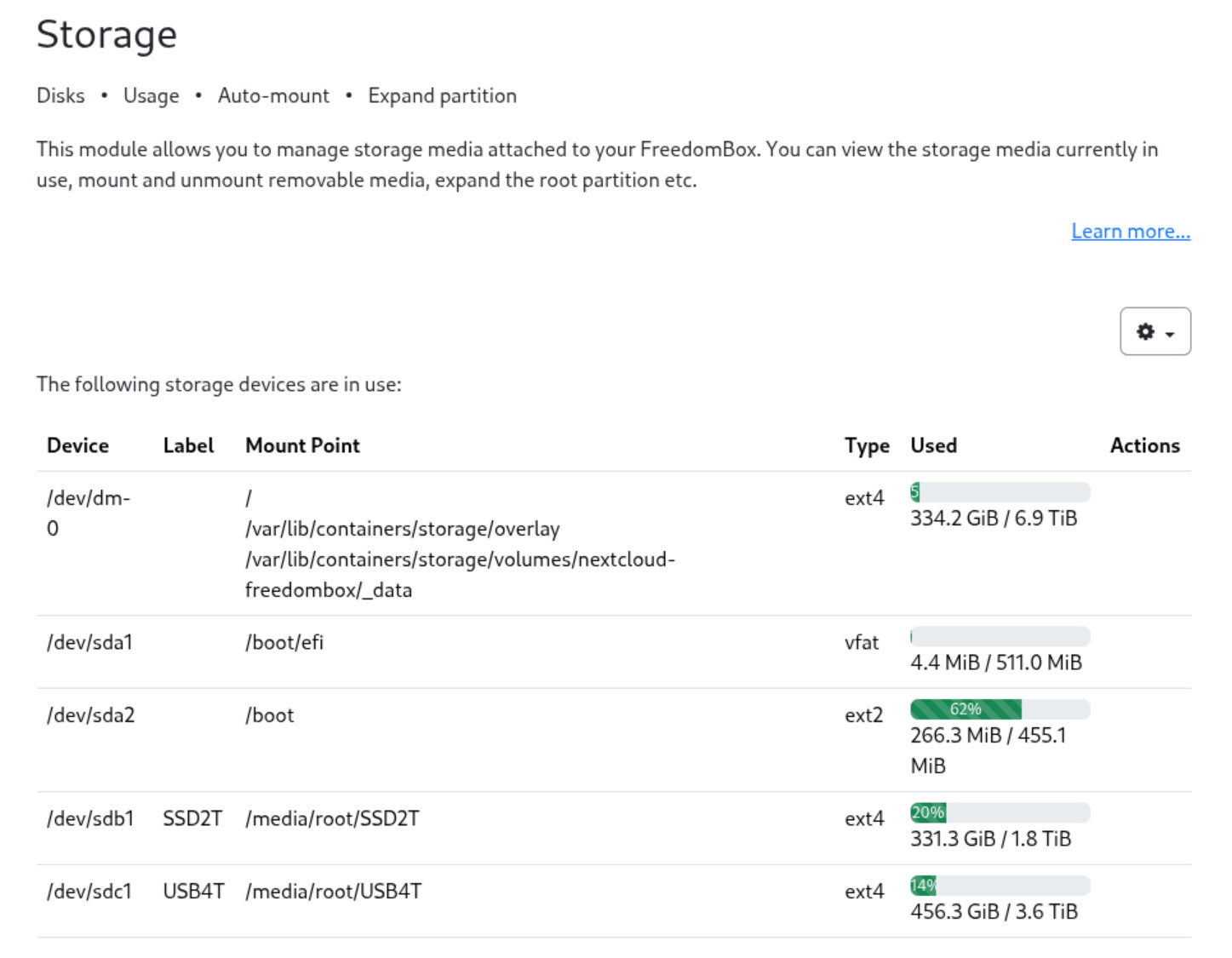
Thanks for the help provided. It made it work out.
KenW
1 Like