I run freedombox on an older desktop PC which has a 500g ssd hard drive that just keeps on ticking away nicely. I run various FB apps including nextcloud and its Memories app for my photo collection. The only problem I have is the drive capacity prevents me from keeping all of my photos on it. I plan to replace the primary drive with a 2 or larger TB ssd unit. I have a 4TB usb drive and a 2 TB ssd usb drive attached that I use for additional storage.
My local tech tells me he can copy an image of everything on the drive to a new drive and expand the partition to the full disk size. Would that work?
With Trixie coming out soon an alternate plan might be to do a full fresh install once it is released. Would that be a better idea?
Ken Walker
running Debian GNU/Linux 12 (bookworm) and FreedomBox version 25.9.2. FreedomBox is up to date.
My local tech tells me he can copy an image of everything on the drive to a new drive and expand the partition to the full disk size. Would that work?
Yes. There are good tools to do exactly this. These are not destructive to the original disk, so ask to keep that just in case things are not right the first time if you have somebody do the work for you. You would do well to ask them to put the old disk in a static bag for you.
I have put off doing the hard drive upgrade I mentioned earlier but it is time to go ahead with it before I run out of storage space on the primary drive and so that I can move stuff to it that I lack space for now.
I am now using Trixie and FB26.1.
Instead of replacing the 500g ssd with a larger ssd drive, I am wondering whether continuing to use the existing ssd drive as the primary drive and adding a large regular hard drive internal to the machine would be a better alternative.
I have found that even though I have lots of space on the external ssd and hd plugin usb drives, they aren’t smoothly recognised using Samba or nextcloud and wonder whether a large internal drive might be a smoother solution and a simple upgrade. I could then tell nextcloud to store my photos on the new drive. The existing ssd drive is too small for my collection.
I wonder whether at the same time I should do a fresh install and set up a btrfs file system as that seems to offer more flexibility and back up options? Maybe one change at a time?
Have others been down this road ahead of me?
This is my present storage:
Storage
ID
Type
Location
Size
fbox-vg/root
ext4 filesystem
/
270 / 500 GB
fbox-vg/swap_1
Swap
1.03 GB
nvme0n1 - INTEL SSDPEKNW512G8H (BTNH00620WPU512A)
GPT partitions
512 GB
nvme0n1p1
vfat filesystem (EFI system partition)
/boot/efi
4.6 / 540 MB
nvme0n1p2
ext2 filesystem
/boot
280 / 480 MB
nvme0n1p3
LVM2 physical volume
511 GB
sda - WD My Passport 264F (323431313936343031393532)
I’d remind you, then, that there’s nothing at all wrong with mechanical disks. You probably have room for one or two (or more). Consider your plan after you get your hardware budget together.
Mechanical disks will be a lower price point than SSD. You can get 4TB for $80 with 2 year warranty, for example.
You will need:
Drive bays in the computer enclosure
SATA cables for each drive you buy
An available SATA connection on your main board, or you’ll have to buy a PCI SATA card.
If you need a SATA expansion card, read a little about which vendors have good Linux support (not customer service support, but that their stuff works reliably).
You can think about a fresh install, but here’s an alternative to that. Get everything ready for a fresh install, but try to convert your root to BTRFS. I understand there’s a tool for this. Once you have that you can use native BTRFS tools to get your disks organized the way you want. If that doesn’t work, then you fall back to the fresh install plan.
I like the low RPM mechanical disks. I don’t need high performance with FreedomBox, and these tend to be quiet. I have a bunch of disks in the computer over in the corner and I can’t hear it except when they grind away - but even then it’s not noisy. Search disks for “quiet”, “noise”, or look at the spec sheet which may have the dB estimate for the disk.
Thanks for that. Would you continue to use the 550g ssd as the primary drive and go with mechanical drives for additional storage or would it be best to get rid of the ssd and just use a large mechanical drive for the primary? I had it in my head that the ssd for primary would be quicker but your comments make me wonder if one large mechanical drive may be the way to go.
I’m happy with low rpm mechanical disks and I do not have any interactive workload on Freedombox. I don’t even have a monitor or keyboard attached.
SSD will be faster.
You already have some amount of mileage on the SSD. If it’s a lot you’ll need to think about it breaking eventually.
I have run mechanical disks to failure, they tend to start to tell you that they are not healthy if you pay attention with smartd and you can get ahead of it. I have not experienced and SSD breaking yet, and I can’t say if they go all at once or if you can detect that ahead of time. Maybe read about that online to make an informed choice.
I have just had the hard drive upgrade I mentioned earlier done by a local tech.
My Freedombox is an HP desktop with 12g ram. It had a 500g ssd hard drive. I had the tech remove that and replace it with an 8TB hard drive. If I understand it correctly, he copied the entire SSD drive to the new HD. He said that he expanded the data partition to take up the space on the drive.
It fires right up nicely after the change of drives. When I look at storage in plinth, the old 500g ssd drive that has been removed shows up with the storage bar in yellow. It doesn’t seem to show the increased storage at all.
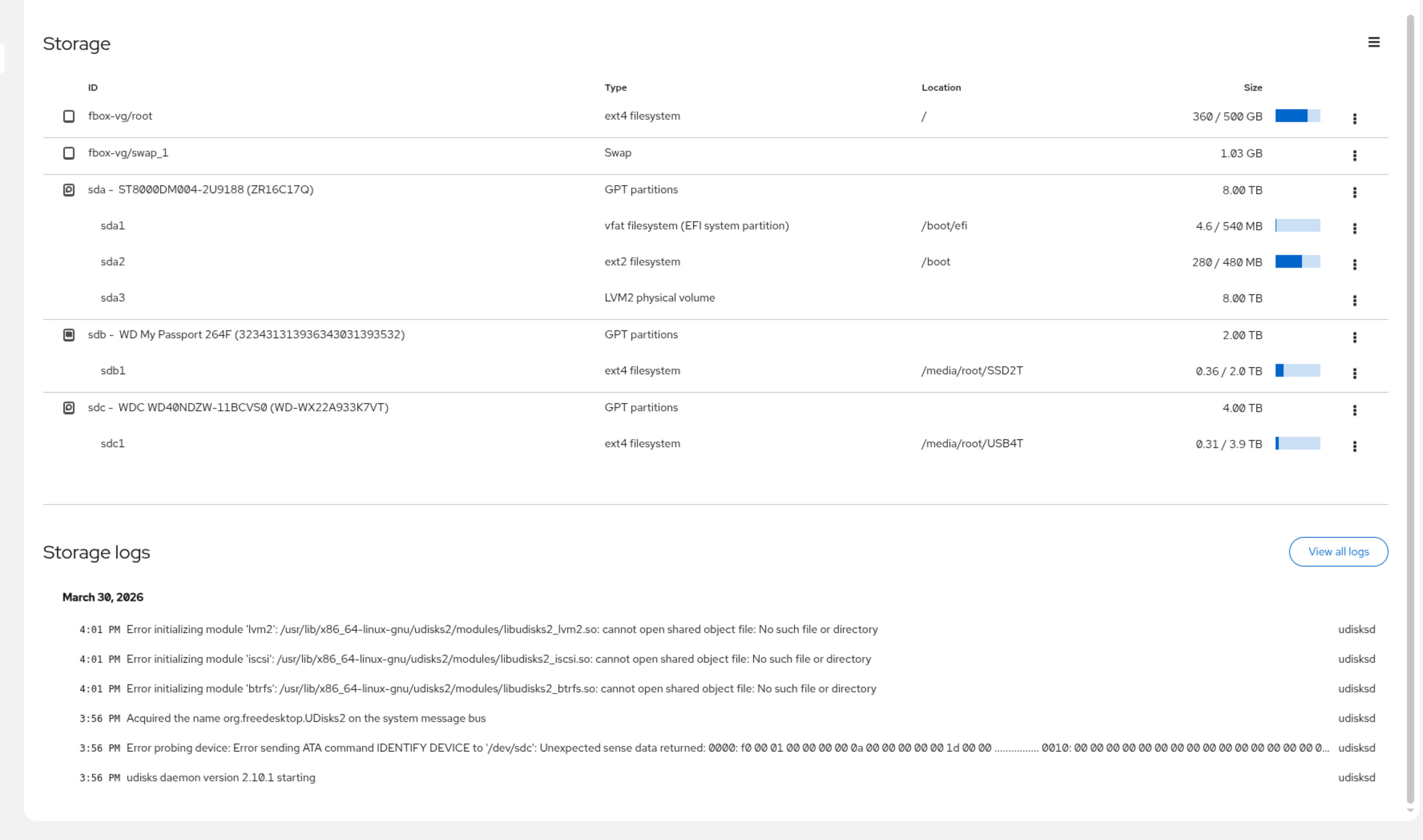
When I use cockpit to look at the storage the box now has it still shows the 500g drive (seems odd to me because I have it here in a bag!) and it shows the 8TB of space as sda3
You are running Debian GNU/Linux 13 (trixie) and FreedomBox version 26.4.1. There is a new FreedomBox version available. Your Freedombox needs an update!
Before I start pressing buttons and messing things up, I thought I should ask here what I should do next and whether things look ok so far.
I will study that, thanks. The meaning of these tables are not clear to me so it may take some thinking.
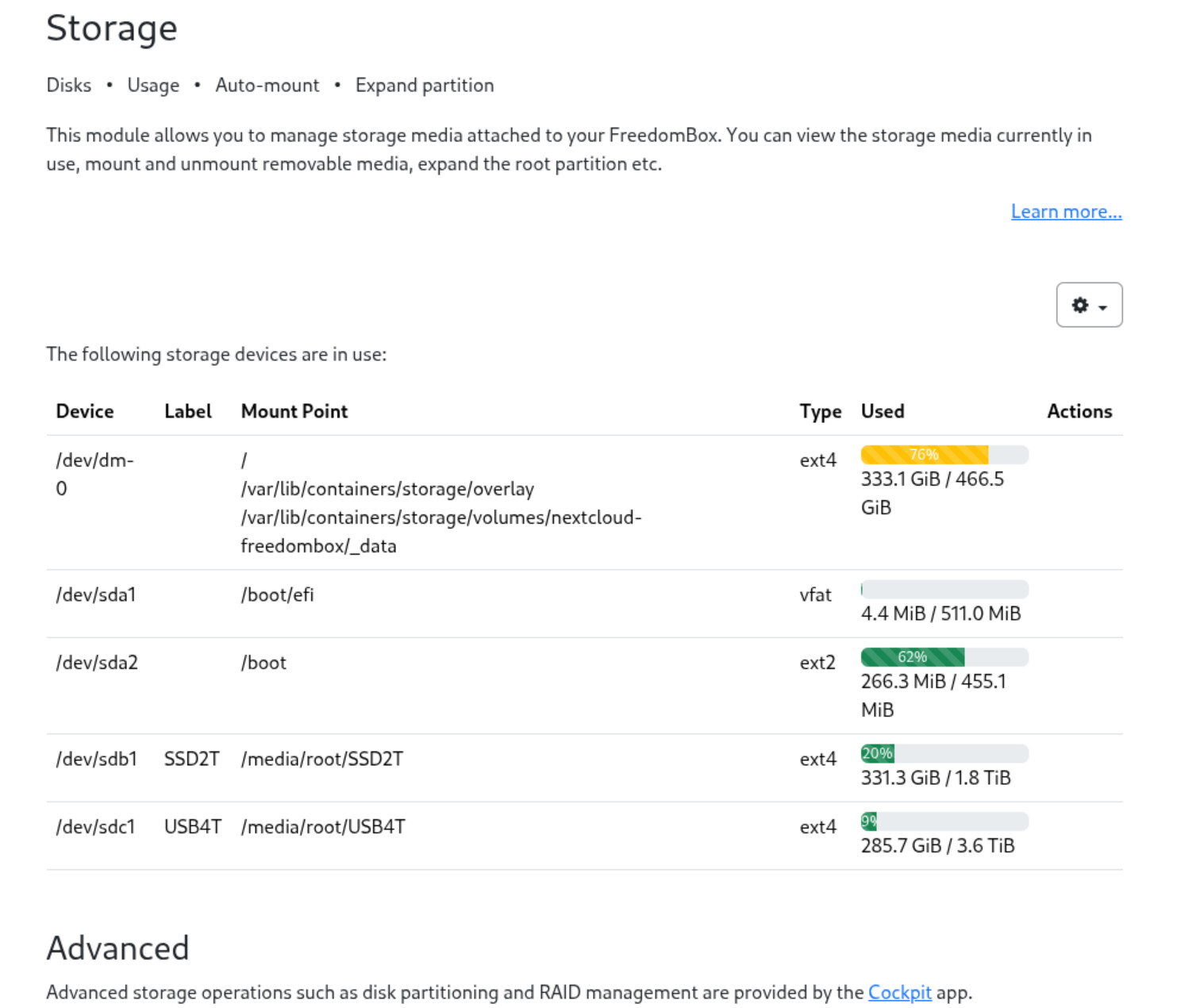
You mention dm-0. I see that in the table plinth produced. The 333/466 numbers seem to come from the size of the old ssd drive which is sitting here in a bag on my desk so there is something off the start that I am not getting. I guess when we say it is mounted at /, it must mean / is on sda?
You tell me my root is on dm-0 not on the new device.
I will do some digging and see if I can get a better sense of what these tables mean before I try my hand at setting up swap and migrating /.
In the meantime, it seems to be working just fine. Well, maybe I spoke to soon. Nextcloud seems to be working as are the other apps, but when I go to plinth it renders like this after I asked it to update freedombox . Woops:
That odd rendering seems to be local to the browser I am using. On other devices and on the same device with different browsers, it renders properly so, even though I haven’t been able to get rid of it on Vivaldi on this device, it seems like an extraneous issue.
I have the same issue with the rendering. Firefox on Linux Mint renders it like in your case while Brave on my Desktop displays it fine. Brave Browser on my Mobile renders Plinth again in your mentioned example.
But: thanks to the team for all your effort in maintaining and developing FreedomBox!!!
Edit: sorry for my inpatience! A reboot did fix the rendering issue!
In the bottom picture that is fbox-vg/root which sounds like a logical volume
In the top picture there is the /dev/dm-0 device mounted at /
The name dm-0 sounds like it is a dm-crypt device, but that’s only a name that a user types in, so this could also be a name assigned to an md (lvm) device. We’ll need to understand exactly what that thing is.
What output do you get from the command vgs as root? That should list LVM volume groups.
Okay, @KenW, here’s what’s going on. It looks like good news.
Your new disk is /dev/sda with partitions used as follows:
/dev/sda1 is your EFI partition on /boot/efi
/dev/sda2 is your /boot partition
/dev/sda3 is a physical volume (PV) for logical volume manager (LVM)
You have a LVM volume group named fbox-vg.
Your fbox-vg volume group contains your one and only LVM physical volume /dev/sda3.
Your volume group contains “logical volumes” which you can think of as virtual hard disk partitions except that many of them can exist on a single disk partition.
there is one named swap_1 (980Megs) which looks like swap space judging by the name
there is one named “root” of 475G ← that’s your freedombox /
The easiest thing to do would be to extend the “root” lv to include the remaining free space of the /dev/sda3 PV. As a second step you’d probably have to expand the ext4 filesystem to make use of that storage. You are pretty much committing all of that disk if you go this route.
I’ll note that your swap space is small for the amount of RAM you have. 1-2 x RAM for swap space is the usual. You could go up to 24GB for swap. If you want to reserve the option to add swap later if you need it then just leave some space at the end of the disk. Expand your “root” by 7.5 TB or something to keep some space at the end of the device you could use for swap if you came to need it. If you get to the point where you need that 500GB we can solve that problem later. If your FreedomBox has been running fine you can always just ignore the swap size comment and use the entire disk for filesystem storage.