Finally figured out my system

FBX + OpenMediaVault (I couldn’t choose)

I’m using FBX mainly as a web server with it’s Let’s Encrypt capabilities. WordPress, MediaWiki and NextCloud. I also run Cockpit and Syncthing Apps. All the other apps don’t really interest me.

FBX runs on a Mini PC that used to be my HTPC but ran out of space pretty quick. The cheapest option to get more space and also have it expandable was a a Mini NAS PC so that is now the HTPC.

I installed Debian KDE on it because I read the NAS OSes don’t necessarily output to HDMI all that well and my HTPC runs my dumb TV and makes it less dumb. The plan was Kodi for the media library but as much as I want to like it, after 15+ years, I’m still not a fan, though the new flatpak version seems nearly bug free.

This NAS PC I got came with a USB stick with unRAID pre-installed and free for basic for a year but eventually, I’d have to pay. I test drove it and got no special thrill.

Plan B (or maybe D). OpenMediaVault NAS OS on the NAS. Install Jellyfin which runs on a local IP address that the FBX Mini PC can access via a browser. It’s obviously ok to install a desktop on FBX now, Gnome or other. With a desktop, comes a browser to watch Jellyfin via local IP.

I will use a Single-Site Browser for Jellyfin or any free streaming site as I already do on my laptop. A SSB is a very minimal browser for a single site. No toolbars, menu, address bar, extensions or themes. Here’s what FBX looks like in one.
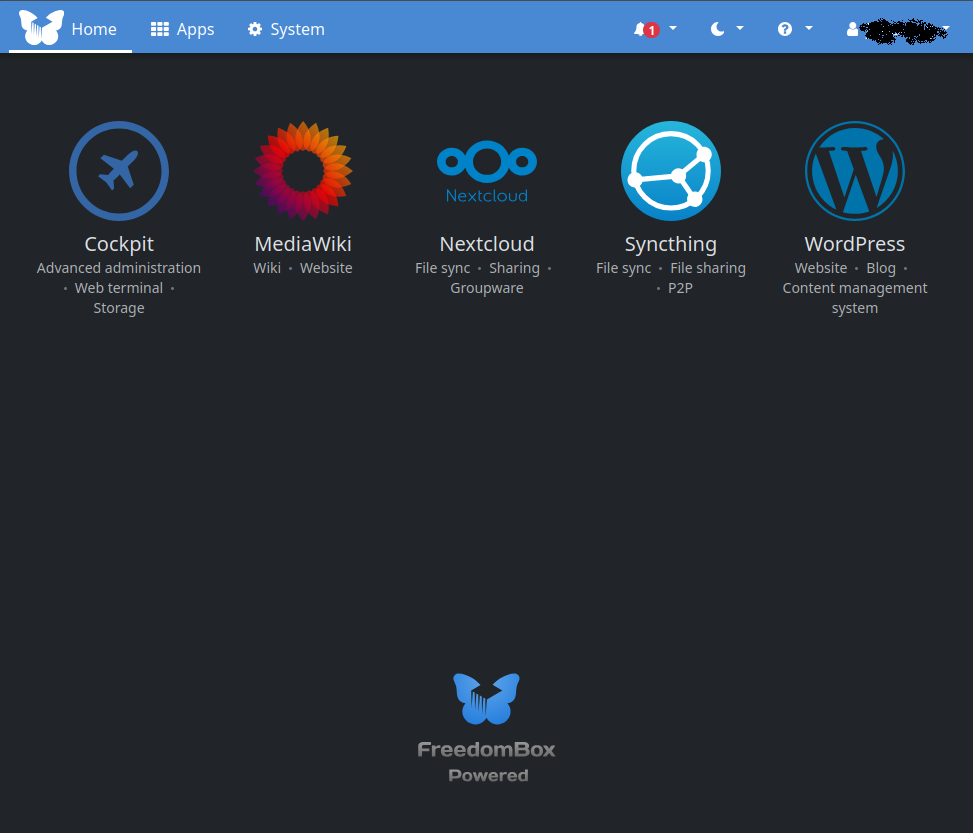
I could install the Jellyfin Client app but there’s already going to be a browser and they look exactly the same. I’m guessing the Jellyfin app for a PC is just Jellyfin as a SSB.

The reason for OpenMediaVault is that it gives me access to more apps that pertain to my local network use case.

Like FBX, it is also built on top of Debian. Unlike FBX, it really doesn’t want a desktop installed. In fact, you can install OpenMediaVault on an existing Debian but unlike FBX, it won’t let you install it if there is a desktop present.

That’s ok though because like all NAS OSes, it’s accessed via a web browser and I’ll do that from my laptop, in a Single-Site Browser.

The SSB thing was a regular thing you could do with browsers back in the day. Peppermint sort of brought it back with an app they made called ICE SSB. The effort was to keep resources usage low and make it a sort of Cloud OS. Tabs eat RAM, as does the full browser the tabs are on.

I’ve opted for XFCE as the FBX Debian desktop. It’s a little lighter on resources. There is no DM/Desktop Manager aka log in screen. It starts with no desktop. I log in to get a terminal. Then I can type startxfce4 to start the desktop. Then logout to close XFCE and get back to the terminal.

Summary;

OpenMediaVault accessed via SSB on my laptop

Jellyfin installed on OpenMediaVault accessed via SSB on the FBX and the monitor is our TV

Other apps will be installed on OMV and accessed from my laptop and other machines I have around here. I have one PC that runs an automated high tunnel aka hoophouse.

1 Like

Thank you for sharing details of your awesome setup.

Apart from Jellyfin what other apps and functions are you using from OpenMediaVault? I am curious because we could consider them for FreedomBox too.

A couple of apps I’d like to see on FBX are Docuwiki and Pi2Share. MediaWiki has a learning curve and is overly expansive for a personal Wiki. The other three FBX wikis are kind of barebones.

[wikipedia] DokuWiki is an open source wiki application, licensed under GPLv2 and written in the PHP programming language. It works on plain text files and thus does not need a database. It has a syntax is similar to the one used by MediaWiki, and is often recommended as a more lightweight, easier to customize alternative.

Logsec is a Note taking app that’s gaining in popularity and often synced via Syncthing. It’s not a structured system like Trilium Notes but it works for some people. I have Logsec on my phone for taking notes at work. It’s date based like a journal. It automatically creates a page for every day, when opened on a given day. It won’t save them though if if you don’t add any content. Also has pages. Tabs are a major part of organization.

I mainly use Trilium because OCD.

Pi2Share(Docker container of course) is a nice modern stand-alone gallery that’s made to run on minimal resources, hence the Pi name. It’s been around for 10 years but isn’t some well known app. It’s mainly one guy but with quite a lot of contributors. It will read Adobe’s XMP Face region metadata but doesn’t run AI facial recognition like most galleries are these days.

I’m going to let the AI thing get settled before I use it for anything more than a search engine. It’s a wild wild West, Gold Rush situation right now.

Zoph is 1998 UI and was never meant for a public facing gallery, as is mentioned in the description.

I didn’t realize how bad the landscape for a stand-alone self hosted image gallery would be. I guess everyone’s just using WordPress with a plugin which is what I’ll probably end up doing.

Likewise for docs/manual. Slim pickings for standalone apps that aren’t aimed at developers. (write the docs in your favorite programming language)

BasePress for WP is a nice one but a bit heavy. VS Knowledge Base is a decent lightweight one that I already use.

As far as galleries and other photo apps, an odd thing is the varying support for EXIF metadata. Seems the same on desktop apps too. Add a caption in one system and it shows as a description in another.

What I want for an image app or set of apps probably doesn’t exist or would cost a pretty penny for Adobe but I don’t do Windows or MAC and I haven’t paid for software in decades.

I can create a system using Trilium Notes with the Notes structured to match directories I make. That along with checkbox content type will give me a versioning system of sorts. Then the right online gallery will complete it.

Update: UmbrelOS replaced OMV.

Umbrel is to NAS what Gnome is to desktop Linux. It just works and looks good, modern and consistent. The apps are actually Dockers but are one-click install. No Pull url or Yaml config; unless you want that.

Current Umbrel apps installed are qBittorrent, Jellyfin, Home Assistant and Trilium Notes. If I can get HA to connect to my greenhouse automation modules, then I’ll probably swap to HA on FBX for web access. qBittorrent on the NAS 10GbE network card, which my fiber optic modem/router also has, downloads things FAST.

The feature that Umbrel or any NAS OS has is easy UI based storage or RAID management. Umbrel only does RAID 1 which is wasteful but has the benefit of redundancy. The other option is full storage with zero redundancy. No config. Just single click, choose one. I currently have three 1 TB M.2 drives in it and have a fourth to put back in it but that won’t gain a bit of storage space. Just full 1 to 1 redundancy. I have an M4 eMMC drive failing in my laptop that has many years of data on it. Obsolete tech too. Almost 100 GB.

Umbrel Samba is drop dead simple. It gives you a link, username and password, all with click of a button to copy each to clipboard. My failing M4; (68,428 of 68, 434 files just finished copying to NAS) The 6 failed files were odd config files I don’t need.

I’ve had a PC since MSDOS, then Win 3.1 and swapped to Linux when I saw what Win 8 was going to look like. Had my share of the blue screen of death. Had my fun with copying and pasting Linux commands, tweaking config files etc. At this point, I want things to work via the Easy Button. I’ll just use everything for their strengths and ease of use.

Other Update: I reinstalled Debian KDE and FBX on the Mini PC. XFCE was lacking in video quality and I just like Plasma. One click to scale the entire GUI for a TV screen. Hopefully Plasma Bigscreen will be finished with a stable release soon.

After initial FBX setup, I had https://my-domain-name.com up and running in a couple of minutes via Dynamic DNS and Let’s Encrypt. Easy button. WordPress installed and Syncthing will be next.

Update Next: I think I’m going to get another Mini PC just to run the TV. Then I can reinstall FBX as headless and make it lean.

The Beelink Mini S13 has the Intel N150 which is better for video than the N95 that the Mini S12 with N95 that FBX is on has. Before testing different NAS OSes, I installed Debian/KDE on the NAS box which has the N150 and noticed the video output to the TV was better.

Final Update: Before too long, my son and I could use an upgrade from these 15 year old ThinkPads. Utilizing NAS/FBX will help with that. Less storage and even processing power to worry about. Just need fast network and a good screen resolution.

Trilium Notes and qBittorent are two apps I no longer need on the laptop. I can get by with one file manager instead of four, each with it’s own special features like FTP or SSH managers. VLC won’t be used much so I can go with whatever the OS has, Dragon in the case of KDE.

I’m getting used to the train of thought of Server and Clients which has been around forever in business. It’s different. Feels like letting go of something by not having an app installed on this machine but I’m gaining since I have multiple machines that can all use the app and it’s all one dataset. They’re just clients now to my server machine.