Can't connect to FB through PageKite

Problem Description

I can’t reach my FreedomBox through my PageKite.

Steps to Reproduce

  1. I created an account on PageKite.net for bluevein.pagekite.me
  2. I entered the following info on Home > System > PageKite:
    • pagekite.net for Server domain
    • Server Port: 80
    • my kite secret
  3. I clicked “Update Setup” and let the FreedomBox finish
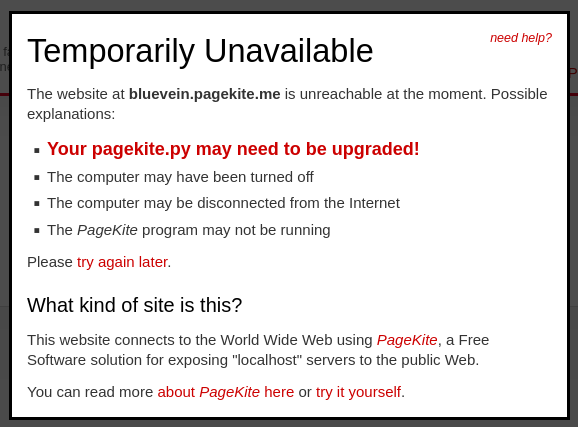
  4. I try to go to http://bluevein.pagekite.me in my browser I get a “Temporarily Unavailable” page from pagekite.net

Expected Results
I expected to see at least a plinth login or landing page for my FreedomBox

Actual results
I get a “Temporarily Unavailable” page from pagekite.net

Screenshot

Information

  • FreedomBox version:26.1
  • Hardware: Pioneer kit with the A20-OLinuXino-LIME2 board
  • How did you install FreedomBox?: I downloaded the 26.1 image for the Pioneer and wrote it to a microSD card.
  • Network Setup: My FBX is connected behind an ISP-provided home router (which includes a firewall) and not in a DMZ. I do not have a static IP.
  • Other info: the hostname and domain for my FBX is still “freedombox.local”, The automatic Let’s Encrypt process failed because the CA couldn’t download the challenge file(s) from my FBX. According the PBX Diaganostics, both tests for PageKite passed.

I appreciate any help

Jan 18 2026 update

After searching through the FBX logs in Cockpit, I found this message occurring repeatedly:

ts=696d351b; t=2026-01-18T19:31:39; ll=1fd; err=Error in connect: Traceback (most recent call last):   File "/usr/lib/python3/dist-packages/pagekite/proto/conns.py", line 647, in _BackEnd     data, parse = self._Connect(server, conns)                   ~~~~~~~~~~~~~^^^^^^^^^^^^^^^   File "/usr/lib/python3/dist-packages/pagekite/proto/conns.py", line 466, in _Connect     self.fd.connect((sspec[0], int(sspec[1])))     ~~~~~~~~~~~~~~~^^^^^^^^^^^^^^^^^^^^^^^^^^^   File "/usr/lib/python3/dist-packages/sockschain/__init__.py", line 1060, in connect     self.__negotiatessl(nexthop[0], nexthop[1], proxy,     ~~~~~~~~~~~~~~~~~~~^^^^^^^^^^^^^^^^^^^^^^^^^^^^^^^       weak=(proxy[P_TYPE] == PROXY_TYPE_SSL_WEAK),       ^^^^^^^^^^^^^^^^^^^^^^^^^^^^^^^^^^^^^^^^^^^^       anonymous=(proxy[P_TYPE] == PROXY_TYPE_SSL_ANON))       ^^^^^^^^^^^^^^^^^^^^^^^^^^^^^^^^^^^^^^^^^^^^^^^^^   File "/usr/lib/python3/dist-packages/sockschain/__init__.py", line 967, in __negotiatessl     self.__sock = SSL_Connect(ctx, self.__sock,                   ~~~~~~~~~~~^^^^^^^^^^^^^^^^^^                               connected=True, verify_names=want_hosts)                               ^^^^^^^^^^^^^^^^^^^^^^^^^^^^^^^^^^^^^^^^   File "/usr/lib/python3/dist-packages/sockschain/__init__.py", line 220, in SSL_Connect     fd.do_handshake()     ~~~~~~~~~~~~~~~^^   File "/usr/lib/python3.13/ssl.py", line 1372, in do_handshake     self._sslobj.do_handshake()     ~~~~~~~~~~~~~~~~~~~~~~~~~^^ ssl.SSLCertVerificationError: [SSL: CERTIFICATE_VERIFY_FAILED] certificate verify failed: certificate has expired (_ssl.c:1029)

If I’m reading this error message correctly (which I may not be, I’m not a PageKite or FBX expert), it looks like the PageKite service on my FBX can’t connect to the remote PageKite service (on pagekite.net)

To try to confirm, I checked the certs for pagekite.net in my web browser, and no issues there. I then checked the certs pagekite.me (where my FBX kite is supposed to live) with openssl s_client -connect pagekite.me:80 -showcerts. Here’s the output of that command:

Connecting to 69.164.211.158
CONNECTED(00000003)
depth=2 C=US, ST=New Jersey, L=Jersey City, O=The USERTRUST Network, CN=USERTrust RSA Certification Authority
verify return:1
depth=1 C=GB, ST=Greater Manchester, L=Salford, O=Sectigo Limited, CN=Sectigo RSA Domain Validation Secure Server CA
verify return:1
depth=0 CN=pagekite.me
verify error:num=10:certificate has expired
notAfter=Apr 11 23:59:59 2024 GMT
verify return:1
depth=0 CN=pagekite.me
notAfter=Apr 11 23:59:59 2024 GMT
verify return:1
---
Certificate chain
 0 s:CN=pagekite.me
   i:C=GB, ST=Greater Manchester, L=Salford, O=Sectigo Limited, CN=Sectigo RSA Domain Validation Secure Server CA
   a:PKEY: RSA, 2048 (bit); sigalg: sha256WithRSAEncryption
   v:NotBefore: Mar 13 00:00:00 2023 GMT; NotAfter: Apr 11 23:59:59 2024 GMT

. . . followed by a whole lot more text . . .

So it seems that the cert for the actual PageKite relay domain has been expired for almost 2 years. Can anyone confirm that their PageKite on pagekite.me currently works?

Thanks
Not sure if it’s related, but I’ve been trying to set up my own PageKite frontend on a VPS, and if I use Python 3 (default on Trixie) I get a bunch of errors. Downgrading to Python 2 (not available as a Trixie package…) I do not get the errors, but FB and the VPS cannot connect. I asked ChatGPT (so I do not know if it’s really true, but my knowledge is limited), and it says the issue lies in using two different versions of Python, even though I run the same version of PageKite on both systems and Python 3 seems to cause issues in the frontend…

@kosagi I since you can’t connect with either Python 3 or Python 2, I suspect that the errors you’re getting with Python 3 might be the same ones I get, since I didn’t install Python 2 and switch to that before attempting to run PageKite. I suspect that you’re not getting any errors with Python 2 because the PageKite Python code that ships with FBX version 26.1 & 26.2 doesn’t even run on Python 2 (or the version of Python 2 that you can get with Trixie) and the script just fails silently. Could you post the error messages that you’re getting by running PageKite with Python 3 (after redacting any sensitive info)? I suspect that your errors match mine.

Update: 9 days ago I emailed the PageKite support email address with a condensed version of the issue I’ve posted here, and I included a link to this forum thread and explained that I suspect that their expired cert for pagekite.me is what’s preventing me from accessing my FBX over PageKite. I haven’t received a response. I don’t know how else to contact the PageKite folks to either confirm or refute my suspicion about their expired cert.

Hi! I tried to use the newest version of pagekite (v1.5.2.260113), which is stated to use python3, and I don’t get the errors but I still cannot connect my FDB to it. The errors I used to get with the debian repository version (v1.5.2.201011) are those that follow:

Crashed: Traceback (most recent call last): m: x.x.x.x:x
File “/usr/lib/python3/dist-packages/pagekite/proto/conns.py”, line 1796, in ProcessTls
domains = self.GetSni(data)
File “/usr/lib/python3/dist-packages/pagekite/proto/selectables.py”, line 730, in GetSni
hello, vmajor, vminor, mlen = struct.unpack(‘>BBBH’, data[0:5])
~~~~~~~~~~~~~^^^^^^^^^^^^^^^^^^^^
TypeError: a bytes-like object is required, not ‘str’

During handling of the above exception, another exception occurred:

Traceback (most recent call last):
File “/usr/lib/python3/dist-packages/pagekite/pk.py”, line 4256, in Main
pk.Start()
~~~~~~~~^^
File “/usr/lib/python3/dist-packages/pagekite/pk.py”, line 4222, in Start
self.Loop()
~~~~~~~~~^^
File “/usr/lib/python3/dist-packages/pagekite/pk.py”, line 4042, in Loop
self.ProcessReadable(iready, throttle)
~~~~~~~~~~~~~~~~~~~~^^^^^^^^^^^^^^^^^^
File “/usr/lib/python3/dist-packages/pagekite/pk.py”, line 3882, in ProcessReadable
if conn and not (conn.fd and conn.ReadData(maxread=throttle)):
~~~~~~~~~~~~~^^^^^^^^^^^^^^^^^^
File “/usr/lib/python3/dist-packages/pagekite/proto/selectables.py”, line 427, in ReadData
return self.ProcessData(data)
~~~~~~~~~~~~~~~~^^^^^^
File “/usr/lib/python3/dist-packages/pagekite/proto/selectables.py”, line 695, in ProcessData
return self.ProcessTls(data)
~~~~~~~~~~~~~~~^^^^^^
File “/usr/lib/python3/dist-packages/pagekite/proto/conns.py”, line 1813, in ProcessTls
self.Send(TLS_Unavailable(unavailable=True), try_flush=True)
~~~~~~~~~^^^^^^^^^^^^^^^^^^^^^^^^^^^^^^^^^^^^^^^^^^^^^^^^^^^
File “/usr/lib/python3/dist-packages/pagekite/proto/selectables.py”, line 449, in Send
pending = ‘’.join([self.write_blocked, str(‘’.join(data))])
~~~~~~~^^^^^^
TypeError: sequence item 0: expected str instance, int found

Error: sequence item 0: expected str instance, int found

So I understand that it was just a matter of updating the front-end. However, FDB is not able to connect, returning “Invalid account or shared secret”. This happens even if I try using the newest version. Therefore, if the cause of error for both of us is the same, maybe there is an issue with the pagekite’s FDB configuration files or with how plinth writes to them (I’ve been unable to try it with another system, but I tripled-check and both domain and secret seem to be correctly set on Plinth, and on the front-end config files using these instructions: Pagekite - Configure Your Linux System for use with Pagekite).