Really basic question here. Sorry I am very new to this but want to learn.
I just want to build a private home server that will sync with my phone and store my pics when I take them.
Do I need a home pc to make a freedom box work?
If “yes” will it work on windows?
It seems to me that after these questions the freedom box is pretty turn key for setting up what I want above… Right?
Welcome @Rdolph1! We were all newbies, and some of us used to be young, too.
You do not need a home PC. These are the common options for using FreedomBox:
You can buy a small FreedomBox device such as the Pioneer. Pioneer and some others can be purchased preinstalled. I suspect this is the largest population and was the original target hardware for FreedomBox.
You can use a home PC installing FreedomBox as the operating system. This is likely the second largest population of users and how I do it.
Renting a virtual private server to run FreedomBox is much easier than it sounds. They start at about $5 per month and I’ve tried this. It worked great.
You could run FreedomBox on a Windows PC but you would have to have a FreedomBox virtual machine running on your Windows PC. This could get complicated for a novice. Software to do this might be VirtualBox or others.
However, if by “will it work on windows,” means that you want to connect to a FreedomBox server from your Windows PC then yes, that works flawlessly out of the box.
FreedomBox setup can be done for you if you buy preinstalled. You would be able to manage an installation yourself with the documentation and leaning on the people on this board. If you are in a rush buy preinstalled, but if you’d like to learn your way through the setup you can use an old PC to try it out. I started using FreedomBox with an old PC I had, and once I got comfortable I bought a new PC to dedicate to being my FreedomBox. I’m incredibly pleased with it.
Now, let’s talk pictures, because I’ve become the pictures guy around here, apparently. Tell me more about this part…
I just want to build a private home server that will sync with my phone and store my pics when I take them.
There’s some options and it’s possible that there will be some gaps. So walk me through an example of what this means for you. Something like this…
I take pictures on my mobile phone and I also have a camera with an SD card…
I want to pick the pictures to upload or I want everything to be uploaded without my intervention
How much editing capability do you need? What sorts of things do you do to photos usually? Do you do that on your computer or on your phone?
How many pictures are we talking about?
Are you using an Android, Apple, or another type of phone?
Do you do all your internet through your mobile device, or do you also have internet service for your home?
If you have internet service for your home, do you have a home network or does your PC plug right into your DSL or cable modem?
Hi.. wow! Thanks for the quick response.
Im going to look into the options you gave me for hardware.
As far as pics go. I dont want to have to pay for a cloud service anymore for pic storage. My goal is to take a pic with my phone and have it automatically upload to my personal cloud. As it now does with google cloud. I also want to be able to share pics with friends on my cloud by giving them a link or whatever.
And finally I want to have 3 backup hard drives of my pics that also backup automatically. So Im thinking I will probably go with the PC option. I wont be sure until I look into the forst option you gave me.
Your timing is perfect. I have heaps of photos to put in Zoph and I like your synchronization idea. I think we have everything to do this.
So you have at least 15GB of photos if you are giving Google a nickel. How much are we talking here in total? This is going to be a bulk operation.
My goal is to take a pic with my phone and have it automatically upload to my personal cloud.
I think we could do this with FreedomBox - it’s actually a very good use case to build a solution from. I haven’t taken the step to synchronization myself, but here’s what this looks like…
FreedomBox
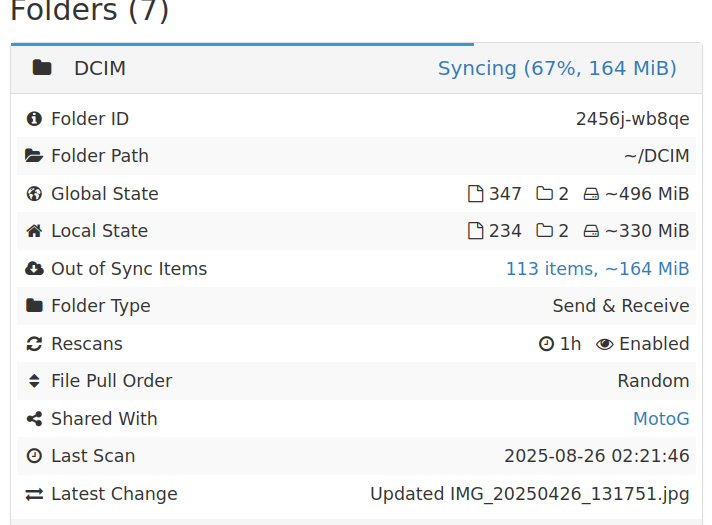
You use Syncthing running on your phone to do a synchronization to FreedomBox. I think we can do a few things with automation here that would be nice.
We get the pictures from the Syncthing folder on FreedomBox to the import folder of Zoph.
Import the photos in Zoph and you’ll have them available in a web album that you are hosting yourself.
I also want to be able to share pics with friends on my cloud by giving them a link or whatever.
Zoph documentation says it does this. Your FreedomBox will have to be accessible from the internet and it can do that securely.
And finally I want to have 3 backup hard drives of my pics that also backup automatically.
We have a couple options in FreedomBox for this. I think you’re covered. There will be a few details along the way to handle, but we help each other out with that sort of thing on this board.