Environment
Debian GNU/Linux 13 (trixie) and FreedomBox version 26.5.1. FreedomBox is up to date.
Problem Description
I am having problem to add storage to my Freedombox.
I have successfully installed FreedomBox and some apps (Calibre, Kiwix and Nextcloud). When I started to fill the library in Calibre I noticed that the allocated space was about to run out.
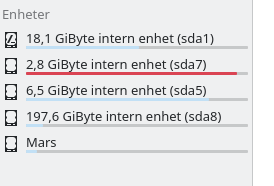
At the moment I have two internal hard-drives in my desktop where drive one has four partitions and the second one is just one empty 2Tb disk (Mars) ready to store stuff.
How do I tell FreedomBox (Calibre, Nextcloud and whatever) to use that space instead?
I have searched the web but most results are very old. I was kind of hoping to find a tool in the system or Cockpit but as far as I understand, there is none?
Welcome @Bjarka ! I’m writing to you as one, that started two years ago as a newbie with the same intention like you. I will give you some thoughts without saying it is the way to go. I don’t know your setup, but what I don’t understand is why you have so many partitions. Nextcloud as example runs in a container inside FreedomBox and you do not have to worry about security.
You need one partition for your whole FreedomBox OS. You can’t run Nextcloud as app outside the OS. Samba is an app where you can store data outside on a separate disk. But the apps you mentioned belong to the FreedomBox OS. Also FreedomBox can do backups and therefore the backups are preconfigured and the data of the apps can not be stored somewhere else. Probably the best way is to do a backup of your apps and reinstall FreedomBox on your large partition.
Edit: What kind of hardware do you have? What is the intention of having many partitions / drives? How are these drives / partitions linked together?
Hi David and thanks for your reply.
I can imagine myself in two years, trying to advice someone like you are doing now. Thanks again for taking your time.
My hardware is a Fractal design 4 case with a gigabyte motherboard, 32 Gb RAM and two mechanical drives. 1 256Gb drive with four partitions and one 2Tb drive.
I will add additional storage soon because I am a digital hoarder.
As to your questions, Long story short (-ish), I have salvaged a few desktops and my main goal is to create a server for me and my family. Many options only had cli and I wanted a gui so, I ended up with Debian, I followed a guide and I used the recommended settings hence the many partitions.
I didn’t consider that to be an issue. I want one dedicated space for my server and then allocate space for the various apps.
If it will be an issue I’ll just wipe everything and start over. (but if I can, I want to avoid it)
I understand (I think) how the different apps runs within FreedomBox however, I want to figure out where they store the data, and if you can change it. So, I did a test yesterday. I created a document, gave it a very specific name, uploaded it to Nextcloud, deleted it from its original storage and tried to find it. I didn’t succeed. So they are not searchable.
Now, Samba, wow, thanks for that suggestion. It has all the options I am missing with the other apps. I can actively choose where I want to store my data. That will help me a lot. Maybe I’ll settle with that.
I can, thanks to Samba (and you) now see that the Freedombox OS-disk is installed on sda1.
So, my thoughts goes like this. Wipe it clean, fresh install with fewer partitions to reduce the struggle… or keep struggling.
Your setup is maybe right for a PC that will need some more partitions for SWAP etc. But for FreedomBox as a server you don’t need this. You need to figure out what will be the best setup for your use case. As an example: I have a firewall/router with WireGuard installed and all our clients (notebooks, mobiles) are connected that way to reach the services hosted on FreedomBox. I have all data on SAMBA and what we as family need locally on our clients I sync with Syncthing between SAMBA and the clients. Nextcloud gives you the ability to reach your data without a VPN (out of security concerns I do not open my firewall to reach SAMBA from outside without VPN).
Proof it, if it is the better way to wipe the system and start all over. Maybe you can setup one drive with FreedomBox having enough space for all your apps with its data and have the other drive for hording your data with SAMBA. Make sure you backup SAMBA with e.g. rsync, because the data of SAMBA is not getting backed up with FreedomBoxBackups.
With FreedomBox you have many possibilities to setup the right use case for you and your family… CALdav and CARDdav e.g is available in Nextcloud, Radicale and SOGo…