I’m afraid the handshake fails. Have triple checked the settings - all good.
Im thinking maybe I need to install wireguard on the Opensense firewall to facilitate comms with the FBX server?
I’m afraid the handshake fails. Have triple checked the settings - all good.
Im thinking maybe I need to install wireguard on the Opensense firewall to facilitate comms with the FBX server?
I didn’t really study your use case. So I am sorry, if my thoughts do not help. I made a good experience with installing WireGuard on my pfsense firewall and connect all my clients with the firewall. Automatically all servers and the firewall itself are reachable from outside with our clients (PC, Notebooks Mobiles). A rule on the firewall does route all the traffic from our clients to the firewall to the internet if desired. So I profit from the filters on the firewall. I do not even feel a difference in terms of speed, if I use WG (outside the house) or not. Your question then would be, how you anonymize the outgoing traffic from your firewall to your target in the web.
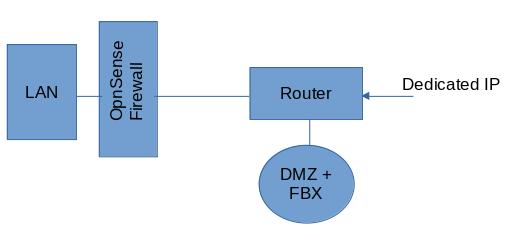
@major_ludd does your configuration look something like this:
@David I also found that the speed with wireguard is excellent. It’s amazing.
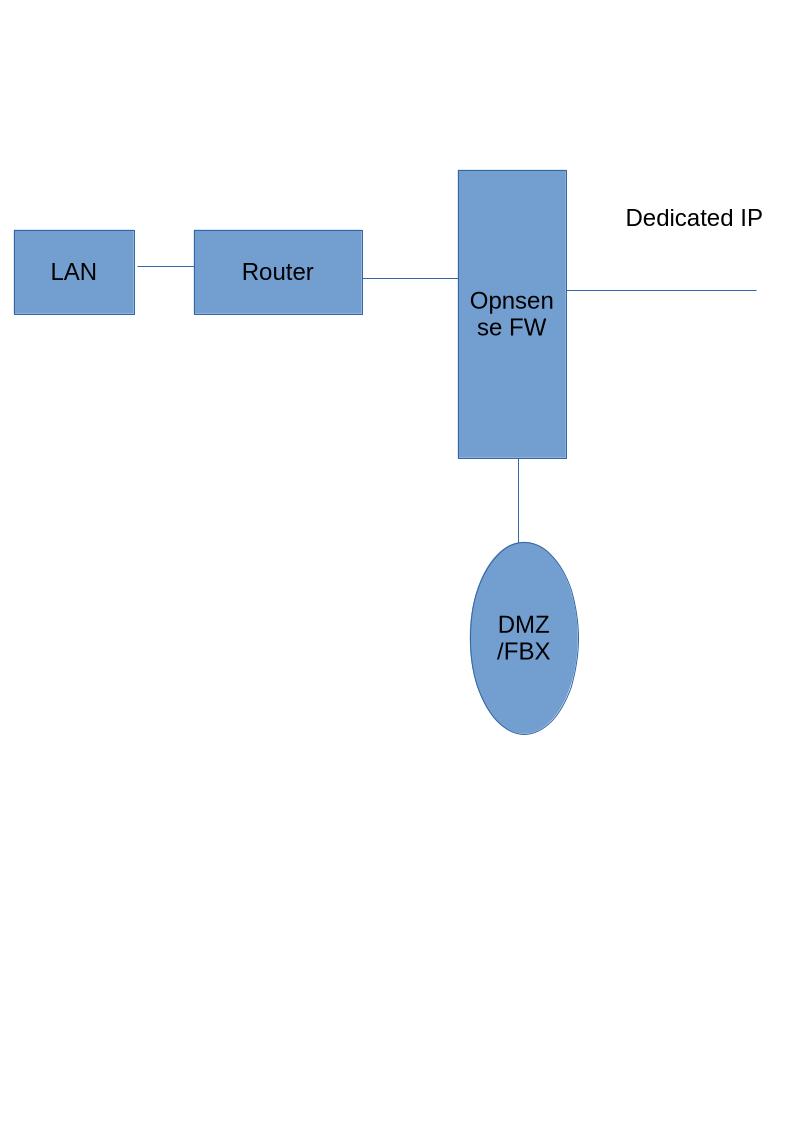
Not quite, the Router is to the left of Opnsense FW; which is directly above the DMZ/FBX
@major_ludd thanks for the diagram. Looking at this configuration, there are 3 firewalls: router firewall, opnsense firewall, and the freedombox firewall. Also the router itself, the opnsense firewall, and the freedombox are capable of routing traffic. Does that seem right?
To test my understanding, is it true that a device on your LAN can communicate with the FBX in the OPNsense DMZ? Is the freedombox in the same subnet as your other LAN devices, e.g., 192.168.0.1/24 or similar?
On the topic of setting up Wireguard peers between Freedombox and your end-user device, I wonder if you need to first need to remove the connection to the Mullvad server? That temporarily prevents routing of all traffic to the Mullvad server and that may be enough to get the end-user device to peer with the FBX-Wireguard app. If you get a peer handshake, then add back the wireguard connection to Mullvad.
For convenience make a copy of all your FBX-to-Mullvad wireguard info before you delete it. 
The possible advantage with this approach is it temporarily removes the “dual routing” in the FBX-Wireguard app.
It seems right for my purpose. I mentioned in a previous post, I have no requirement to access the FBX from the LAN. All communication with this device is to be via WAN. My primary aim is to protect my LAN from potentially untrusted devices - that includes the FBX device and software.
Please see my answer to your previous question. In summary, my LAN cannot communicate with FBX, except by going out over WAN.
One salient point worth making, the dedicated IP provided by my ISP is in fact several public IP addresses. Each address is routed thro’ the Opnsense FW to individual servers within the DMZ. One of which is of course the FBX. The LAN too gets a dedicated public IP.
Apologies for my belated reply.
Thank you for your contribution. It provided much food for thought
First the good news.
As suggested, I disabled the WG Client to Mullvad Server config and successfully got a handshake betwween an Android Client and the FBX WG server.
Thereafter, I re-enabled the config to the Mullvad server and got locked out of everything (SSH, Tor, Domain name) Rebooted FBX, however its only accessible via Tor .onion. The android client no longer handshakes to the FBX
Basically I’m back square one.
I’m pondering if there are any Network Specialists on this forum who might help? there again they seemingly only support Olinex devices?
Thanks to your diagram I’m just starting to understand your setup. I appreciate the care you’re taking in setting up a private and well-protected system. May I ask what kind of hardware you are using for the OPNsense firewall?
On the idea of temporarily removing the outbound wireguard connection, I do think this is worth trying. You can then (hopefully) connect to your Freedombox via your dedicated public IP, which you’ll also use as the endpoint in your end-user device’s wireguard configuration. This will fit in with your goal of accessing your FBX from the WAN. And I’m hoping that temporarily removing the outbound FBX-Wireguard connection will allow you to peer your end-user device.
Going back to my post (linked above) about using FBX-Wireguard with Mullvad, I did the connection to Mullvad first and then the peering to my end-user machine second. It worked out for me, working from my LAN, but I think this needs to be done the other way around, with end-user peering done first.
Well this might or might not work, but I hope you have a chance to test it out.
Sure. Follow the link. Its the APU2 (select your NIC’s and RAM) PC Engines apu2 system boards.
I did provide feedback on this. Looking at the timings of the respective posts, they probably coincided?
Darn!
Yes, hopefully someone with wireguard/network expertise will see this thread and offer insight.
My sense is that, at present, you have only one “External” interface and all traffic on that interface is being directed to a Mullvad server. It seems like you need a second external interface, say wg3, dedicated just for your wireguard end-user peers. I’m not sure how to move forward, unfortunately.
Did you manage to solve this?
The issue is that FreedomBox’s WireGuard “As a client” UI always creates a full tunnel (AllowedIPs=0.0.0.0/0), routing all outbound traffic (including web UI replies) through MullvadVPN. This breaks external access to your domain.
I’ve submitted a merge request to fix split/full tunnel control. Hopefully, it will arrive soon.
Split tunneling is an option (by editing the NM config for wg1 to limit AllowedIPs), but requires complex policy routing tables to force only Miniflux through VPN.
In my opinion, the quickest fix for obfuscating Miniflux is to enable the Tor proxy app. It provides SOCKS5 on 127.0.0.1:9050.
Then, you can either:
This is the easiest and gives your fine-grained control
socks5://127.0.0.1:9050sudo systemctl edit miniflux[Service]
Environment="HTTP_PROXY=socks5://127.0.0.1:9050"
Environment="HTTPS_PROXY=socks5://127.0.0.1:9050"
Run journalctl -u miniflux -f from a terminal, then refresh your feeds. It should show it is using SOCKS.
This way, your external domain access works while your requests are obfuscated.
However, if you prefer Mullvad over Tor or need system-wide routing, you’ll probably need to look into policy-based routing.