# User and password on first run?
**URL:** https://discuss.freedombox.org/t/user-and-password-on-first-run/836
**Category:** Support
**Created:** [April 25, 2020, 5:11pm UTC](https://discuss.freedombox.org/t/user-and-password-on-first-run/836 "2020-04-25T17:11:25Z")
**Posts on this page:** 13
**Page:** 2
### Author:  [@ifreedombox](https://discuss.freedombox.org/u/ifreedombox)
#### Post date: [May 2, 2020, 7:54am UTC](https://discuss.freedombox.org/t/user-and-password-on-first-run/836/21 "2020-05-02T07:54:06Z")
Thanks for bearing with me for the last hundred meters… I’d be happy if I could start the server next week…
As to letsencrypt, after running diagnostics, getting:
> Access to URL https://\*\*\*\*\*.freedombox.rocks failed
---
### Author:  [@Sunil](https://discuss.freedombox.org/u/Sunil)
#### Post date: [May 3, 2020, 12:03am UTC](https://discuss.freedombox.org/t/user-and-password-on-first-run/836/22 "2020-05-03T00:03:56Z")
Let’s Encrypt server will try to contact your machine from the outside to confirm that you own the domain. If the connect from outside, does not work, then LE won’t either. After you fix the outside access issue, simply click ‘Obtain’ in the LE app to fix that.
---
### Author:  [@Sunil](https://discuss.freedombox.org/u/Sunil)
#### Post date: [May 3, 2020, 12:11am UTC](https://discuss.freedombox.org/t/user-and-password-on-first-run/836/23 "2020-05-03T00:11:31Z")
Your network administrator needs to forward
From IP: anywhere (since your external users could be anywhere)
From ports: 80 and 443
To IP: Your host IP address
To ports: 8080 and 4430 (assuming these are ports you have forwarded in VirtualBox to your guest).
Your host firewall must be configured to accept these ports. 80 port mapping is for Let’s Encrypt to work.
Your mapping will be
External Client → Company external IP : 443 → Your host machine : 4430 → Your FreedomBox : 443
External Client → Company external IP : 80 → Your host machine : 8080 → Your FreedomBox : 80
> [@ifreedombox](#):
>
> When trying to run the Matrix Synapse server, I’d like to know whether I have to activate the public registration or not. My user case is only to let in people to whom I sent an invitation.
I am not sure if Matrix provides an invitation mechanism. You can create non-admin FreedomBox user accounts for each of your intended user accounts and ask them to use those accounts with matrix.
---
### Author:  [@ifreedombox](https://discuss.freedombox.org/u/ifreedombox)
#### Post date: [May 4, 2020, 8:44am UTC](https://discuss.freedombox.org/t/user-and-password-on-first-run/836/24 "2020-05-04T08:44:20Z")
Hi and thanks for the feedback, appreciated. As was to be expected, I’m still not able to make it work. Maybe it’s because we are behind an authentifying firewall ? In that case, should I use pagekite? It does show up in the system settings in Freedombox, but when trying to install it, getting error msg :
> another installation or update is being executed. Please wait a few moments and try again.
But I’m getting this each time, even when rebooting vbox. How should I proceed to install this with Freedombox in virtualbox? A new VM ?
Or maybe there’s free alternatives to pagekite, such as ngrok or [portmap.io](http://portmap.io) ?
Network admin told me no special port for http, just plain old 80. We do have special port for authenticating.
Just ran diagnostics in Freedombox. Everything passed except :
- letsencrypt
- Application : networks
Using DNSSEC on IPv4
Using DNSSEC on IPv6
Can this shed any further light or can I do a more thorough debugging?
Could there be a conflict with the Apache server that got automatically installed and also uses ports 80 and 443?
Secundo, I might try out a different independent network from the corporate one. This time I’d be on wifi. Which network settings should I apply in VirtualBox in this case ? When I tried bridged network, vbox crashed and got following error message :
> You must specify a machine to start, using the command line.
> Usage: VirtualBoxVM --startvm \
> Starts the VirtualBox virtual machine with the given name or unique identifier (UUID).
Does it change anything in the choice, knowing that the wifi internet access is determined by the MAC address of the laptop on which Freedombox is running (i.e. should we add the generic MAC address of the virtual network interface in vbox too ?).
Do I need to set up a specific new wifi network with all the details?
---
### Author:  [@ifreedombox](https://discuss.freedombox.org/u/ifreedombox)
#### Post date: [May 5, 2020, 4:59pm UTC](https://discuss.freedombox.org/t/user-and-password-on-first-run/836/25 "2020-05-05T16:59:52Z")
looking forward to ur assistance !
---
### Author:  [@balduin](https://discuss.freedombox.org/u/balduin)
#### Post date: [May 5, 2020, 5:04pm UTC](https://discuss.freedombox.org/t/user-and-password-on-first-run/836/26 "2020-05-05T17:04:53Z")
@ifreedombox were you able to get FreedomBox up and running?
---
### Author:  [@ifreedombox](https://discuss.freedombox.org/u/ifreedombox)
#### Post date: [May 6, 2020, 5:58am UTC](https://discuss.freedombox.org/t/user-and-password-on-first-run/836/27 "2020-05-06T05:58:20Z")
no, not yet, still waiting for sunil’s help. But do have an update though. Problem is ports 80 and 443 are already rerouted for another internal ip, so is there a way around this (maybe like rerouting again from that PC to mine internally )?
---
### Author:  [@Sunil](https://discuss.freedombox.org/u/Sunil)
#### Post date: [May 7, 2020, 5:17am UTC](https://discuss.freedombox.org/t/user-and-password-on-first-run/836/28 "2020-05-07T05:17:54Z")
> [@ifreedombox](#):
>
> another installation or update is being executed. Please wait a few moments and try again.
If nothing fixes this issue, please try the following commands on a shell (either with SSH or Cockpit):
```auto
dpkg --configure -a
apt -f install
reboot
```
> [@ifreedombox](#):
>
> Or maybe there’s free alternatives to pagekite, such as ngrok or [portmap.io](http://portmap.io) ?
Don’t have experience with those other services.
> [@ifreedombox](#):
>
> Network admin told me no special port for http, just plain old 80.
In a typical network setup, traffic coming from the Internet will not be routed to your specific machine. Unless network administrator configures as I have described, it will not work.
> [@ifreedombox](#):
>
> Using DNSSEC on IPv4
> Using DNSSEC on IPv6
These are failing usually, ignore them.
> [@ifreedombox](#):
>
> Secundo, I might try out a different independent network from the corporate one. This time I’d be on wifi.
All the advice given before is the same. Except you are the network administrator now. Login to your Wi-Fi router and configure port forwarding as described.
> [@ifreedombox](#):
>
> You must specify a machine to start, using the command line.
> Usage: VirtualBoxVM --startvm \
> Starts the VirtualBox virtual machine with the given name or unique identifier (UUID).
This problem seems unrelated to bridge network setup. Make sure you have selected the correct network interface to bridge with. This should be network interface that you get Internet connection with on the host machine.
> [@ifreedombox](#):
>
> Does it change anything in the choice, knowing that the wifi internet access is determined by the MAC address of the laptop on which Freedombox is running (i.e. should we add the generic MAC address of the virtual network interface in vbox too ?).
In case of bridged mode, yes, the virtual network adapter must be whitelisted too. In case of NAT, your whitelisted host Wi-Fi MAC address is sufficient.
Finally,
- Consider trying a single board computer to get around problems with VirtualBox port forwarding.
- If your network administrator can’t help you or does not understand port forwarding, then the only choices for you are Pagekite (or similar) or setup a [cloud instance](https://freedombox.org/cloud/).
---
### Author:  [@ifreedombox](https://discuss.freedombox.org/u/ifreedombox)
#### Post date: [May 8, 2020, 2:57pm UTC](https://discuss.freedombox.org/t/user-and-password-on-first-run/836/29 "2020-05-08T14:57:11Z")
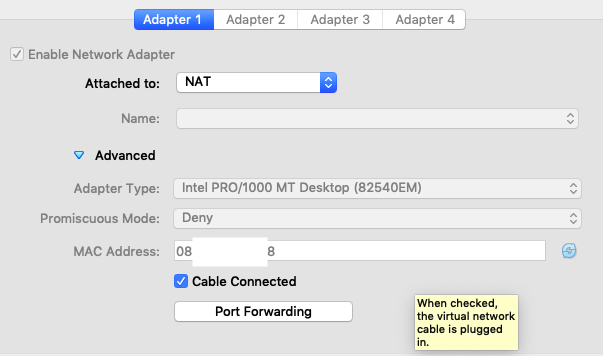
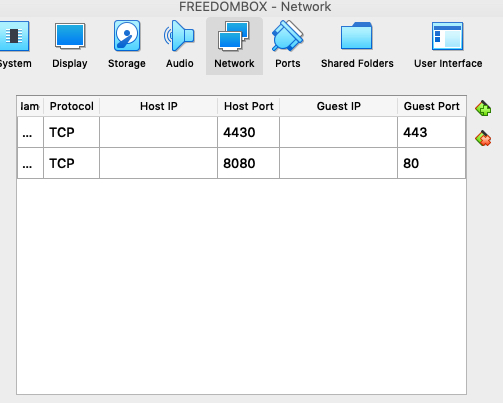
Good. Some updates. We routed my FBOX through another ISP having ports 80 and 443 available for forwarding. Finally managed to get network admin do the proper forwarding according to your instructions (see screenshot). Is this ok ?

This is how things look like in network settings in virtualbox :
Guess what ? Letsencrypt **still** doesn’t work !! When I try to simply reach my matrix address (https://\*\*\*\*\*freedombox.rocks) it also doesn’t work. So now I’m really lost… Also it says saving debug to /var/log/letsencrypt, but that folder doesn’t even shop up there !
Does the random MAC address of the VM in virtual box interfere with the settings ? Inside our LAN Internet access is granted with the physical MAC address of the PC as identifier.
I believe I read somewhere someone had to actually disable SSL to force http connections to letsencrypt. Could this be the culprit and if so, how to temporarily disable SSL?
Is there any detailed debugging available on FBOX I could send?
With all this, it might be worthwhile to try out Pagekite (or similar). What (free) alternatives to Pagekite do you recommend?
When selecting Pagekite in FBOX, it says it’s not available to my distro… What does that mean.
Can you help me out with setting up Pagekite ? Doesn’t look very straightforward for \*nix noobs like me. Thanks again.
---
### Author:  [@ifreedombox](https://discuss.freedombox.org/u/ifreedombox)
#### Post date: [May 10, 2020, 11:10am UTC](https://discuss.freedombox.org/t/user-and-password-on-first-run/836/30 "2020-05-10T11:10:41Z")
looking forward to ur help…
---
### Author:  [@Sunil](https://discuss.freedombox.org/u/Sunil)
#### Post date: [May 12, 2020, 12:20am UTC](https://discuss.freedombox.org/t/user-and-password-on-first-run/836/31 "2020-05-12T00:20:02Z")
> [@ifreedombox](#):
>
> Good. Some updates. We routed my FBOX through another ISP having ports 80 and 443 available for forwarding. Finally managed to get network admin do the proper forwarding according to your instructions (see screenshot). Is this ok ?
Your router configuration and virtualbox looks correct. You should also map 8448 to 8448 in VirtualBox.
Looks like you are using MacOS. Check to see if your firewall is blocking incoming traffic on the three ports and add exceptions if necessary.
To debug the current situation and ensure that router mappings are working, try the following exercise:
- Shutdown the FreedomBox VM.
- On MacOS, machine run:
nc -l 4430
- On another machine connected to Internet differently than your MacOS machine (such as via 4G) run:
nc yourmachine.freedombox.rocks 4430
You should see the same message on the MacOS machine. If it works, then the outside traffic is able to reach your machine. Otherwise, you need to check router mapping, DNS IP address, firewall etc. again.
Once this works, stop the nc processes and start FreedomBox machine again. Then try to access FreedomBox web interface from the alternate machine.
> [@ifreedombox](#):
>
> Does the random MAC address of the VM in virtual box interfere with the settings ? Inside our LAN Internet access is granted with the physical MAC address of the PC as identifier.
I don’t believe this should matter.
> [@ifreedombox](#):
>
> I believe I read somewhere someone had to actually disable SSL to force http connections to letsencrypt. Could this be the culprit and if so, how to temporarily disable SSL?
FreedomBox has this properly handled. If you can access your FreedomBox web interface from the outside Internet, LE should succeed. Focus on that.
> [@ifreedombox](#):
>
> With all this, it might be worthwhile to try out Pagekite (or similar). What (free) alternatives to Pagekite do you recommend?
I don’t know of any. I recommend Pagekite.
> [@ifreedombox](#):
>
> When selecting Pagekite in FBOX, it says it’s not available to my distro… What does that mean.
Pagekite is temporarily not available in testing distribution. We are working to fix this problem. It is available in stable distribution.
> [@ifreedombox](#):
>
> Can you help me out with setting up Pagekite ? Doesn’t look very straightforward for \*nix noobs like me. Thanks again.
See this manual page: [FreedomBox/Manual/PageKite - Debian Wiki](https://wiki.debian.org/FreedomBox/Manual/PageKite)
---
### Author:  [@ifreedombox](https://discuss.freedombox.org/u/ifreedombox)
#### Post date: [May 12, 2020, 8:13am UTC](https://discuss.freedombox.org/t/user-and-password-on-first-run/836/32 "2020-05-12T08:13:47Z")
> [@Sunil](#):
>
> - Shutdown the FreedomBox VM.
> - On MacOS, machine run:
> nc -l 4430
> - On another machine connected to Internet differently than your MacOS machine (such as via 4G) run:
> nc yourmachine.freedombox.rocks 4430
OK thanks for the feedback. Yes I’m on Mac OS.
Native firewall isn’t activated and I deactivated mac’s equivalent to zone alarm.
Where do I have to paste this command ? In the Terminal ? That’s what I did and I don’t see anything happen. Do I have to type sudo before it ? Someone tried to access from his iPhone in the webbrowser (Safari) and that yielded a Google search. So obviously we’re doing something wrong. Thanks for giving us some more details as where to type this commands in…
---
### Author:  [@Sunil](https://discuss.freedombox.org/u/Sunil)
#### Post date: [May 12, 2020, 6:02pm UTC](https://discuss.freedombox.org/t/user-and-password-on-first-run/836/33 "2020-05-12T18:02:18Z")
Yes, you do need type these command in the terminal. Also see this: [https://superuser.com/questions/115553/netcat-on-mac-os-x](https://superuser.com/questions/115553/netcat-on-mac-os-x)
[Previous page](https://discuss.freedombox.org/t/user-and-password-on-first-run/836.md?page=1)