# \[SOLVED\] Samba not starting after Trixie upgrade
**URL:** https://discuss.freedombox.org/t/solved-samba-not-starting-after-trixie-upgrade/4038
**Category:** Support
**Created:** [December 22, 2025, 6:07pm UTC](https://discuss.freedombox.org/t/solved-samba-not-starting-after-trixie-upgrade/4038 "2025-12-22T18:07:34Z")
**Posts on this page:** 4
**Page:** 1
### Author:  [@joseph](https://discuss.freedombox.org/u/joseph)
#### Post date: [December 22, 2025, 6:07pm UTC](https://discuss.freedombox.org/t/solved-samba-not-starting-after-trixie-upgrade/4038/1 "2025-12-22T18:07:35Z")
**Related**
> [@Nmbd Service Won't Start (Samba Not Working)](https://discuss.freedombox.org/t/nmbd-service-wont-start-samba-not-working/2752):
>
> When running diagnostics in Plinth, these items fail: Service nmbd is running Listening on udp4 port 137 Listening on udp4 port 138 I don’t have samba enabled in Plinth but set it up via SSH. It was working fine. I didn’t access the share for a few months and, during that time, my FreedomBox upgraded from Bullseye to Bookworm. I recently did a clean install of the client machine (a PC runnung Debian) too and couldn’t get the share to mount anymore. I don’t know at what point the problem occu…
> [@\[SOLVED\] Apparmor service not starting after Trixie upgrade](https://discuss.freedombox.org/t/solved-apparmor-service-not-starting-after-trixie-upgrade/3865/3):
>
> If you look for a different problem try this command instead: /sbin/apparmor\_parser -N /etc/apparmor.d The command above only gives results containing the string “su” because of the | grep su part at the end.
**Problem Description**
Samba service will not start. Logs report a problem with apparmor.
**Steps to Reproduce**
1. Login to FreedomBox.
2. Go to Cockpit Services
3. See samba not started, start that manually
4. Service attempts to start, fails, logs an error.
**Expected Results**
Samba service should start normally.
**Actual results**
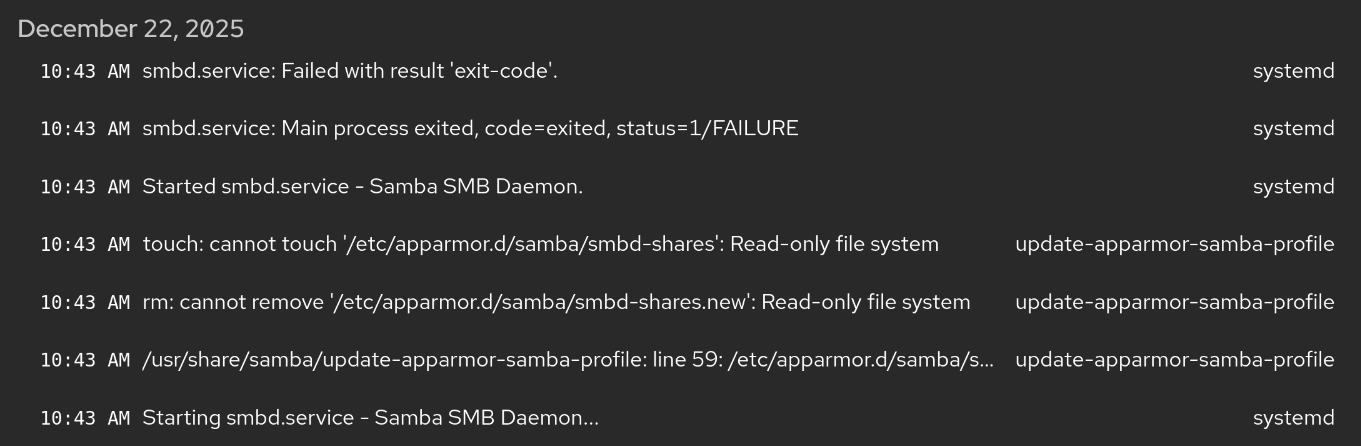
Error messages from Samba:
> update-apparmor-samba-profile
> /usr/share/samba/update-apparmor-samba-profile: line 59: /etc/apparmor.d/samba/smbd-shares.new: Read-only file system
The filesystem is not read only. The \_UID field in the log entry is 0 (root). I was able to use `touch` to create an empty /etc/apparmor.d/samba/smbd-shares.new file as root. Permissions of this file and folder match others in /etc/apparmor.d.
I’ve also checked for apparmor profiles installed outside of packages using `/sbin/apparmor_parser -N /etc/apparmor.d | xargs -i dpkg-query --search {} >/dev/null` There are no samba related profiles not part of an installed package. Everything looks as-distributed here.
The solution in the Nmbd service post did not resolve the issue (explicit addition of local network address to firewall). My firewall configuration for Internal already included that interface and with all subnets before the change.
It appears the line 59 error is the cause of the next two errors. The apparmor profile should be recreated after every samba startup - so the .new file fails. The next two errors appear to be subsequent file operations using the .new file.
**Screenshot**
**Information**
- _FreedomBox version_: You are running Debian GNU/Linux 13 (trixie) and FreedomBox version 25.17.1. FreedomBox is up to date.
- _Hardware_: Linux xxx 6.12.57+deb13-amd64 #1 SMP PREEMPT\_DYNAMIC Debian 6.12.57-1 (2025-11-05) x86\_64 GNU/Linux
- _How did you install FreedomBox?_: Debian netinst (maybe stretch or even jessie) and then ‘DEBIAN\_FRONTEND=noninteractive apt-get install freedombox -y’
---
### Author:  [@vexch](https://discuss.freedombox.org/u/vexch)
#### Post date: [December 23, 2025, 11:51am UTC](https://discuss.freedombox.org/t/solved-samba-not-starting-after-trixie-upgrade/4038/2 "2025-12-23T11:51:55Z")
Currently the Samba app is not compatible with Apparmor. Seems like you have apparmor-profiles installed, you can disable the Samba profile with `aa-disable /usr/sbin/smbd`.
I created an issue [https://salsa.debian.org/freedombox-team/freedombox/-/issues/2558](https://salsa.debian.org/freedombox-team/freedombox/-/issues/2558) to make Samba work with Apparmor.
---
### Author:  [@joseph](https://discuss.freedombox.org/u/joseph)
#### Post date: [December 23, 2025, 3:38pm UTC](https://discuss.freedombox.org/t/solved-samba-not-starting-after-trixie-upgrade/4038/3 "2025-12-23T15:38:20Z")
I’m comfortable with that given samba is an internal service. Thanks for sharing this!
---
### Author:  [@joseph](https://discuss.freedombox.org/u/joseph)
#### Post date: [December 23, 2025, 7:43pm UTC](https://discuss.freedombox.org/t/solved-samba-not-starting-after-trixie-upgrade/4038/4 "2025-12-23T19:43:47Z")
# Victory.
`aa-disable` comes from the aa-utils package which I did not have installed. A person wanting to do this needs to `apt install aa-utils` before using `aa-disable`.
Thank you for recommending this.