# Provide LXC Template for Proxmox, just like you do with VirtualBox or Docker
**URL:** https://discuss.freedombox.org/t/provide-lxc-template-for-proxmox-just-like-you-do-with-virtualbox-or-docker/3940
**Category:** Development
**Created:** [October 8, 2025, 1:36pm UTC](https://discuss.freedombox.org/t/provide-lxc-template-for-proxmox-just-like-you-do-with-virtualbox-or-docker/3940 "2025-10-08T13:36:27Z")
**Posts on this page:** 6
**Page:** 1
### Author:  [@life-turkey](https://discuss.freedombox.org/u/life-turkey)
#### Post date: [October 8, 2025, 1:36pm UTC](https://discuss.freedombox.org/t/provide-lxc-template-for-proxmox-just-like-you-do-with-virtualbox-or-docker/3940/1 "2025-10-08T13:36:27Z")
**Summary**
Provide an LXC Template directly importable into Proxmox
**Problem**
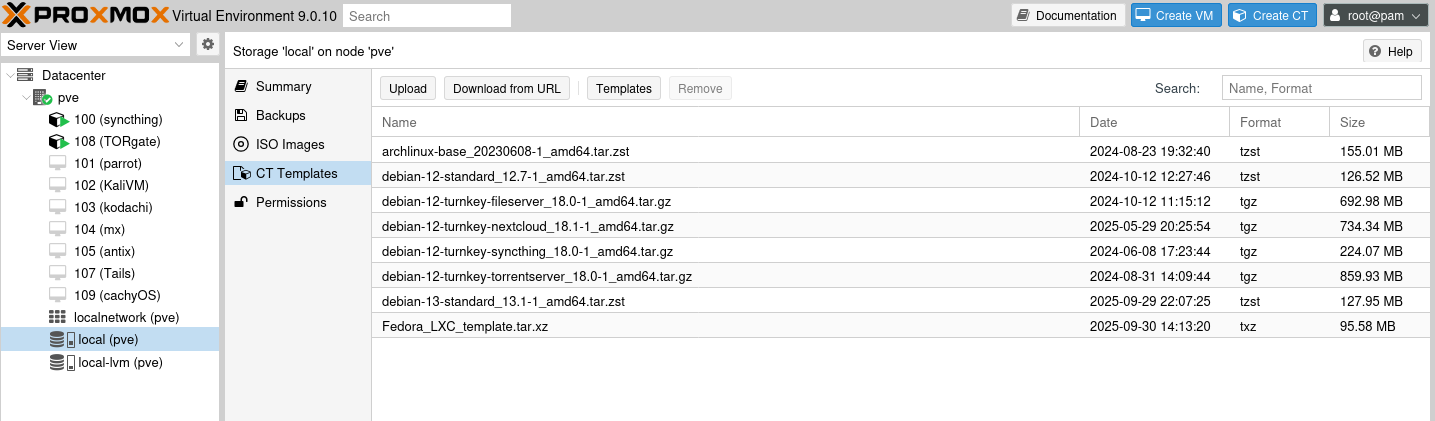
I was hoping to download an LXC template that is directly importable into Proxmox. Yes, I know there is qcow2 formats, but I want FreedomBox to run in a container inside my Proxmox hypervisor, so the LXC tarball would be a welcome addition to your available downloads.
**Solution**
Develop and offer as a regular download, an LXC tarball that is tested with Proxmox I would be willing to do the testing if someone would create the LXC template and send it to me or post it on the website as alpha/beta and I could provide feedback. I have never had any luck with utilities to convert any of these images, so that activity will not be possible for me, but I think there’s a lot of home lab users running Proxmox and think it would be a great addition to your offerings.
**Screenshots/Layouts**
**Alternatives**
Develop same tarball and also post up to Turnkey Linux, Proxmox’s repo for all containers. [All virtual appliances | TurnKey GNU/Linux](https://www.turnkeylinux.org/all)
**Tasks**
TBD
---
### Author:  [@life-turkey](https://discuss.freedombox.org/u/life-turkey)
#### Post date: [October 9, 2025, 5:30pm UTC](https://discuss.freedombox.org/t/provide-lxc-template-for-proxmox-just-like-you-do-with-virtualbox-or-docker/3940/2 "2025-10-09T17:30:45Z")
Produced on “brightu DOT ai”, Enoch provided by HealthRanger:
**Summary:** Creating an LXC Tarball Container from ISO for Direct Import into Proxmox: A Step-by-Step Guide
To create an LXC tarball container from an ISO file for direct import into Proxmox, follow this detailed procedure. This process assumes you have already set up Proxmox and have basic knowledge of Linux command line.
1. **Download and Install necessary tools:**
Before starting, ensure you have the following tools installed on your Proxmox host:
```auto
apt install debootstrap lxc-image-tools lxc
Get:1 http://security.debian.org trixie-security InRelease [43.4 kB]
Get:2 http://security.debian.org trixie-security/main amd64 Packages [52.2 kB]
Get:3 http://security.debian.org trixie-security/main Translation-en [35.0 kB]
Hit:4 http://ftp.us.debian.org/debian trixie InRelease
Hit:5 http://ftp.us.debian.org/debian trixie-updates InRelease
Hit:6 http://download.proxmox.com/debian/pve trixie InRelease
Fetched 131 kB in 1s (106 kB/s)
All packages are up to date.
***Error: Unable to locate package lxc-image-tools***
```
1. **Create a directory structure:**
Create a directory structure to house your new container. Replace `my-container` with your desired container name.
2. **Create the base system:**
Use `debootstrap` to create a minimal debian system. Replace `stretch` with your desired debian version (e.g., `buster`, `bullseye`).
3. **Mount the ISO file:**
Mount the ISO file containing your desired operating system. Replace `/path/to/iso` with the actual path to your ISO file, and replace `iso-label` with the label of your ISO.
4. **Copy files from the ISO:**
Copy the necessary files from the mounted ISO to your container’s rootfs. This step depends on the ISO’s contents. For a minimal Debian install ISO, use:
5. **Unmount the ISO:**
Unmount the ISO file.
6. **Create an LXC tarball:**
Use `lxc-image-tools` to create an LXC tarball from your container’s rootfs.
7. **Import the LXC tarball into Proxmox:**
Log in to your Proxmox web interface, navigate to “Storage” \> “CT Templates”, and click “Import Template”. Select the `.[tar.gz](https://tar.gz)` file created in the previous step and click “Import”.
8. **Create a new LXC container from the template:**
In the Proxmox web interface, navigate to “Create CT” and select your newly imported template. Configure your container settings and click “Start”.
9. **Verify the container:**
Once the container is started, verify that it’s running by checking the container list in the Proxmox web interface or using the `lxc-ls` command on your Proxmox host.
---
### Author:  [@life-turkey](https://discuss.freedombox.org/u/life-turkey)
#### Post date: [October 9, 2025, 9:44pm UTC](https://discuss.freedombox.org/t/provide-lxc-template-for-proxmox-just-like-you-do-with-virtualbox-or-docker/3940/3 "2025-10-09T21:44:01Z")
Reference the above included console output, lxc-image-tools is not in the repository, so the AI generated procedure seems either incorrect or dated, making this procedure insufficient, but I’ll leave it here because maybe it will help developers utilize the parts in that procedure that are good.
---
### Author:  [@jvalleroy](https://discuss.freedombox.org/u/jvalleroy)
#### Post date: [October 11, 2025, 1:43pm UTC](https://discuss.freedombox.org/t/provide-lxc-template-for-proxmox-just-like-you-do-with-virtualbox-or-docker/3940/4 "2025-10-11T13:43:07Z")
Here’s a recipe to build an (untested) LXC image with FreedomBox:
1. Install distrobuilder package:
```bash
$ sudo apt install distrobuilder distrobuilder-images
```
1. Make a copy of the Debian template:
```bash
$ cp /usr/share/distrobuilder-images/debian.yaml freedombox.yaml
```
1. Open freedombox.yaml in a text editor, and search for “packages”. Add “freedombox” to the first section with a list of packages:
```auto
packages:
manager: apt
update: true
cleanup: true
sets:
- packages:
- dialog
- freedombox
- init
- iproute2
- iputils-ping
- isc-dhcp-client
- locales
- netbase
- net-tools
- openssh-client
- procps
- sudo
- vim
action: install
```
1. Build the image:
```bash
$ sudo distrobuilder build-lxc freedombox.yaml ./freedombox-trixie-image/ -o image.release=trixie
```
The output will be stored in this folder:
```bash
$ ls freedombox-trixie-image/
meta.tar.xz rootfs.tar.xz
```
I did not test the resulting image yet. But I can share the image with you if you have trouble with building it.
---
### Author:  [@life-turkey](https://discuss.freedombox.org/u/life-turkey)
#### Post date: [October 11, 2025, 4:28pm UTC](https://discuss.freedombox.org/t/provide-lxc-template-for-proxmox-just-like-you-do-with-virtualbox-or-docker/3940/5 "2025-10-11T16:28:46Z")
I saw distrobuilder and did not understand the syntax, so it sounds like you’re on the right track. I am happy to test it if you generate the tarball and post it somewhere I can download it, test on Proxmox, and report results here when done. Of course it will help if you rename tarball to a name that contains “FreedomBox” in it.
Thanks again.
---
### Author:  [@nbenedek](https://discuss.freedombox.org/u/nbenedek)
#### Post date: [February 20, 2026, 7:53pm UTC](https://discuss.freedombox.org/t/provide-lxc-template-for-proxmox-just-like-you-do-with-virtualbox-or-docker/3940/6 "2026-02-20T19:53:27Z")
This is working fine under PVE 9.1.5.