# Plinth, SSH, Transmission, Samba, and Syncthing reachability problem after apt upgrade
**URL:** https://discuss.freedombox.org/t/plinth-ssh-transmission-samba-and-syncthing-reachability-problem-after-apt-upgrade/1545
**Category:** Support
**Created:** [April 25, 2021, 8:14pm UTC](https://discuss.freedombox.org/t/plinth-ssh-transmission-samba-and-syncthing-reachability-problem-after-apt-upgrade/1545 "2021-04-25T20:14:45Z")
**Posts on this page:** 15
**Page:** 1
### Author:  [@Jacob](https://discuss.freedombox.org/u/Jacob)
#### Post date: [April 25, 2021, 8:14pm UTC](https://discuss.freedombox.org/t/plinth-ssh-transmission-samba-and-syncthing-reachability-problem-after-apt-upgrade/1545/1 "2021-04-25T20:14:45Z")
**Problem Description**
I have apt update and upgraded, this is what happened after. I tried my browser on my PC and phone, I tried to use the url’s web interfaces to try to connect to Plinth, Transmission, and Syncthing. The page says “It took too long to respond”. Also, the Samba share is no longer available on my network.
**Steps to Reproduce**
- Sudo apt update, sudo apt upgrade (In a remote client PUTTY)
- Open browser on machine connected to wired local network
- Go to my bookmarked FreedomBox’s local IP address
- Wait until the “The page took too long to respond” appears
- Other devices show “ERR\_ADRESS\_UNREACHABLE”
**Expected Results**
- Plinth web interface functions normally.
**Actual results**
- SSH using a remote client PUTTY times out
- Transmission web interface times out
- Samba share is no longer available on network
- Plinth web interface times out
- however the SYNCTHING service still works fine and is connected to my machine
- The ip address is the same in the FreedomBox terminal splash screen and on my network monitoring tool “Fing” on my phone.
**Information**
This device is a Raspberry Pi 4 that I have set up using this method
> [@Best way to put FreedomBox on RBPi 4 2gb](https://discuss.freedombox.org/t/best-way-to-put-freedombox-on-rbpi-4-2gb/323/4):
>
> OK! I have got my Raspberry Pi 4 working with FreedomBox! Sort of… Right now, when I try to install a program from the plinth UI it says something about backports not being signed or something. That issue is for another thread and another day sweat_smile. For right now, I have an UNOFFICIAL GUIDE I can share to y’all that can get you to a user account in your FreedomBox. My hardware, Raspberry pi 4 2gb, 128gb microSD card, official RBPi 4 USB C power supply. Prerequisites I connected my RB…
and has functioned properly for a little more than a year.
When SSH failed, I plugged my monitor and keyboard into my pi for the first time. Everything seems to start up just fine and when I log into my FreedomBox account, the ASCII butterfly shows up just fine with three addresses I can use to reach the interface using a browser. I first checked to see if the Pi was offline so I ran sudo apt update to see if it could connect to servers. It did and found a MB or so of new packages that I then upgraded. I also installed a SMART disk tester so the unit is online. I updated the kernel too. After rebooting multiple times using sudo reboot, the interface would not show up.
While I am writing this support forum, the pi was idle for a few minuets and a whole wall of errors with something about sda syncthing or something. I wish I was smart enough to capture but I panic rebooted. I cannot tell if it is a drive failure because I can navigate to the drive and read one of my syncthing files “cat example.txt” just fine.
How is a samba share and the entire interface offline but Syncthing is fine?
Also, My college Wangblows 10 computer freezes for 30 seconds every time explorer.exe has a foreground window 😂 because it checks the Q: drive (the samba share) every time to see if it can connect. Attached is the windows error message, its odd for sure. 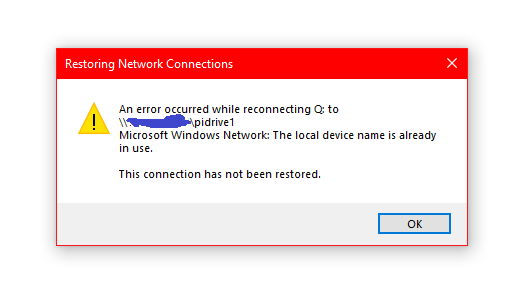
What should I try to do?
---
### Author:  [@Jacob](https://discuss.freedombox.org/u/Jacob)
#### Post date: [April 25, 2021, 8:15pm UTC](https://discuss.freedombox.org/t/plinth-ssh-transmission-samba-and-syncthing-reachability-problem-after-apt-upgrade/1545/2 "2021-04-25T20:15:58Z")
I forgot to mention, the interface worked when I tested it shortly after upgrading and rebooting a few times days prior. Also, I installed another thing on the freedombox using the terminal and it said “Pending kernel upgrade” so I guess I didn’t upgrade the kernel. I just ran “sudo iptables --list” and the whole thing was blank. Should it look like that?
---
### Author:  [@okno](https://discuss.freedombox.org/u/okno)
#### Post date: [April 25, 2021, 11:38pm UTC](https://discuss.freedombox.org/t/plinth-ssh-transmission-samba-and-syncthing-reachability-problem-after-apt-upgrade/1545/3 "2021-04-25T23:38:27Z")
Is plinth working with no errors?
What happens if you stop plinth (systemctl stop plinth.service) then launch it manually (/usr/bin/plinth)?
---
### Author:  [@Jacob](https://discuss.freedombox.org/u/Jacob)
#### Post date: [April 26, 2021, 1:08am UTC](https://discuss.freedombox.org/t/plinth-ssh-transmission-samba-and-syncthing-reachability-problem-after-apt-upgrade/1545/4 "2021-04-26T01:08:40Z")
Hi! Thanks for giving me a step into finding out what’s wrong!
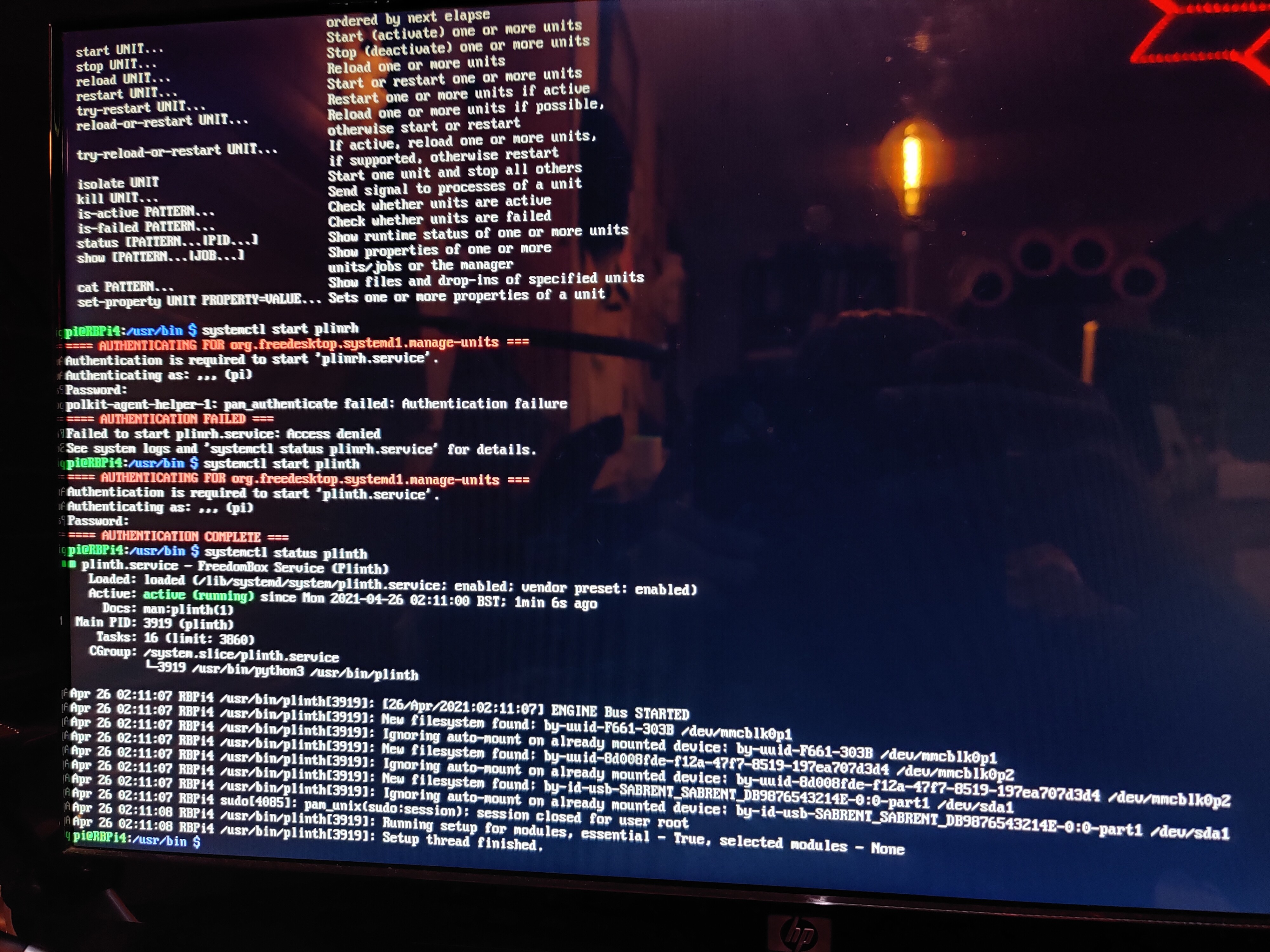
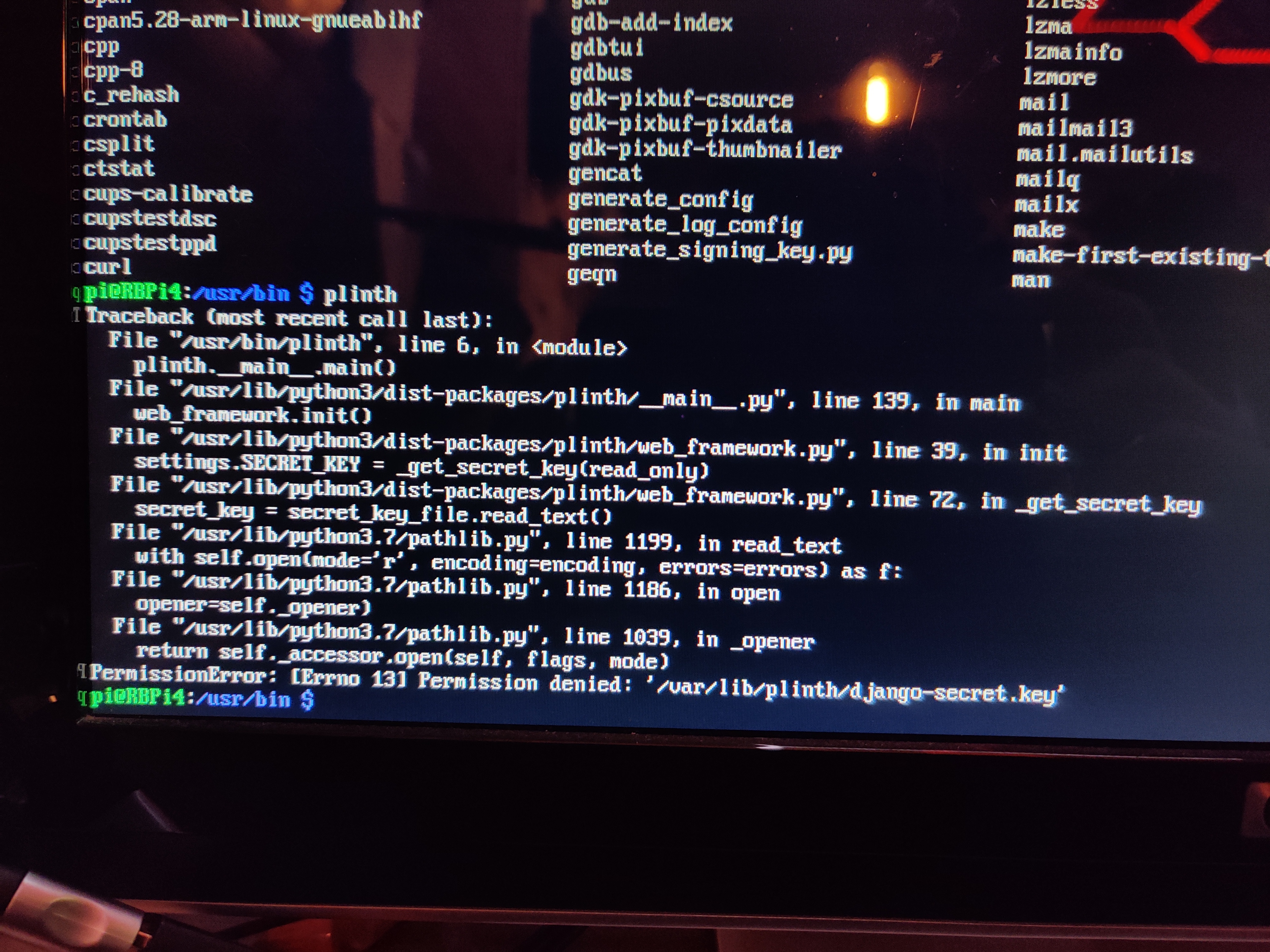
I restarted the service. The first image is it running and it’s status. You second image is me trying to flat-out execute Plinth. Sorry for the quality, Operating system screen captures are unavailable. After restarting the service, the page is still not available.
---
### Author:  [@Jacob](https://discuss.freedombox.org/u/Jacob)
#### Post date: [April 26, 2021, 1:28am UTC](https://discuss.freedombox.org/t/plinth-ssh-transmission-samba-and-syncthing-reachability-problem-after-apt-upgrade/1545/5 "2021-04-26T01:28:23Z")
I ran a ping test on my entire network, everything responded in 4ms or less except the FreedomBox (my other FreedomBox and Nextcloud RBPI responded.) Which would have %100 packet loss.
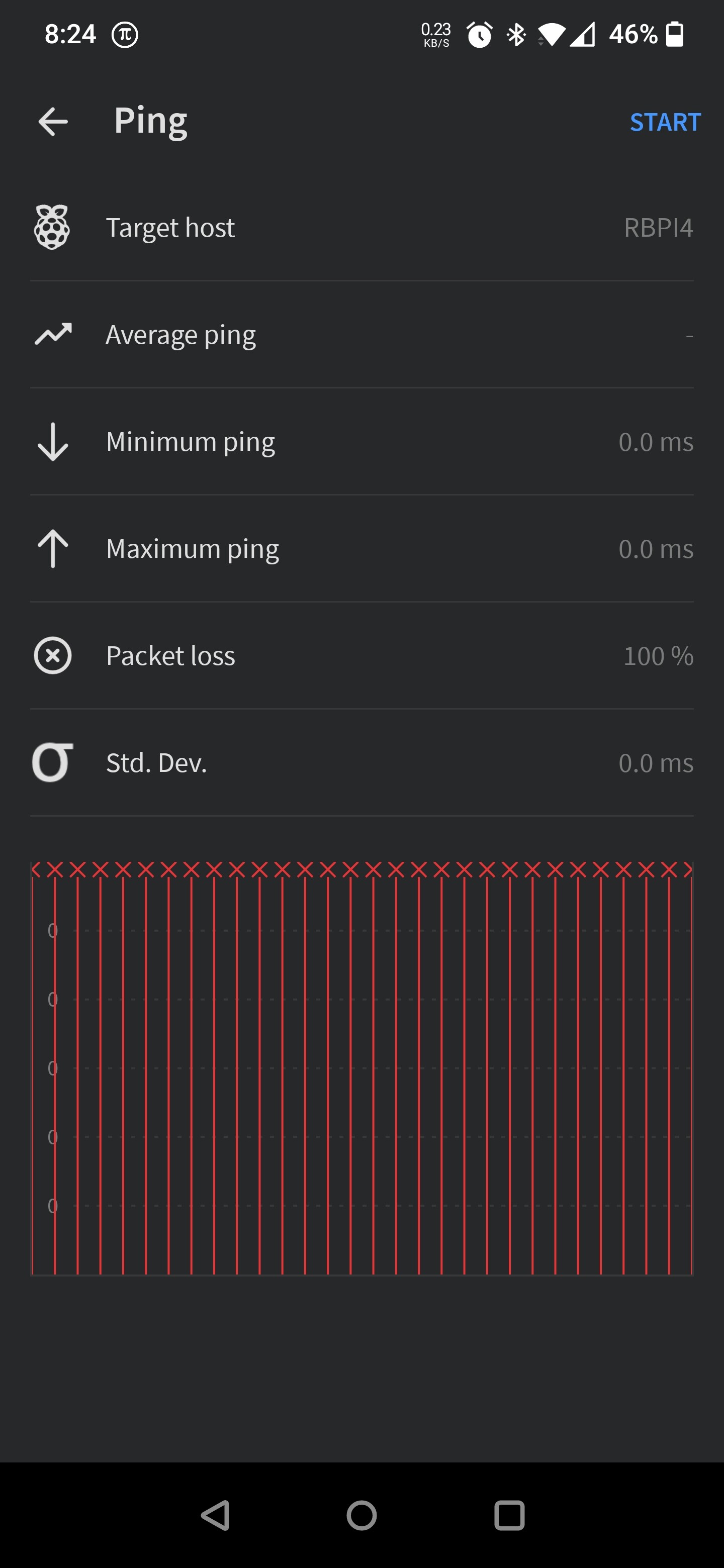
The network activity light on the LAN interface is rapidly and sporadically blinking as if it is downloading or streaming a video.
---
### Author:  [@okno](https://discuss.freedombox.org/u/okno)
#### Post date: [April 26, 2021, 1:47am UTC](https://discuss.freedombox.org/t/plinth-ssh-transmission-samba-and-syncthing-reachability-problem-after-apt-upgrade/1545/6 "2021-04-26T01:47:48Z")
The “permission denied” is probably an artifact from starting plinth as a user other than plinth. But since /etc/passwd has /sbin/nologin as plinth’s shell, you need to override and start plinth like so:
su -s /bin/sh -c “/usr/bin/plinth” plinth
ie, run the command “/usr/bin/plinth” after su’ing to plinth and using the shell “/bin/sh”
---
### Author:  [@Jacob](https://discuss.freedombox.org/u/Jacob)
#### Post date: [April 26, 2021, 1:59am UTC](https://discuss.freedombox.org/t/plinth-ssh-transmission-samba-and-syncthing-reachability-problem-after-apt-upgrade/1545/7 "2021-04-26T01:59:56Z")
Thanks for the next step yet again! Here is what I have now.
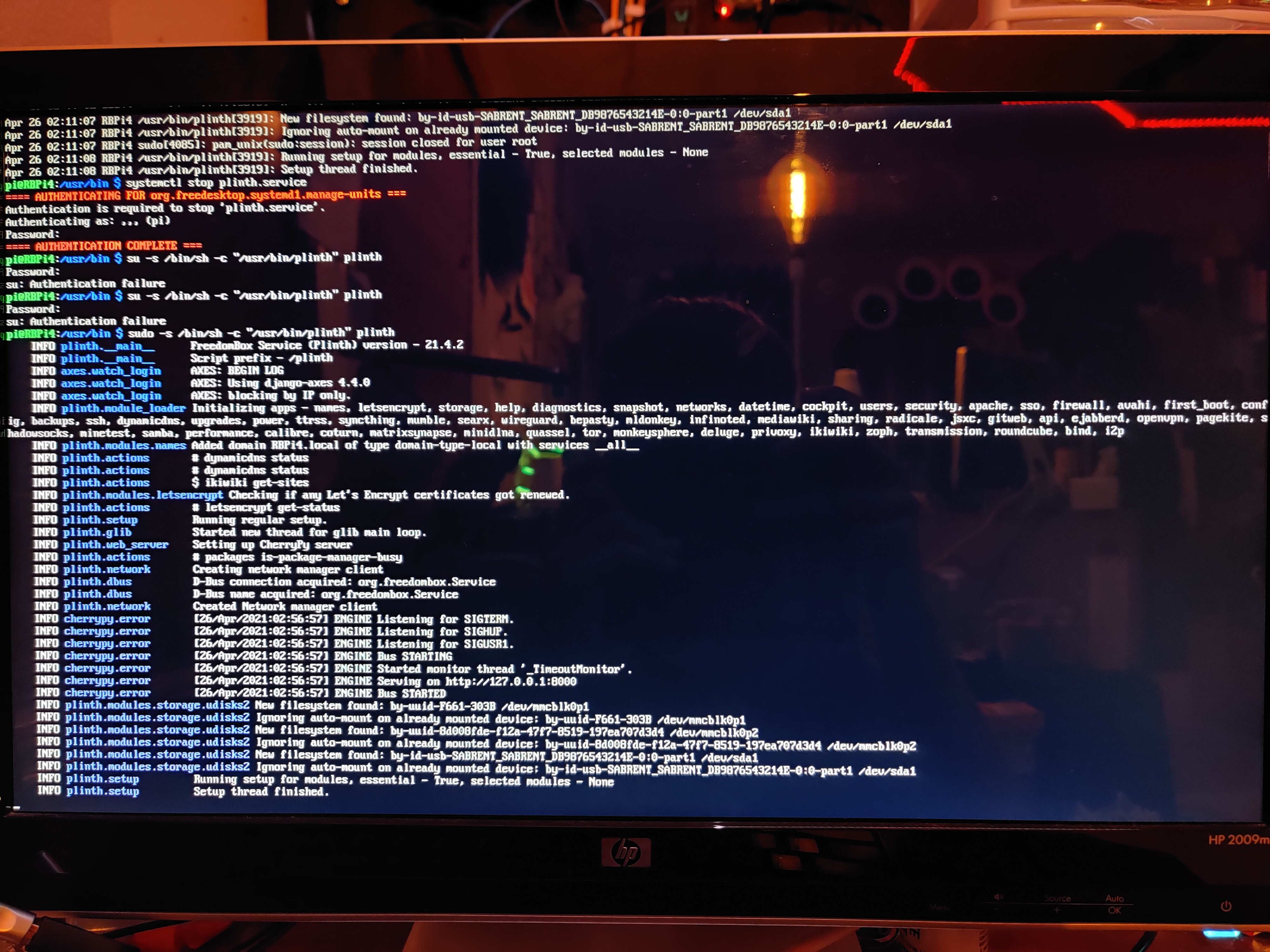
The interface is still unfortunately not there.
---
### Author:  [@okno](https://discuss.freedombox.org/u/okno)
#### Post date: [April 26, 2021, 2:29am UTC](https://discuss.freedombox.org/t/plinth-ssh-transmission-samba-and-syncthing-reachability-problem-after-apt-upgrade/1545/8 "2021-04-26T02:29:34Z")
Is apache2.service running?
Apache should be listening on ports 80 and 443, and
plinth should be listening on port 8000
See what ports are being listened on with: " ss -lntu "
Does /var/log/apache2/{access.log, error.log} give any clues?
---
### Author:  [@Jacob](https://discuss.freedombox.org/u/Jacob)
#### Post date: [April 26, 2021, 2:39am UTC](https://discuss.freedombox.org/t/plinth-ssh-transmission-samba-and-syncthing-reachability-problem-after-apt-upgrade/1545/9 "2021-04-26T02:39:43Z")
I learned something new today!
Command | less
Let’s you scroll! I didn’t know how to quit as my Ctrl + C didn’t let me out so I ctrl + alt + delete to reboot😬 anyway.
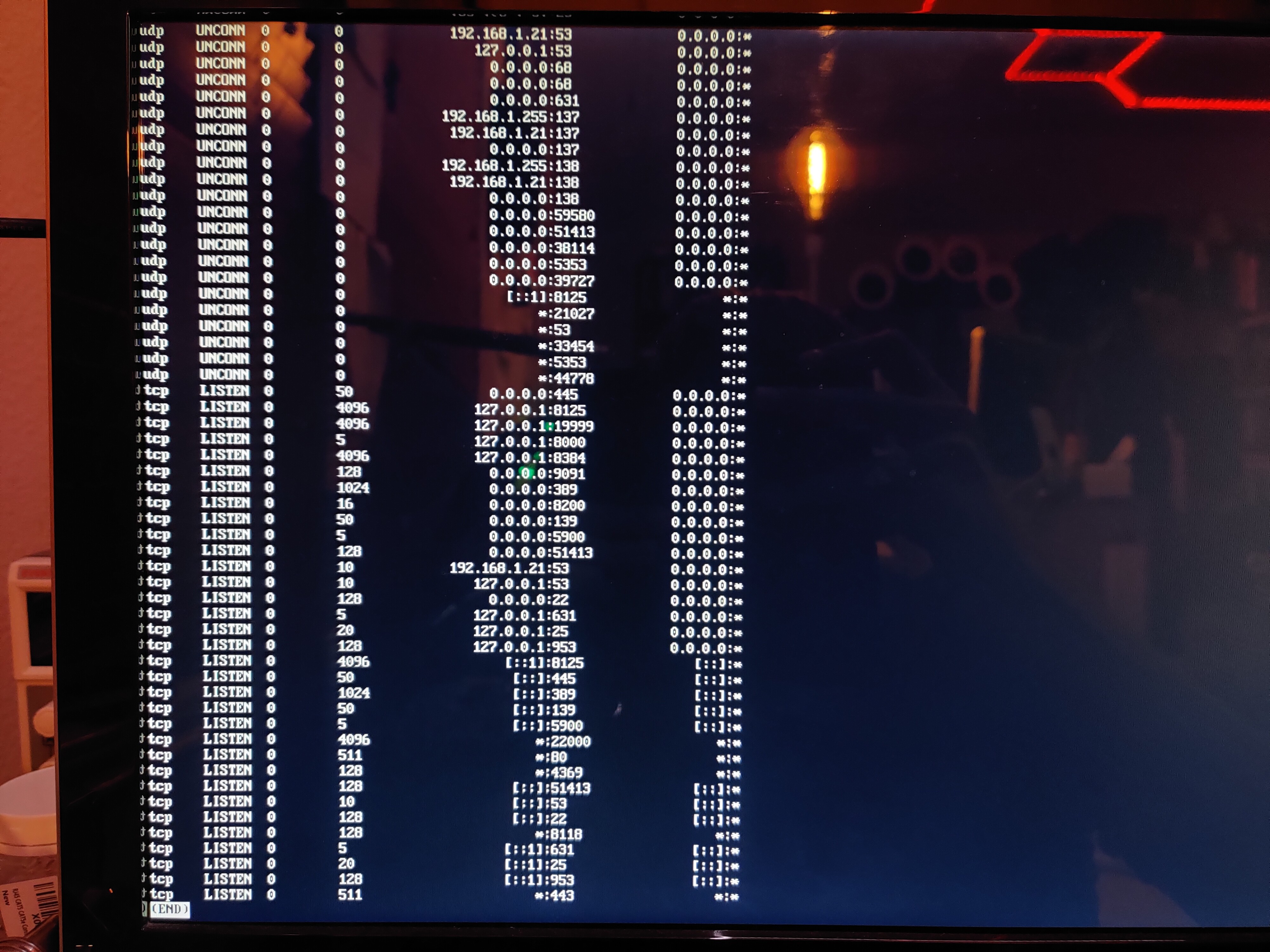
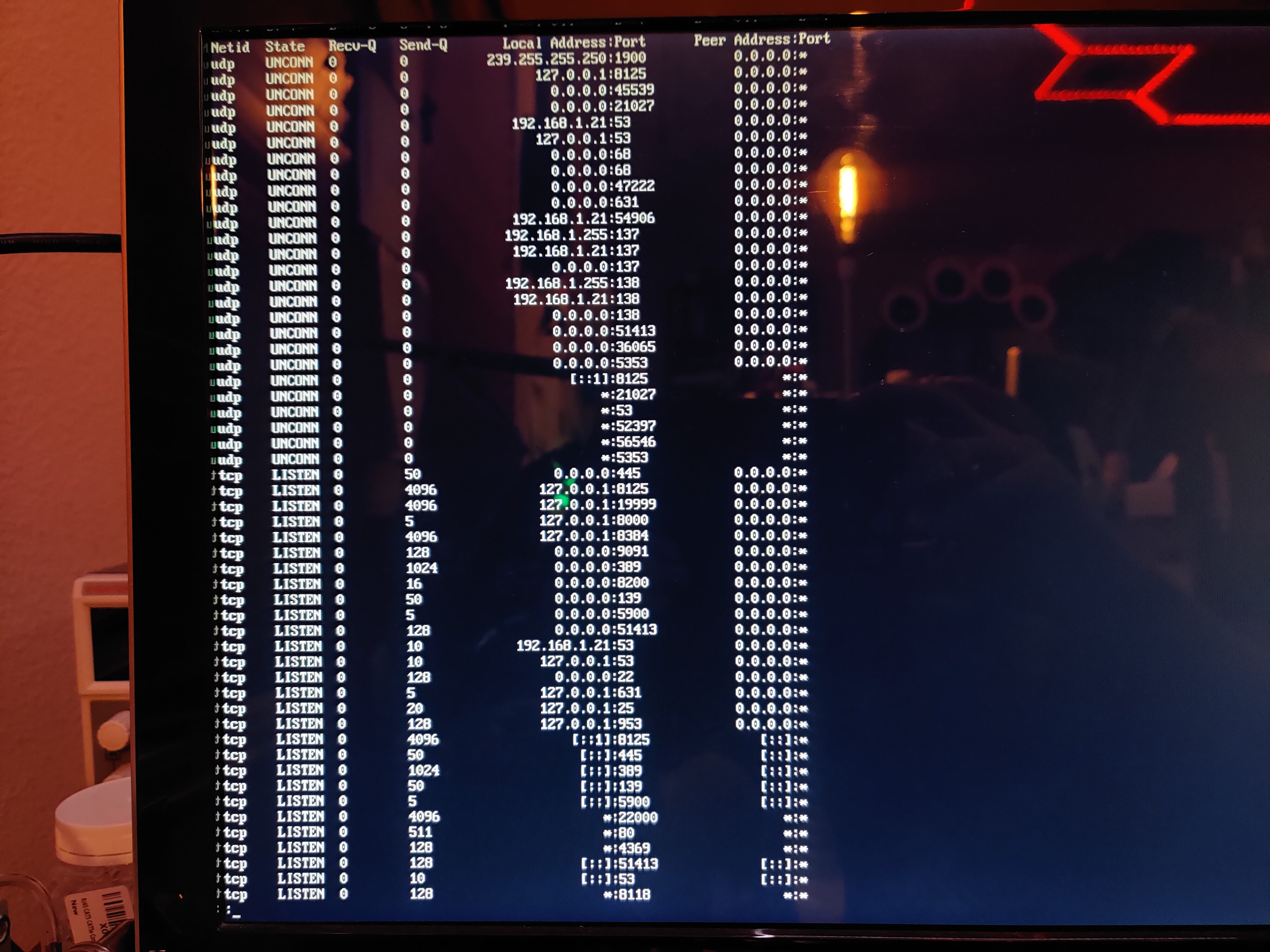
This is what I get. Hey, port 19999 for my netdata interface is there. I installed that today. Too bad it doesn’t work either. Oh, Ctrl + Z works to stop “command | less”
---
### Author:  [@okno](https://discuss.freedombox.org/u/okno)
#### Post date: [April 26, 2021, 4:26am UTC](https://discuss.freedombox.org/t/plinth-ssh-transmission-samba-and-syncthing-reachability-problem-after-apt-upgrade/1545/10 "2021-04-26T04:26:32Z")
Well, apache2 is listening on ports 80 and 443 and plinth on localhost:8000
I don’t think the Freedombox deploys any firewall rules to close off ports, so if you have a service running on a port it should be visible and no iptables rules (or nf\_tables or xtables).
So you’re back to the network connectivity problem.
Are you still able to ping the internet from the Freedombox?
Some commands to try with the tool “ip” already installed on the Freedombox
ip -br link show
ip -s link show eth0
ip -br address show
ip neighbor show
ip route show
Is the raspberry pi wireless or wired? with an ethernet port or usb to ethernet dongle?
---
### Author:  [@Erie](https://discuss.freedombox.org/u/Erie)
#### Post date: [April 26, 2021, 12:29pm UTC](https://discuss.freedombox.org/t/plinth-ssh-transmission-samba-and-syncthing-reachability-problem-after-apt-upgrade/1545/11 "2021-04-26T12:29:19Z")
I also got connectivity issues since a month or so. Got two FB, one at home and one at a very distant place I can not travel to to attach monitor and keyboard. The devices seems to be online (shows up in the router list of connected devices, conntected via Ethernet). Port scan returns “Port filtered”, ssh and plinth are unreachable (“Network unreachable”).
After I tried many different things on the console of the device I have access to, suddenly the devices was again reachable from the LAN (and also WAN). Frustratingly I have no idea why. Went well for a week or two but now the problem resurfaced.
Very frustrating since all my synchronization setup is broken and I only can use my main computer since data is not in sync.
I am suspecting some kind of security feature freedombox comes with, like a firewall or fail2ban. But as I read fail2ban by default only bans you for 600 seconds and probably won’t affect the plinth web interface. Running a bit out of options of what to try next.
---
### Author:  [@jvalleroy](https://discuss.freedombox.org/u/jvalleroy)
#### Post date: [April 26, 2021, 1:45pm UTC](https://discuss.freedombox.org/t/plinth-ssh-transmission-samba-and-syncthing-reachability-problem-after-apt-upgrade/1545/12 "2021-04-26T13:45:42Z")
> [@okno](#):
>
> I don’t think the Freedombox deploys any firewall rules to close off ports
FreedomBox does have a firewall:
[https://wiki.debian.org/FreedomBox/Manual/Firewall](https://wiki.debian.org/FreedomBox/Manual/Firewall)
---
### Author:  [@Erie](https://discuss.freedombox.org/u/Erie)
#### Post date: [April 26, 2021, 3:38pm UTC](https://discuss.freedombox.org/t/plinth-ssh-transmission-samba-and-syncthing-reachability-problem-after-apt-upgrade/1545/13 "2021-04-26T15:38:27Z")
After
```
sudo apt remove freedombox ; sudo apt autoremove
```
the problem went away. So the problem seems to be caused by freedombox.
After reinstalling freedombox the problem came back.
```
sudo systemctl stop firewalld
```
solved the problem. So it should be some update to the firewall rules that caused the problem. The problem appeared after an update of freedombox. I guess my remote server is lost forever (or till covid travel restrictions are down) since I can’t disable the firewall there.
---
### Author:  [@Jacob](https://discuss.freedombox.org/u/Jacob)
#### Post date: [April 27, 2021, 1:15pm UTC](https://discuss.freedombox.org/t/plinth-ssh-transmission-samba-and-syncthing-reachability-problem-after-apt-upgrade/1545/14 "2021-04-27T13:15:54Z")
That seems to be the problem! Thankfully, my freedom box is behind a router so none of the ports are forwarded to my external IP address. I’m sure when I reboot my pi, the service will restart. So, its a fix for right now but it requires my monitor and keyboard to be hooked up at all times :(. Thank all of you for your help in this thread!
---
### Author:  [@Jacob](https://discuss.freedombox.org/u/Jacob)
#### Post date: [April 29, 2021, 1:21pm UTC](https://discuss.freedombox.org/t/plinth-ssh-transmission-samba-and-syncthing-reachability-problem-after-apt-upgrade/1545/15 "2021-04-29T13:21:45Z")
Ah, I understand the purpose of Firewalld now. I once installed MLDonkey just to disable it. Now, the folders and files show up on my other computer on the same network automatically. So from what I understand, only disable Firewalld on a safe PRIVATE network. AND Only disable it if your FreedomBox is behind a router (this would have required you to forward ports for this machine or others in the past). This solution worked out for me but, others mileage may very. It all depends on if you want your services to be revealed to your network or not.