# Can't connect to the FreedomBox with Samba
**URL:** https://discuss.freedombox.org/t/cant-connect-to-the-freedombox-with-samba/2666
**Category:** Support
**Created:** [July 7, 2023, 7:32pm UTC](https://discuss.freedombox.org/t/cant-connect-to-the-freedombox-with-samba/2666 "2023-07-07T19:32:50Z")
**Posts on this page:** 8
**Page:** 1
### Author:  [@Ultrapeer](https://discuss.freedombox.org/u/Ultrapeer)
#### Post date: [July 7, 2023, 7:32pm UTC](https://discuss.freedombox.org/t/cant-connect-to-the-freedombox-with-samba/2666/1 "2023-07-07T19:32:51Z")
**Problem Description**
I am trying to connect via Samba to my FreedomBox, but get a no route to host message under Ubuntu 22.04 with the MATE desktop and Caja as the file manager. The funny thing is that I can ssh to the box just fine, and I can access Plinth via Firefox just fine too.
I tried to type smb://freedombox.local or the local IP address to no avail. I used Samba just fine a while ago (before the update to Debian 12 Bookworm). What am I doing wrong?
**Steps to Reproduce**
1. Enable Samba in the application list.
2. Launch Caja or another the file manager.
3. Double click on the Freedombox icon.
4. Enjoy the error message.
**Expected Results**
I would expect to be able to browse the Open\_Share on the hard disk, then copy a file I downloaded with a P2P application on the Freedombox to my PC.
**Actual results**
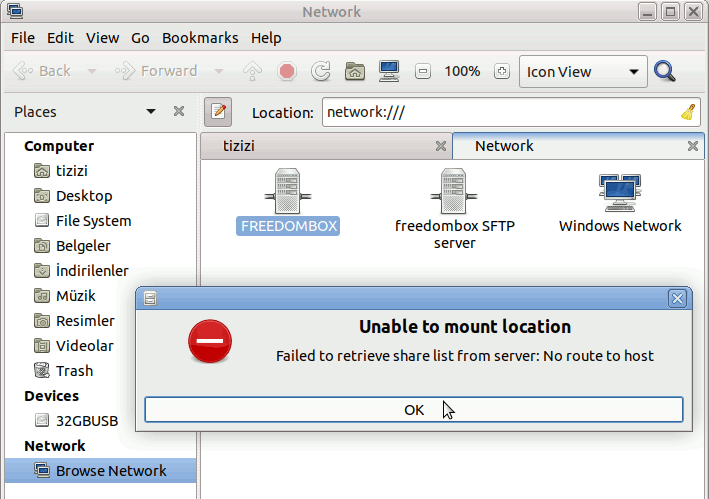
I get an error with the following message:
> Unable to mount location
> Failed to retrieve share list from server: No route to host
**Screenshot**
**Information**
- _FreedomBox version_: 23.6.2
- _Hardware_: Olimex A20-OLinuXino-LIME2 with a hard disk
- _How did you install FreedomBox?_: frankly, I don’t even remember. I have an image that I copied with dd to my computer, when the microSD card dies, I copy it again with dd to a new microSD card.
---
### Author:  [@DachaLife](https://discuss.freedombox.org/u/DachaLife)
#### Post date: [July 8, 2023, 3:29pm UTC](https://discuss.freedombox.org/t/cant-connect-to-the-freedombox-with-samba/2666/2 "2023-07-08T15:29:42Z")
It really depends upon how your network is configured; I’ve assigned a permanent IP address (by Mac address through my 2nd router) to the FB & only access it: smb://xxx.xxx.x.xx (x = assigned IP address with Dolphin/Linux).
It’s connected to a L-3 switch behind a router-security device (VPN enabled), connected to my ISP’s router-security device & modem, with the FB & devices that need to connect to it on their own VLAN & subnet. (If there is a better/more secure way, please let me know fellow FBer’s).
Also, after first login to the cockpit app/setup, I had to set the external drive to be mounted automatically.
---
### Author:  [@fefekrzr](https://discuss.freedombox.org/u/fefekrzr)
#### Post date: [July 11, 2023, 10:06am UTC](https://discuss.freedombox.org/t/cant-connect-to-the-freedombox-with-samba/2666/3 "2023-07-11T10:06:23Z")
Try typing this address in the file manager’s address bar:
`smb://[freedombox name or ip address]/[name of drive]`
This “name of drive”:

For the Open Share I think you can log in as “anonymous user”. If not, try with a user that has credentials and access to shares.
For the home and groups shares you’ll need a user and password, of course.
---
### Author:  [@lavier](https://discuss.freedombox.org/u/lavier)
#### Post date: [December 11, 2024, 7:57pm UTC](https://discuss.freedombox.org/t/cant-connect-to-the-freedombox-with-samba/2666/4 "2024-12-11T19:57:11Z")
Hey, I am stuck at the same problem.
If i try to connect via Samba in Dolphin, I get the error: " Could not connect to host x.x.x.x: Host unreachable.
---
### Author:  [@Ged](https://discuss.freedombox.org/u/Ged)
#### Post date: [December 12, 2024, 3:21pm UTC](https://discuss.freedombox.org/t/cant-connect-to-the-freedombox-with-samba/2666/5 "2024-12-12T15:21:19Z")
Did you try connecting with `smb://username@ip` ?
---
### Author:  [@lavier](https://discuss.freedombox.org/u/lavier)
#### Post date: [December 12, 2024, 5:29pm UTC](https://discuss.freedombox.org/t/cant-connect-to-the-freedombox-with-samba/2666/6 "2024-12-12T17:29:16Z")
If i try to access a specific folder like smb://username@ip/media I get a “Timeout on server”.
And when Im trying to connect to smb://username@ip/ I’m stuck in a loading-loop.
---
### Author:  [@Ged](https://discuss.freedombox.org/u/Ged)
#### Post date: [December 12, 2024, 7:09pm UTC](https://discuss.freedombox.org/t/cant-connect-to-the-freedombox-with-samba/2666/7 "2024-12-12T19:09:08Z")
OK. Just to make sure I understand… Can you confirm:
- Your disks are mounted (can check through Cockpit and/or FBX Storage)
- In samba, try configuring your drive (or mount) status as “open share” (can change this later on, right now just try removing any restrictions)
- You’re accessing your samba share within your local lan (i.e. same subnet as FBX)
- Check FBX Diagnostics for any failed test(s)
---
### Author:  [@lavier](https://discuss.freedombox.org/u/lavier)
#### Post date: [December 16, 2024, 7:00pm UTC](https://discuss.freedombox.org/t/cant-connect-to-the-freedombox-with-samba/2666/8 "2024-12-16T19:00:50Z")
Thank you for the response!
- My disk is mounted under /home/ssd in ext4 format
- samba is in “open share” status
- i am in my home network, trying to access it
- and diagnostics give no errors
idk if this helps, but thank you anyway 🙂